Title: Share This Image
Author: ILLID
Published: 18 ਜੁਲਾਈ 2017
Last modified: 11 ਮਾਰਚ 2026
---
ਪਲੱਗਇਨਾਂ ਖੋਜੋ

# Share This Image
[ILLID](https://profiles.wordpress.org/mihail-barinov/) ਵੱਲੋਂ
[ਡਾਊਨਲੋਡ ਕਰੋ](https://downloads.wordpress.org/plugin/share-this-image.2.13.zip)
* [ਵੇਰਵਾ](https://pan.wordpress.org/plugins/share-this-image/#description)
* [ਸਮੀਖਿਆਵਾਂ](https://pan.wordpress.org/plugins/share-this-image/#reviews)
* [ਸਥਾਪਤੀਕਰਨ](https://pan.wordpress.org/plugins/share-this-image/#installation)
* [ਵਿਕਾਸ](https://pan.wordpress.org/plugins/share-this-image/#developers)
[ਸਹਿਯੋਗ](https://wordpress.org/support/plugin/share-this-image/)
## ਵੇਰਵਾ
**Share selected images with customizable content!**
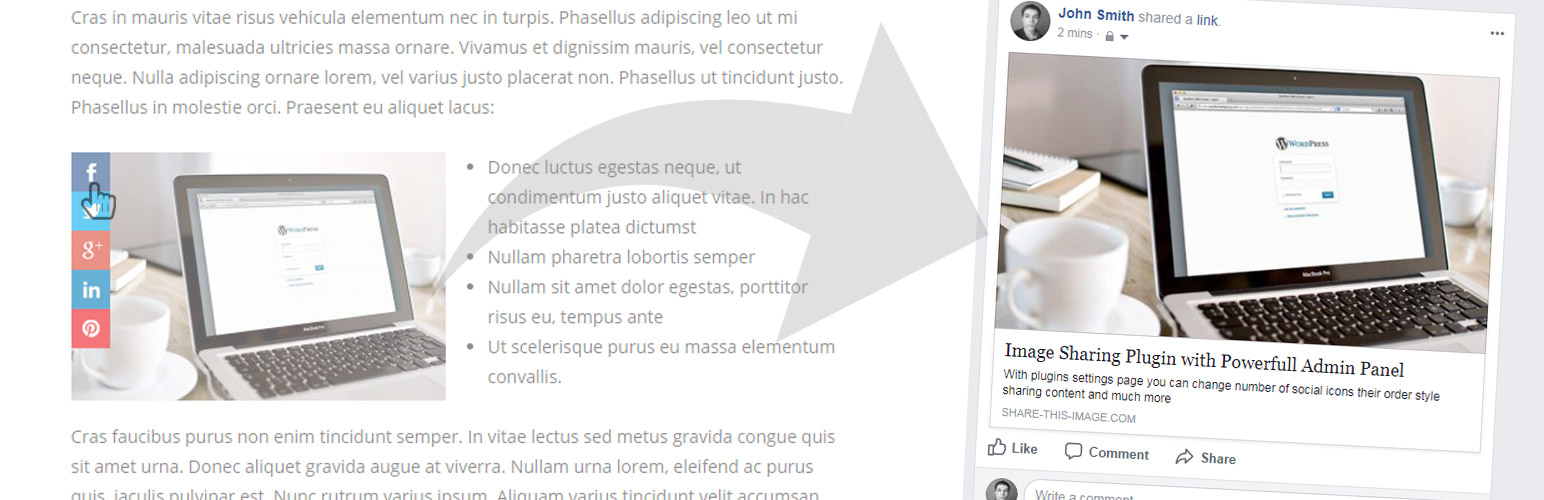
This plugin adds social sharing icons to each image in your site.
Share This Image is a simple and flexible image sharing plugin for WordPress. It
gives you great flexibility to promote your content to the most popular social networks/
messengers.
[Plugin home page](https://share-this-image.com/?utm_source=wp-repo&utm_medium=listing&utm_campaign=sti-repo)
| [Features List](https://share-this-image.com/features/?utm_source=wp-repo&utm_medium=listing&utm_campaign=sti-repo)
| [Live DEMO](https://share-this-image.com/?utm_source=wp-repo&utm_medium=listing&utm_campaign=sti-repo)
#### Main Features
* Supports all most popular social networks/messengers: **facebook**, **x**, **
linkedin**, **pinterest**, **tumblr**, **WhatsApp**, **Telegram**, **Messenger**,**
reddit**, **vkontakte**, **odnoclassniki**.
* **Exact sharing** – user will share exactly the same image that he wants.
* **Select what images to share**. Share all images of your site or just from several
pages. Or just single images that you want. All this is possible!
* **Customize content** – fully customizable url, image, title and content that
you want to share.
* **Short links** – build-in feature to create the short attractive looking version
of sharing URL.
* **Powerful Admin Panel** – all settings in one page.
* Build-in **shortcode** for easier work.
* **Fast** – Nothing extra. Just what you need for proper work.
* **Not only images** – apply it not only for images but for any block of content
with specified data-media attributes.
* **Google Analytics** support.
* Supports all major desktop browsers (IE8, IE9, IE10, Chrome, Firefox, Safari,
Opera) and mobile browsers.
#### Premium Features
[Premium Version](https://share-this-image.com/?utm_source=wp-repo&utm_medium=listing&utm_campaign=sti-repo)
* New sharing buttons – **download** image button, **link** button, **embed** code,**
email** sharing and **Houzz** sharing.
* Advanced **content customization** and content variables support. Set sources
for sharing content and change their priority.
* Fully customize shared **title**, **description**, **image** and **url**.
* **Individual buttons content** – customize what content to share individually
for each sharing button.
* Set of **styling options** – predefined icons styles, horizontal or vertical
view, offsets by x and y planes.
* **Individual buttons styles** – set a unique style for each of your sharing buttons.
* Buttons **positions** – choose one of sharing buttons positions: on image, on
image (hover), before image, after image.
* Additional sharing buttons **display rules** – show or not sharing buttons based
on current page and user conditions.
* New option in admin page to **exclude all images from desired pages** from sharing.
* **Auto-scroll** your visitors to the exact location of the image they came to
see.
* Priority support.
#### Plugin Links
[Home Page](https://share-this-image.com/?utm_source=wp-repo&utm_medium=listing&utm_campaign=sti-repo)
[Features List](https://share-this-image.com/features/?utm_source=wp-repo&utm_medium=listing&utm_campaign=sti-repo)
[Pricing](https://share-this-image.com/pricing/?utm_source=wp-repo&utm_medium=listing&utm_campaign=sti-repo)
[Docs](https://share-this-image.com/guide/?utm_source=wp-repo&utm_medium=listing&utm_campaign=sti-repo)
[FAQ](https://share-this-image.com/faq/?utm_source=wp-repo&utm_medium=listing&utm_campaign=sti-repo)
## ਸਕਰੀਨਸ਼ਾਟ
* [[
* Plugin settings page
* [[
* Feature to share selected image
* [[
* Content customization
* [[
* Filtering feature
* [[
* Sharing buttons positions
* [[
* Sharing buttons styles
* [[
* Sharing content customization
* [[
* Individual buttons content
## ਬਲਾਕ
This plugin provides 1 block.
* Sharing Buttons
## ਸਥਾਪਤੀਕਰਨ
1. Upload share-this-image to the /wp-content/plugins/ directory
2. Activate the plugin through the ‘Plugins’ menu in WordPress
## ਅਕਸਰ ਪੁੱਛੇ ਜਾਂਦੇ ਸਵਾਲ
### What Share This Image plugin do?
Share This Image ( STI ) is an image sharing plugin for WordPress. The main difference
between this plugin and many other social sharing plugins is that STI specializes
in image sharing and shares exactly selected images with fully customizable content
like title, description and URL.
Here is a list of some main plugin features:
* Exact image sharing.
* Fully customizable url, image, title and description that you want to share.
* Supports all most popular social networks/messengers.
* Choose what images on what pages to share.
* and many more…
Please visit [features page](https://share-this-image.com/features/?utm_source=wp-repo&utm_medium=listing&utm_campaign=sti-repo)
for a full list of available features.
### What are the requirements to use Share This Image?
Share This Image is a plugin for self-hosted WordPress sites, or wordpress.com hosted
sites that allow installation of third party plugins.
Share This Image requires
the following at minimum to work properly:
* WordPress 4.0 or greater
* WooCommerce 3.0.0 or greater
* PHP 5.5 or greater
* MySQL 5.6 or MariaDB 10.0 or greater
* Apache or Nginx server (recommended, but other options may work as well)
### Is it work with my theme/plugin?
Plugin will work with most of the available WordPress themes. And it also was tested
with the most popular WordPress plugins. If yo still faced any problems using the
plugin please plugin [contact support](https://share-this-image.com/contact/?utm_source=wp-repo&utm_medium=listing&utm_campaign=sti-repo).
### What is the steps to make this plugin works on my site?
In order to start showing plugin sharing buttons you need to take the following
steps:
1. Install and activate the Share This Image plugin. [More](https://share-this-image.com/guide/installation/?utm_source=wp-repo&utm_medium=listing&utm_campaign=sti-repo).
2. Check the plugin settings page. [More](https://share-this-image.com/guide/settings-page/?utm_source=wp-repo&utm_medium=listing&utm_campaign=sti-repo).
3. Check display rules. With these special options it is possible to choose what
images on what pages must be available for sharing. [More](https://share-this-image.com/guide/buttons-display-rules/?utm_source=wp-repo&utm_medium=listing&utm_campaign=sti-repo).
4. Set sharing button. Enable/disable sharing buttons that must be visible on your
site. [More](https://share-this-image.com/guide/social-networks/?utm_source=wp-repo&utm_medium=listing&utm_campaign=sti-repo).
5. Finish! From now sharing buttons must work on selected pages ( based on current
display rules ).
### Can I enable image sharing only for certain pages or images?
Yes. With the [Display rules](https://share-this-image.com/guide/buttons-display-rules/?utm_source=wp-repo&utm_medium=listing&utm_campaign=sti-repo)
option it became very simple to show/hide sharing button based image, page or user
conditions.
### What about mobile devices support?
Sharing buttons works great on both desktop and mobile devices. Optionally you can
disable mobile sharing by opening the plugin settings page and turning off Enable
on mobile? option.
By default on mobile instead of a sharing button block you will
see one sharing icon that will show a sharing button when clicking on it. But this
behaviour [can be changed](https://share-this-image.com/guide/mobile-support/?utm_source=wp-repo&utm_medium=listing&utm_campaign=sti-repo).
### Can I change the styles for sharing buttons?
Yes. With the PRO plugin settings you can choose from several pre-defined sharing
buttons styles or change styling for each button individually. [Learn more](https://share-this-image.com/guide/buttons-styling/?utm_source=wp-repo&utm_medium=listing&utm_campaign=sti-repo).
### How can I customize what url, image, title and description to share?
When sharing new image for title and description plugin first of all looks in ‘data-
title’ and ‘data-summary’ attributes of image.
So you can set your fully customizable content by adding this attributes. It’s can
look like that:
```
 ```
If image doesn’t have data attributes then plugin will use title attribute for title
and attr attribute for summary.
```
```
If image doesn’t have data, title and attr attributes then will be used default
title and description that you set in the plugin settings page.
Also it is possible to set shared image that can be different from image in the ‘
img’ tag.
It’s can be done with help of ‘data-media’ attribute:
```
```
If image doesn’t have data attributes then plugin will use title attribute for title
and attr attribute for summary.
```
```
If image doesn’t have data, title and attr attributes then will be used default
title and description that you set in the plugin settings page.
Also it is possible to set shared image that can be different from image in the ‘
img’ tag.
It’s can be done with help of ‘data-media’ attribute:
```
 ```
Also you can change shared link.
By default plugin will share link to the page where your shared image in situated.
But you can simply change this behavior.
Just add ‘data-url’ attribute with link that you want to be shared.
```
img src="images/youre-cool-image.jpg" data-url="http://your-link.com">
```
With the PRO plugin version you have the more advanced features in content customization.
You can set priority for [content sources](https://share-this-image.com/guide/content-sources/?utm_source=wp-repo&utm_medium=listing&utm_campaign=sti-repo),
use special [text variables](https://share-this-image.com/guide/content-variables/?utm_source=wp-repo&utm_medium=listing&utm_campaign=sti-repo)
and even customize sharing content [individually for each sharing button](https://share-this-image.com/guide/buttons-content-options/?utm_source=wp-repo&utm_medium=listing&utm_campaign=sti-repo).
### How to use plugins build-in shortcode?
Most common there is no need to use shortcode. Plugin will automatically work with
all images that you have on your site.
But with shorcode it is very simple to share desired image with custom title and
description.
All you need to do is add this shortcode inside your page or post content section
```
[sti_image image="http://your-image-to-display.jpg" shared_image="http://your-image-to-share.jpg" shared_title="Your-title" shared_desc="Your-Description"]
```
It is very simple and don’t need additional explanation.
### Is it works only with ‘img’ tag?
No.
Plugin give ability to run it not only for images, but for any blocks of content.
Only one condition – this block must have data-media attribute with link to shared
image.
For example – we have block with custom content inside. This block has class shared-
box. So it is very easy to add sharing content for it.
```
```
Also you can change shared link.
By default plugin will share link to the page where your shared image in situated.
But you can simply change this behavior.
Just add ‘data-url’ attribute with link that you want to be shared.
```
img src="images/youre-cool-image.jpg" data-url="http://your-link.com">
```
With the PRO plugin version you have the more advanced features in content customization.
You can set priority for [content sources](https://share-this-image.com/guide/content-sources/?utm_source=wp-repo&utm_medium=listing&utm_campaign=sti-repo),
use special [text variables](https://share-this-image.com/guide/content-variables/?utm_source=wp-repo&utm_medium=listing&utm_campaign=sti-repo)
and even customize sharing content [individually for each sharing button](https://share-this-image.com/guide/buttons-content-options/?utm_source=wp-repo&utm_medium=listing&utm_campaign=sti-repo).
### How to use plugins build-in shortcode?
Most common there is no need to use shortcode. Plugin will automatically work with
all images that you have on your site.
But with shorcode it is very simple to share desired image with custom title and
description.
All you need to do is add this shortcode inside your page or post content section
```
[sti_image image="http://your-image-to-display.jpg" shared_image="http://your-image-to-share.jpg" shared_title="Your-title" shared_desc="Your-Description"]
```
It is very simple and don’t need additional explanation.
### Is it works only with ‘img’ tag?
No.
Plugin give ability to run it not only for images, but for any blocks of content.
Only one condition – this block must have data-media attribute with link to shared
image.
For example – we have block with custom content inside. This block has class shared-
box. So it is very easy to add sharing content for it.
```
Youre custom content ( text, html or any other )
```
Don’t forget, that class name of block must be specified in plugin selector option.
For example, if we want to share all images and this block then selector will be
img, .shared-box.
That’s all! After this if any of your visitors hover on block with class name shared-
box he will see appeared share box with social buttons.
### I install this plugin on my local server and have issues with sharing images. What’s wrong?
In order to share images and all other data social networks must scrap data from
you website page. So if your website is not publicly available data will not be
scraped.
### Sharing buttons are not visible on my page. What to do?
There are many reasons that can lead to such an issue. Please follow these steps
that can help you with solving the problem.
* Open plugin settings page and find **Minimal width** and **Minimal height** options.
Make sure that they are bigger enought overwise sharing will not work for some
of your site images.
* Check **Buttons position** option and if it is set to **On image ( always show)**
then change it to **On image ( show on mouse enter )**.
* Check the **Display rules** option and make sure that you have proper display
conditions for the sharing button.
If your problem is still there – please ask
your question on support forum.
### Sharing buttons not visible for my gallery/grid? What to do?
Problem with the plugin like image galleries or grids is that they load its content
dynamically and use JavaScript code for this. The Share This Image plugin works
great with many of such types of plugins but sometimes the issues can still appear.
In this case please try following steps:
* Open the plugin settings page and check **Buttons position** option. If it is
set to **On image ( always show )** then change it to **On image ( show on mouse
enter )**.
* This steps requires some coding skills. The trick is to recall sharing buttons
display method after the gallery/grid images are fully loaded.
Than just use
following JavaScript code:
* $(“img”).sti();
The trick here is to call that method only after the gallery/grid images are loaded.
Usually such plugins have some JS triggers that are activated after the full load.
So you need to know it and then the final code will looks like that:
```
$(document).on("custom-event-name", function(){
window.clearTimeout(timeoutID);
timeoutID = window.setTimeout( function() {
$("img").sti();
}, 1000 );
});
```
### Sharing buttons shares default page content and not the one that I selected. How to fix it?
There are several reasons for this. Please walk through the steps below.
Note:
after each step you need to clear your browser cache and the cache of any active
caching plugin on your website.
* Open the plugin settings page and find **Use intermediate page** option. Change
its value and check if something was changed.
* Make sure that your website is open for indexing: open **Settings** -> **Reading**
page and find **Search engine visibility** option.
* Use tools like [Facebook debugger](https://developers.facebook.com/tools/debug/)
or [Twitter card validator](https://cards-dev.twitter.com/validator) to check
what actual sharing data social networks sees. This information can help you
figure out what goes wrong.
### How can I report security bugs?
You can report security bugs through the Patchstack Vulnerability Disclosure Program.
The Patchstack team help validate, triage and handle any security vulnerabilities.
[Report a security vulnerability.](https://patchstack.com/database/vdp/share-this-image)
## ਸਮੀਖਿਆਵਾਂ

### [A Waste of an Hour](https://wordpress.org/support/topic/a-waste-of-an-hour/)
[Chris](https://profiles.wordpress.org/justkeepdistance/) 10 ਮਾਰਚ 2025
Not working just want you to upgrade or something maybe the pro version but I won’t
be installing it again a waste of an hour

### [change url](https://wordpress.org/support/topic/change-url-49/)
[readysite](https://profiles.wordpress.org/readysite/) 19 ਨਵੰਬਰ 2024 10 replies
it says here that i can change url deafult /guide/customize-content/, It shares
a link to a page, I only need a picture. I spent an hour of time.

### [Great Support](https://wordpress.org/support/topic/great-support-5393/)
[leventea](https://profiles.wordpress.org/leventea/) 26 ਫਰਵਰੀ 2024
I had only 2 issues in 4 years.Support was very understanding in both cases, providing
great help, fast solution.

### [An excellent tool for custom sharing of site images (responsive support too)](https://wordpress.org/support/topic/an-excellent-tool-for-custom-sharing-of-site-images-responsive-support-too/)
[garethbowden](https://profiles.wordpress.org/garethbowden/) 11 ਦਸੰਬਰ 2023
A number of client sites I built required the ability to share image assets directly
across social platforms. After extensive testing of several of the main premium
plugins, I was happy to find this plugin which was able to share successfully across
social platforms (FB, Twitter in this case). Very flexible to customise, and responsive
support with updates made to integrate with my existing Elementor environment. Recommended.

### [Doesn’t do what’s implied](https://wordpress.org/support/topic/doesnt-do-whats-implied/)
[SWEATe](https://profiles.wordpress.org/sweate/) 29 ਨਵੰਬਰ 2021 1 reply
Tested with Twitter. This plugin doesn’t really “share the image” — what it does
is share the link to the post that it’s on. We can do that with any social media
sharing plugin here, making this one pointless, and redundant if you already have
another social media sharing plugin running.

### [The best I found !](https://wordpress.org/support/topic/the-best-i-found-4/)
[sagelev](https://profiles.wordpress.org/sagelev/) 25 ਮਈ 2021
Esay to handle and functional !
[ Read all 21 reviews ](https://wordpress.org/support/plugin/share-this-image/reviews/)
## ਯੋਗਦਾਨੀ ਤੇ ਵਿਕਾਸਕਾਰ
“Share This Image” is open source software. The following people have contributed
to this plugin.
ਯੋਗਦਾਨੀ
* [ ILLID ](https://profiles.wordpress.org/mihail-barinov/)
[“Share This Image” ਦਾ ਆਪਣੀ ਭਾਸ਼ਾ ਵਿੱਚ ਅਨੁਵਾਦ ਕਰੋ।](https://translate.wordpress.org/projects/wp-plugins/share-this-image)
### ਵਿਕਾਸ ਕਾਰਜ ਵਿੱਚ ਰੁਚੀ ਰੱਖਦੇ ਹੋ?
[Browse the code](https://plugins.trac.wordpress.org/browser/share-this-image/),
check out the [SVN repository](https://plugins.svn.wordpress.org/share-this-image/),
or subscribe to the [development log](https://plugins.trac.wordpress.org/log/share-this-image/)
by [RSS](https://plugins.trac.wordpress.org/log/share-this-image/?limit=100&mode=stop_on_copy&format=rss).
## ਤਬਦੀਲੀ-ਚਿੱਠਾ
[View full changelog](https://share-this-image.com/guide/free-version/?utm_source=wp-repo&utm_medium=listing&utm_campaign=sti-repo)
#### 2.13 ( 11.03.2026 )
* Fix – Add validation for short links
* Fix – Update table exists check for short links table
#### 2.12 ( 05.02.2026 )
* Update – Plugin header details. Add homepage link
* Fix – Add additional server side requests checks
#### 2.11 ( 24.01.2026 )
* Fix – Add additional server side requests checks
#### 2.10 ( 12.01.2026 )
* Fix – Add additional check for sti_shortLinks ajax requests
#### 2.09 ( 06.01.2026 )
* Update – Replace twitter icon and styles
* Update – Freemius sdk
#### 2.08 ( 27.01.2025 )
* Update – Freemius sdk
#### 2.07 ( 16.12.2024 )
* Update – Freemius sdk
#### 2.06 ( 28.10.2024 )
* Update – Freemius sdk
#### 2.05 ( 14.10.2024 )
* Update – Freemius sdk
#### 2.04 ( 16.09.2024 )
* Update – Freemius sdk
* Fix – Check host before making redirect for shortlinks
#### 2.03 ( 04.09.2024 )
* Fix – Encode parameters for shortcodes
#### 2.02 ( 30.08.2024 )
* Fix – Encode URL parameters for plugin settings page
* Fix – Encode parameters for sharing buttons blocks
#### 2.01 ( 12.08.2024 )
* Update – Freemius sdk
#### 2.00 ( 15.07.2024 )
* Update – Freemius sdk
#### 1.99 ( 20.05.2024 )
* Update – Compare host names before redirecting user via sharing link
#### 1.98 ( 06.05.2024 )
* Update – Freemius sdk
#### 1.97 ( 22.04.2024 )
* Update – Freemius sdk
#### 1.96 ( 29.03.2024 )
* Fix – Bug with short links feature
#### 1.95 ( 16.03.2024 )
* Fix – With with redirects when sharing custom page url
#### 1.94 ( 04.03.2024 )
* Add – Viber sharing button
#### 1.93 ( 22.02.2024 )
* Add – New plugin settings page layout
#### 1.92 ( 22.01.2024 )
* Update – Support for Envira Gallery plugin
* Fix – Pinterest sharing
#### 1.91 ( 08.01.2024 )
* Update – Freemius sdk
#### 1.90 ( 25.12.2023 )
* Update – Integration with GA4
* Dev – Add stiAnalytics js event
#### 1.89 ( 04.12.2023 )
* Add – Notices about plugin integrations
* Update – Admin page styles
* Update – Freemius sdk
#### 1.88 ( 22.11.2023 )
* Add – Notices about plugin integrations
#### 1.87 ( 06.11.2023 )
* Dev – Update function for display rules options
* Update – Freemius sdk
#### 1.86 ( 16.10.2023 )
* Update – Support for Avada theme
* Update – Support for Metaslider plugin
* Dev – Add sti_generated_group_selector filter
#### 1.85 ( 30.09.2023 )
* Add – Support for OceanWP theme blocks
* Update – Support for Avada theme
* Update – Google Analytics 4 integration
#### 1.84 ( 20.09.2023 )
* Add – New plugin option to control z index style
* Update – Freemius sdk
#### 1.83 ( 04.09.2023 )
* Add – Option to change Twitter icon to X
* Add – Support for Spectra plugin image galleries block
* Update – Support for Elementor image galleries
* Fix – Admin options check after plugin initialization
* Dev – Store buttons svg icons codes only in the php code
#### 1.82 ( 21.08.2023 )
* Add – Support for Elementor image gallery
#### 1.81 ( 10.07.2023 )
* Update – Freemius sdk
* Fix – Bug with block editor search module
#### 1.80 ( 26.06.2023 )
* Add – Admin page error notices for incorrect display rules
* Update – Freemius sdk
#### 1.79 ( 12.06.2023 )
* Update – Support for NextGEN Gallery plugin
* Update – Admin page notices
* Dev – Add sti_media js filter
#### 1.78 ( 01.05.2023 )
* Update – Freemius sdk
#### 1.77 ( 17.04.2023 )
* Update – Support for Avada theme
* Update – Support for Flatsome theme
* Update – Support for Porto theme
* Fix – Styles for sharing buttons with active WP admin bar
#### 1.76 ( 08.03.2023 )
* Update – Freemius sdk
* Fix – Conflict with SEOPress plugin
#### 1.75 ( 09.02.2023 )
* Update – Admin page text
#### 1.74 ( 12.12.2022 )
* Update – Freemius sdk
#### 1.73 ( 31.10.2022 )
* Dev – Add sti_default_selector filter
* Dev – Add sti_generated_selectors filter
#### 1.72 ( 23.08.2022 )
* Update – Freemius sdk
#### 1.71 ( 08.08.2022 )
* Update – Minify assets
#### 1.70 ( 06.06.2022 )
* Fix – Several pages loading during page redirections
#### 1.69 ( 30.05.2022 )
* Fix – Bug with short links feature when using plain permalinks structure
#### 1.68 ( 18.04.2022 )
* Add – Support for WooThumbs for WooCommerce by Iconic plugin
* Dev – Add sti_sharing_box_layout js filters
#### 1.67 ( 07.03.2022 )
* Update – Security fixes
#### 1.66 ( 07.02.2022 )
* Update – Styles for admin page welcome message
* Fix – Bug with admin page scripts loader
#### 1.65 ( 13.12.2021 )
* Add – Support for Envira Gallery plugin
#### 1.64 ( 09.11.2021 )
* Add – Support for Simple Lightbox plugin
#### 1.63 ( 25.10.2021 )
* Update – Styles for sharing buttons
#### 1.62 ( 29.09.2021 )
* Add – Support for SimpLy Gallery Block & Lightbox plugin
#### 1.61 ( 09.09.2021 )
* Update – Odnoklassniki sharing link
* Update – Pinterest sharing link
* Update – Remove Digg and Delicious sharing buttons
* Update – Admin settings fields
* Fix – Error with not valid scripts loaded for new widgets block editor
* Fix – Change styles for mobile sharing icon
#### 1.60 ( 18.08.2021 )
* Add – Sharing buttons display rules feature. Simple way to choose what images
on what pages to share
* Update – Admin page Get Started message
* Update – PRO features description
* Fix – Error during database creation that was caused by wrong COLLATION value
#### 1.59 ( 02.08.2021 )
* Add – Short link option. Adds feature to create and share short links. Very useful
for sharing on Twitter, WhatsApp, etc.
* Update – Sharing buttons styling
* Fix – Sharing buttons shortcode. Share default image if no image specified
#### 1.58 ( 19.07.2021 )
* Fix – Gutenberg blocks display issue
* Dev – Use new block_categories_all filter for blocks
#### 1.57 ( 21.06.2021 )
* Add – Support for Photo Gallery plugin
* Dev – Add stiLoaded js event
#### 1.56 ( 28.05.2021 )
* Update – Tumblr sharing URL
#### 1.55 ( 12.04.2021 )
* Update – Twitter meta tags
#### 1.54 ( 29.03.2021 )
* Dev – Add sti_append_buttons_to js filter
#### 1.53 ( 09.03.2021 )
* Fix – Remove new special character from sharing content to prevent unexpected
issues
#### 1.52 ( 20.02.2021 )
* Add – Gutenberg sharing buttons block
* Update – Freemius SDK
#### 1.51 ( 25.01.2021 )
* Fix – Google Analytics tracking option
#### 1.50 ( 04.01.2021 )
* Add – Support for Elementor pop-ups
* Dev – Add sti_chars_remove_regex js filter
#### 1.49 ( 07.12.2020 )
* Add – Welcome message for new users
* Update – WhatsApp sharing text
* Update – sharer.php file
#### 1.48
* Add – Support for lazy loaded images
* Fix – Mobile detection. Now work with page caching plugins
* Fix – Bug with share buttons duplicates
* Fix – Prevent multiply sharing buttons click events
* Dev – Add re-layout method
#### 1.47
* Add – Support for Envira Gallery plugin
* Add – Support for Jetpack Slider
* Add – Freemius framework for better user experience
* Update – Sharer.php file. Add twitter:image meta tag
* Update – Sharing buttons z-index style
* Update – Plugin settings page
#### 1.46
* Add – stiSharingWindowClosed js event
#### 1.45
* Update – Support for pop-up image plugins
* Update – Support for Divi image gallery
#### 1.44
* Add – Support for Theia Post Slider plugin
* Add – Support for Divi image gallery
#### 1.43
* Add – Facebook app id option
* Fix – Mobile buttons instances display
## ਮੈਟਾ
* Version **2.13**
* Last updated **1 ਮਹੀਨਾ ਪਹਿਲਾਂ**
* Active installations **1,000+**
* WordPress version ** 4.0 ਜਾਂ ਇਸ ਤੋਂ ਉੱਚਾ **
* Tested up to **6.9.4**
* Language
* [English (US)](https://wordpress.org/plugins/share-this-image/)
* Tags
* [facebook](https://pan.wordpress.org/plugins/tags/facebook/)[image](https://pan.wordpress.org/plugins/tags/image/)
[sharing](https://pan.wordpress.org/plugins/tags/sharing/)[social buttons](https://pan.wordpress.org/plugins/tags/social-buttons/)
[twitter](https://pan.wordpress.org/plugins/tags/twitter/)
* [Advanced View](https://pan.wordpress.org/plugins/share-this-image/advanced/)
## ਦਰਜਾਬੰਦੀ
4.2 out of 5 stars.
* [ 15 5-star reviews ](https://wordpress.org/support/plugin/share-this-image/reviews/?filter=5)
* [ 0 4-star reviews ](https://wordpress.org/support/plugin/share-this-image/reviews/?filter=4)
* [ 3 3-star reviews ](https://wordpress.org/support/plugin/share-this-image/reviews/?filter=3)
* [ 1 2-star review ](https://wordpress.org/support/plugin/share-this-image/reviews/?filter=2)
* [ 2 1-star reviews ](https://wordpress.org/support/plugin/share-this-image/reviews/?filter=1)
[Your review](https://wordpress.org/support/plugin/share-this-image/reviews/#new-post)
[See all reviews](https://wordpress.org/support/plugin/share-this-image/reviews/)
## ਯੋਗਦਾਨੀ
* [ ILLID ](https://profiles.wordpress.org/mihail-barinov/)
## ਸਹਿਯੋਗ
ਕੁਝ ਕਹਿਣਾ ਹੈ? ਮਦਦ ਚਾਹੀਦੀ ਹੈ?
[ਸਹਿਯੋਗ ਫੋਰਮ ਦੇਖੋ](https://wordpress.org/support/plugin/share-this-image/)
## ਦਾਨ ਦਿਉ
Would you like to support the advancement of this plugin?
[ ਇਸ ਪਲੱਗਇਨ ਨੂੰ ਦਾਨ ਦਿਉ ](https://www.paypal.com/donate/?hosted_button_id=FDRDNZE6XAKE8)