
ਵੇਰਵਾ
If you have a WooCommerce store, CURCY – Multi Currency for WooCommerce is a must-have plugin for you. CURCY – Multi Currency for WooCommerce allows your customers to switch between currencies and helps your store accept payments in multi-currency. The exchange rate can be set up manually or automatically. The plugin can automatically get customers’ geolocation and display the price in the customers’ native currency.
Important Notice:
-
Plugin works based on WooCommerce 7.x plugin.
-
To handle WP’s Conditional Tags, this plugin uses eval() which is very dangerous because it allows execution of arbitrary PHP code. Therefore, please only fill this field with proper conditional tags which are validated and/or provided by trusted developers.
-
It is released on WordPress.org and you can use plugin as free to build themes for sale.
MULTI CURRENCY FOR WOOCOMMERCE FEATURES
-
Let customers see product prices in different currencies: Use the Currency bar (manage in Design tab), Currency Price Switcher (manage this in General tab), or shortcode to let customers switch the currency.
-
Pay in different currencies: Enable this option to allow your customers to pay in different currencies
-
Auto Detect: Automatically detect a customer’s country code based on IP address and display respective currency set for their country.
-
Geo API: Choose between WooCommerce and External service. If this option is set to WooCommerce, our plugin will geolocate IP from ipinfo.io or ip-api.com. If this option is set to External, our plugin will use IP Geolocation by geoPlugin. For more details, please read geoPlugin’s Privacy Policy and User Agreement.
-
Display approximate price: If you do not want the plugin to detect customer’s country and show the price in their native currency directly when they come to your store, WooCommerce Multi Currency can still show the price in default currency AND the approximate price in the customer’s native currency
-
Set the exchange rate manually: WooCommerce Multi Currency also allows you to set up the exchange rate manually.
-
Manage the Exchange fee: Every time you exchange money from one currency to another, the bank or money transfer operator may apply a currency exchange fee. The difference between the exchange rate they decide to apply and the real exchange rate traded in the market is the currency exchange fee. WooCommerce Multi Currency allows you to add permanent exchange fees to exchange rates.
-
Set custom currency symbols: You can add your custom currency symbols. Example: United States Dollar can be displayed as USD, US$, $…
-
Set fixed price: WooCommerce Multi Currency allows you to add fixed prices in different currencies to the product price. The fixed prices will overwrite the prices calculated by exchange rates.
-
Hide Currency: WooCommerce Multi Currency allows you to hide currencies that you do not want to be shown on the front-end.
PREMIUM FEATURES
►All features from the free version.
-
Unlimited currency: with the premium version, you can add as many currencies as you want. With the free version, you can use 2 currencies only.
-
Use SESSION: Enable this option and the plugin will use the session instead of cookies to save the selected currency.
-
Force a specific currency to Checkout: Put a mandatory currency after customers click “Place order”
-
Display multiple currencies: If the product price on the Single product page and the Checkout page is not in the same currency, this option is helpful
-
Price format: you can create some rule to adjust final price to display beautifully for each currency such as $9.87 -> $9.99 …
-
Switch currency by JS: with the free version, the plugin will add a tag to your URL to define the selected currency, yourwebsite.com/?wmc-currency=EUR for example. The switch currency by JS can help to switch currency without adding the tag to your URL.
-
Select payment methods: select which payment method is available with each currency. Other payment methods will be hidden in the checkout page.
-
Multilingual support: able to select which currency to be used for which language, currently support WPML and Polylang
-
Bulk fixed price: you can quickly add fixed price for every currency by importing them from a CSV file
-
Change currency follow: force currency to change to the one you configure for each country when customers change their billing/shipping country
-
Update exchange rate automatically: The plugin automatically updates exchange rates. You can set the time for the automatic update: every 30 minutes, 1 hour, 6 hours, 1 day, 2 days, 3 days, 1 week, 1 month.
-
Select currency exchange rate APIs: You can select to update the exchange rate from VillaTheme.com, Google Finance, Yahoo Finance. More exchange rate APIs will be added in the future.
-
Receive update exchange rate email: This option of WooCommerce Multi Currency allows the admin to receive a notification email whenever it updates the exchange rate.
-
Premium support: with each purchase, you will have 6 or 12 months of premium support from VillaTheme. Our developers will help if you have any problems with Multi Currency for WooCommerce.
And much more things are waiting for you to discover
Check screenshots at https://villatheme.com/woo-multi-currency/ or https://villatheme.com/extensions/woo-multi-currency/
ਕਾਗਜ਼ਾਤ
Plugin Links
MAY BE YOU NEED
SUBRE – Product Subscription for WooCommerce
Clear Autoptimize Cache Automatically
FEWC – WooCommerce Extra Checkout Fields
EPOW – Custom Product Options for WooCommerce
ChinaDS – Taobao Dropshipping for WooCommerce
9MAIL – WordPress Email Templates Designer
WebPOS – Point of Sale for WooCommerce
Coreem – Coupon Reminder for WooCommerce
COMPE – WooCommerce Compare Products
W2S – Migrate WooCommerce to Shopify
REDIS – WooCommerce Dynamic Pricing and Discounts
EXMAGE – WordPress Image Links
Pofily – WooCommerce Product Filters
Bopo – Woo Product Bundle Builder
WPBulky – WordPress Bulk Edit Post Types
Bulky – Bulk Edit Products for WooCommerce
Catna – Woo Name Your Price and Offers
Product Size Chart For WooCommerce
Product Pre-Orders for WooCommerce
Checkout Upsell Funnel for WooCommerce
Cart All In One For WooCommerce
Email Template Customizer for WooCommerce
ALD – Dropshipping and Fulfillment for AliExpress and WooCommerce
Product Variations Swatches for WooCommerce
Orders Tracking for WooCommerce
Abandoned Cart Recovery For WooCommerce
Customer Coupons for WooCommerce
Virtual Reviews for WooCommerce
Thank You Page Customizer for WooCommerce
Suggestion Engine for WooCommerce
Advanced Product Information for WooCommerce
Product Builder for WooCommerce
ਸਕਰੀਨਸ਼ਾਟ
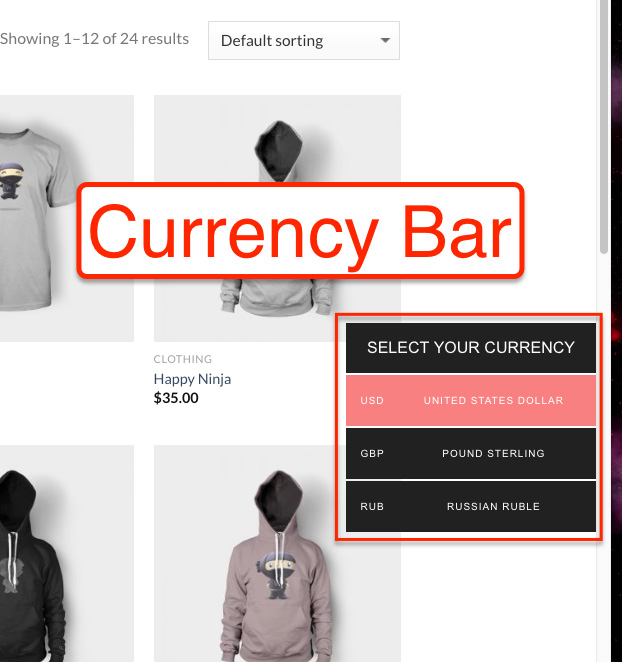
Currency bar 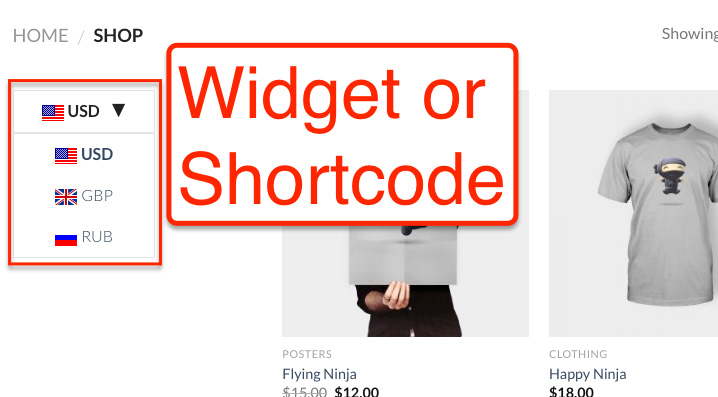
Widget or shortcode 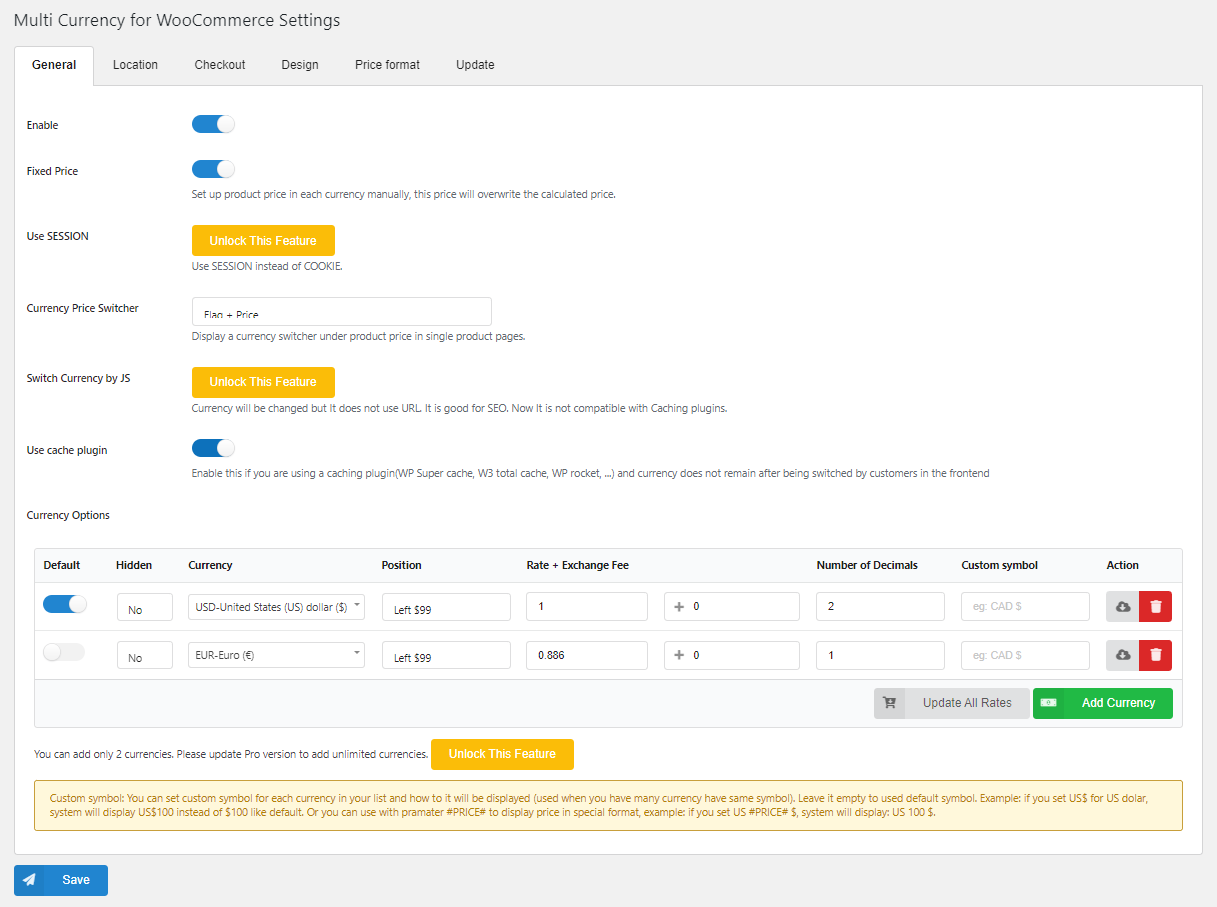
General tab in setting page 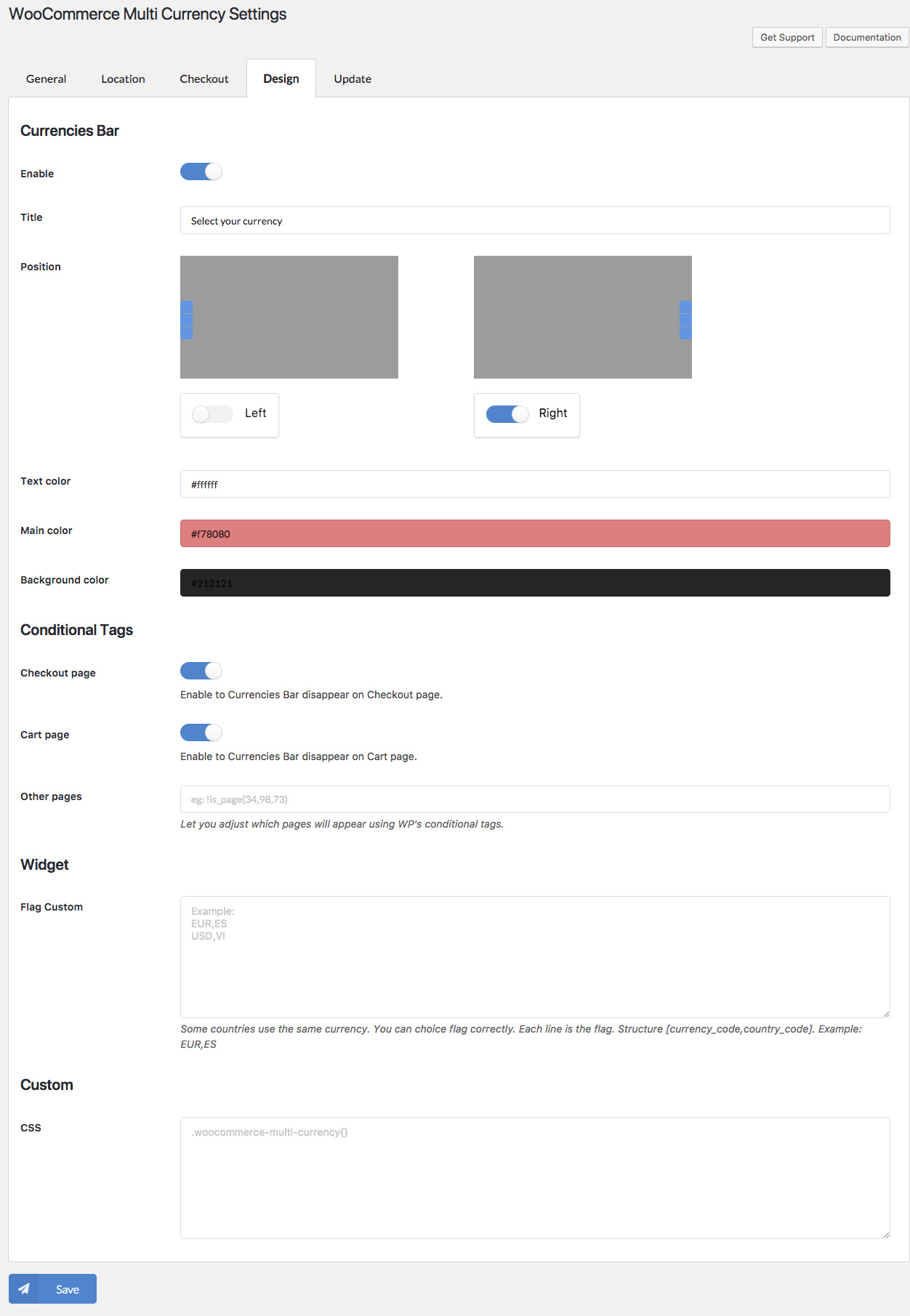
Design tab in setting page
ਸਥਾਪਤੀਕਰਨ
- Unzip the download package
- Upload
woo-multi-currencyto the/wp-content/plugins/directory - ਵਰਡਪ੍ਰੈਸ ‘ਚ ਵਾਧੇ ਨੂੰ ਕਿਰਿਆਸ਼ੀਲ ਕਰਨ ਲਈ ਸੂਚੀ ‘ਚੋਂ ‘ਵਾਧੇ’ ਚੁਣ ਕੇ ਕਰੋ।
ਸਮੀਖਿਆਵਾਂ


ਯੋਗਦਾਨੀ ਤੇ ਵਿਕਾਸਕਾਰ
“CURCY – Multi Currency for WooCommerce – The best free currency exchange plugin – Run smoothly on WooCommerce 8.x” is open source software. The following people have contributed to this plugin.
ਯੋਗਦਾਨੀ

“CURCY – Multi Currency for WooCommerce – The best free currency exchange plugin – Run smoothly on WooCommerce 8.x” has been translated into 1 locale. Thank you to the translators for their contributions.
ਵਿਕਾਸ ਕਾਰਜ ਵਿੱਚ ਰੁਚੀ ਰੱਖਦੇ ਹੋ?
Browse the code, check out the SVN repository, or subscribe to the development log by RSS.
ਤਬਦੀਲੀ-ਚਿੱਠਾ
/2.2.2 – 2024.04.13/
– Fixed: Shipping issue with MyFatoorah
– Fixed: Conflict shipping price with Envia Shipping and Fulfillment
/2.2.1 – 2024.01.05/
– Fixed: Wrong COD price with WooCommerce Smart COD
– Fixed: Missing currency info in admin order
– Updated: Change analytic function workflow
– Updated: Compatibility with CTX Feed Pro
/2.2.0 – 2023.08.23/
– Fixed: Compatible with High-Performance order storage (COT)
– Updated: Compatibility with WP 6.3 and WooCommerce 8.0
/2.1.31 – 2023.07.22/
– Fixed: YITH WooCommerce Product Add-ons & Extra Options Premium compatibility issue
– Fixed: Wrong fixed price display on WC Blocks
– Updated: Compatible with High-Performance order storage (COT)
/2.1.30 – 2023.05.04/
– Updated: Compatibility with google index
/2.1.28 – 2023.03.01/
– Fixed: Convert min/max topup amount
/2.1.27 – 2023.01.12/
– Added: Add loading layer mask option when price is loading by AJAX
– Fixed: String divide string in PHP8
/2.1.26 – 2022.12.09/
– Fixed: Add missing nonce
/2.1.25 – 2022.11.15/
– Fixed: PHP8 – convert string to float
/2.1.24 – 2022.09.10/
– Added: Translate for Vietnamese
/2.1.23 – 2022.07.25/
– Fixed: Fill order data in WooCommerce analytics
/2.1.22 – 2022.06.20/
– Fixed: Compatibility issues with WPC Product Bundles for WooCommerce by WPClever
– Fixed: Flag css overridden by some themes
/2.1.21 – 2022.06.18/
– Fixed: Price not consistent when going to checkout then going to other pages at the first load if Pay in many currencies option is turned off
/2.1.20 – 2022.06.03/
– Fixed: Sanitize/escape data + small fixes
/2.1.19 – 2022.06.02/
– Fixed: Sanitize/escape data
– Added: New shortcode [woo_multi_currency_layout10]
– Optimized: RTL
– Optimized: Sync checkout currency and automatically reload checkout page to work correctly with the new PayPal gateway
/2.1.18 – 2022.05.31/
– Fixed: Correctly escape all URLs
/2.1.17 – 2022.05.30/
– Fixed: Compatibility issues with WooCommerce TM Extra Product Options By ThemeComplete
– Fixed: Compatibility issues with TeraWallet and UddoktaPay Gateway
– Updated: Compatibility with WP 6.0
/2.1.16 – 2022.05.04/
– Fixed: Deprecated _register_controls notice from Elementor 3.6
– Fixed: Some warning notices on the plugin settings page and admin orders page in some cases
– Fixed: Compatibility issues with TerraWallet – credit not converted if order status is manually switched to paid statuses after payment; cashback conversion
– Fixed: Compatibility issues with Visual Products Configurator by ORION – linked options not converting
/2.1.15 – 2022.04.22/
– Fixed: Compatibility issues with LearnPress – WooCommerce Payment Methods Integration
– Fixed: Compatibility issues with Flexible Shipping by WP Desk – do not convert INF
– Updated: Make Approximate price feature work as configured in “Currency by Country” feature if enabled
– Updated: Support Class
/2.1.14 – 2022.03.29/
– Fixed: Compatibility issues with LearnPress – WooCommerce Payment Methods Integration
– Updated: Support Class
/2.1.13 – 2022.03.21/
– Fixed: Compatibility issues with Bookly
– Fixed: Compatibility issues with Learnpress
– Fixed: Compatibility issues with TeraWallet
– Fixed: Compatibility issues with WooCommerce Name Your Price by Kathy Darling
– Improved: WP rocket compatibility – mandatory cookies filter
– Updated: Support Class
/2.1.12 – 2022.01.26/
– Fixed: Error with Learnpress new versions
– Updated: Compatibility with WP 5.9
/2.1.11 – 2022.01.15/
– Fixed: Deprecated is_ajax in WC6.1
/2.1.10 – 2022.01.11/
– Updated: VillaTheme_Support
– Updated: Added Trademark name
– Fixed: Compatibility issues with WooCommerce Payments plugin
– Fixed: Compatibility issues with Woo Discount Rules plugin by Flycart(prices in discount table not converted in some cases)
– Fixed: Compatibility issues with PPOM for WooCommerce by N-MEDIA – Najeeb Ahmad
/2.1.9 – 2021.12.11/
– Fixed: Compatibility with Woo Discount Rules: fixed regular price is not used to calculate discount if “Calculate discount from” option(Woo Discount Rules settings) is set to Regular price
– Updated: SCSS
– Fixed: Price format of EUR may have be incorrect due to WooCommerce Payments plugin
– Fixed: Analytics net sales in some cases
– Fixed: Some compatibility issues with WPC Product Bundles for WooCommerce plugin by WPClever
– Fixed: Reduce z-index of product price switcher to not cover zoom featured/gallery image when zooming
2.1.8 – 2021.10.26
– Fixed: Make converted coupon min/max amount round with respective currency decimals
– Fixed: Incorrect price shown by calculate_extra_price_ajax_handler ajax(WooCommerce Extra Product Options Pro by ThemeHigh)
– Fixed: Compatibility issue with Yith frequently bought together, OrderBumps: WooCommerce Checkout Offers – WooFunnels
– Fixed: Shipping issue with CDEK + Aramex shipping methods
– Updated: [woo_multi_currency_exchange] shortcode can now be used to print out product price
– Added: Compatibility with Catna – WooCommerce Name Your Price and Offers(convert price + support fixed price for Name your price fields)
– Added: Compatibility with WooCommerce Boost Sales new feature – dynamic price and discount for bundle
2.1.7 – 2021.07.31
– Fixed: Flexible shipping cost not converting
– Fixed: WooCommerce Booking resource not converting
– Fixed: WooCommerce Product addons compatibility issue
– Fixed: Conversion issue with Smart bundle for WooCommerce plugin
– Fixed: Conversion issue with PPOM for WooCommerce plugin
– Fixed: Missing VAT information in emails
– Updated: Compatibility with WP 5.8 and WC 5.5
– Updated: Class VillaTheme_Support
– Added: ETH, LTC, ZWL
2.1.6.6 – 2021.06.18
– Fixed: Fixed price of simple subscription product not saving
– Fixed: Shipping class costs conversion
– Updated: Support class
2.1.6.5 – 2021.06.15
– Fixed: Division by zero in price filter of some themes
– Added: Unlock the “Rate decimals” option
2.1.6.4 – 2021.06.11
– Fixed: Division by zero when using price filter in some cases
– Updated: Order stats from other currencies are converted to default currency in WooCommerce Analytics(revenue/orders)
2.1.6.3 – 2021.06.03
– Fixed: Price issue with variable subscription – WooCommerce Subscription
– Added: Change WooCommerce price filter step according to currency
– Added: Compatibility with Woo Discount Rules from Flycart including Bulk discount(percentage+fixed), Product adjustment(percentage+fixed), Cart adjustment(percentage discount only)
– Added: Option to enable/disable the use of rel=”nofollow” in currency switcher buttons
2.1.6.2 – 2021.03.06
– Fixed: Price issue with Visual Product Configurator
– Fixed: WooCommerce subscription – renew subscription + fixed price issue
– Fixed: Advanced product fields for WooCommerce pro – Min cart subtotal rule issue
– Fixed: WooCommerce product addons – incorrect displaying price
– Fixed: Yith dynamic pricing and discount – Quantity discount rule
– Fixed: Wrong price in facebook feed created by WooCommerce Product Feed Pro plugin from WebAppick
– Updated: Compatibility with WP 5.7 and WC 5.0
2.1.6.1 – 2020.12.25
– Updated: Calculate mini cart in other hook
2.1.6 – 2020.10.27
– Updated: Compatible with cache plugin option
2.1.5.6 – 2020.07.21
– Fixed: Color option for shortcode
2.1.5.5 – 2020.07.02
– Fixed: define WPFC_CACHE_QUERYSTRING notice
2.1.5.4 – 2020.06.15
– Updated: Compatible with WooCommerce Report
2.1.5.3 – 2020.06.2
– Fixed: Filter by price
2.1.5.2 – 2020.05.22
– Fixed: Compatible with WP Rocket Cache
2.1.5.1 – 2020.05.21
– Updated: Change role to woocommerce_manage
2.1.5 – 2020.05.19
– Updated: Compatible with Elementor
2.1.4.4 – 2020.04.23
– Updated: Support file
2.1.4.3 – 2020.04.21
– Updated: Add 2 new shortcode: [woo_multi_currency_layout8] [woo_multi_currency_layout9]
– Compatible: WooCommerce TM Extra Product Options (themeComplete) – full
– Compatible: Subscriptio – WooCommerce Subscriptions (RightPress) – full
– Compatible: Discussion on RnB – WooCommerce Booking & Rental Plugin (RedQ Team) – full
– Compatible: WooCommerce PDF Vouchers – WordPress Plugin (wpweb) – full
2.1.4.2 – 2020.03.23
– Updated: Support file
2.1.4.1 – 2019.11.30
– Fixed: Switcher bar doesn’t show at checkout page.
2.1.4 – 2019.11.16
– Fixed: Currency bar CSS
2.1.3.9 – 2019.11.16
– Updated: Sanitize input data
2.1.3.8 – 2019.10.10
– Updated: Change order detail notice by currency value
2.1.3.7 – 2019.10.07
– Updated: Update readme
2.1.3.6 – 2019.09.12
– Updated: Optimize load flags
– Updated: Add ETH flag
– Updated: Optimize display loop
2.1.3.5 – 2019.05.09
– Updated: Premium version link
– Updated: Exchange rate API
2.1.3.4 – 2019.05.03
– Fixed: Problem with WooCommerce Bookings
– Updated: Exchange rate API
2.1.3.3 – 2019.04.04
– Updated: Make admin notices dismissible
/2.1.3.2 – 2019.03.08/
– Updated: Do not auto clear cache(W3 Total cache and WP Rocket)
– Fixed: Exchange rates widget
/2.1.3.1 – 2018.01.04/
– Updated: The same premium
/2.1.3 – 2018.12.21/
– Updated: Class support
– Fixed: Currency position not working
– Fixed: Tab JS in backend
/2.1.2.4.1 – 2018.11.10/
– Fixed: Support class
/2.1.2.4 – 2018.10.16/
– Remove: Upgrade notification
– Remove: Encrypted initial data
– Fixed: Sanitize data
– Fixed: Class support
– Fixed: Return 404 issue with Autoptimize
– Fixed: Currencies bar unclickable on some users’ site
– Updated: Anchor link wrap currency symbol on currencies bar
– Updated: Learnpress compatibility
/2.1.2.3 – 2018.10.15/
– Remove: Upgrade notice
/2.1.2.2 – 2018.09.26/
– Fixed: Missing class method
/2.1.2.1 – 2018.09.05/
– Fixed: Currency price switcher
/2.1.2 – 2018.09.05/
– Added: Custom define SERVER IP
– Added: Currency price switcher
– Fixed: Approximately price
– Fixed: Shortcodes
– Fixed: Update currency when order completed.
– Fixed: Widget flag
– Updated: CSS for mobile
– Compatible: WooCommerce Booking
/2.1.1.2 – 2018.08.22/
– Fixed: Shipping rate decimal
– Fixed: Class support
/2.1.1.1 – 2018.07.09/
– Fixed: class Data of free version
/2.1.1 – 2018.07.07/
– Updated: Flag images
– Updated: Class Support
– Fixed: Order ID on thank you page
– Fixed: Clear browser cache
– Fixed: Fixed price
– Added: Widget, shortcode of Currency rates
/2.1.0.1 – 2018.05.29/
– Fixed: Class support
– Added: WPML.org
/2.1.0 – 2018.05.14/
– Fixed: Clear cache plugins
– Fixed: Currency not change on widget Price filter
– Fixed: Cache price when exchange of price.php
– Added: Shortcode exchange with number
– Compatibled: WooCommerce Wholesale prices
/2.0.9.1.1 – 2018.05.11/
– Fixed: Support class
/2.0.9.1- 2018.05.08/
– Fixed: Clear cache
/2.0.9- 2018.04.28/
– Added: Clear cache with Autoptimize
– Added: Clear cache with WP Fastest Cache
– Added: Clear cache with WP Rocket
– Fixed: Decimal is 0 with other currencies
– Fixed: Fixed price not saving on external/affiliate product
/2.0.8.2.1 – 2018.04.28/
– Fixed: Warning of URL
/2.0.8.2 – 2018.04.16/
-Updated: Link to pro version
/2.0.8.1 – 2018.04.09/
– Fixed: Class support
/2.0.8 – 2018.03.05/
– Compatible: Printful shipping
– Fixed: Class support
– Fixed: Decimal symbols
/2.0.7.3 – 2018.01.16/
– Fixed: Price cache
/2.0.7.2 – 2018.01.13/
– Fixed: show debug
/2.0.7.1 – 2018.01.12/
– Fixed: Price Cache
/2.0.7 – 2018.01.12/
– Optimized: Get data
– Fixed: Tab CSS in backend
/2.0.6 – 2018.01.06/
– Fixed: Conflict CSS of Currency bar
– Fixed: Hide approximately if currency detect is the same current currency
– Fixed: Change currency back that override in checkout page
/2.0.5 – 2017.12.23/
– Updated: Large size for flag
– Added: Geo API
– Added: ETH, LTC currency
– Added: Drag and drop currency
– Fixed: Currency symbol not change when empty cart
– Fixed: EUR text
– Compatible: Visual Product Builder
– Compatible: WooCommerce Subscriptions
– Compatible: WooCommerce Product Bundles
/2.0.4 – 2017.11.23/
– Fixed: WooCommerce load after
– Fixed: Conditional tags
– Fixed: Custom CSS
– Added: Bulk edit in product variation
– Added: System page
/2.0.3 – 2017.11.20/
– Fixed: Move data to new version
– Fixed: Shipping with WooCOmmerce 3.1.1
/2.0.2 – 2017.11.11/
– Fixed: Conflict Class
/2.0.1 – 2017.11.10/
– Fixed: Check design on page
– Fixed: Compatible with Flatsome theme
/2.0.0 – 2017.11.09/
– Updated: New version 2.0
– VillaThemePlugins:[{“title”:”9MAIL – WordPress Email Templates Designer”,”link”:”https:\/\/1.envato.market\/kj3VaN”,”thumb”:”https:\/\/s3.envato.com\/files\/398495606\/icon-80×80.jpg”,”image”:”https:\/\/s3.envato.com\/files\/398495607\/01_preview.jpg”,”description”:””,”free_url”:”https:\/\/bit.ly\/9mail-wp-email-templates-designer”,”slug”:”9mail-wordpress-email-templates-designer”,”demo_url”:”https:\/\/new2new.com\/?item=9mail”},{“title”:”ALD – Aliexpress Dropshipping and Fulfillment for WooCommerce”,”link”:”https:\/\/1.envato.market\/PeXrM”,”thumb”:”https:\/\/s3.envato.com\/files\/313200023\/logo.png”,”image”:”https:\/\/s3.envato.com\/files\/313200024\/01_preview.jpg”,”description”:””,”free_url”:”http:\/\/bit.ly\/aliexpress-dropshipping-and-fulfillment-for-woocommerce”,”slug”:”aliexpress-dropshipping-and-fulfillment-for-woocommerce”,”demo_url”:”https:\/\/alidropship.new2new.com\/my-account\/”},{“title”:”Bopo – WooCommerce Product Bundle Builder – Build Your Own Box”,”link”:”https:\/\/1.envato.market\/4eLB0L”,”thumb”:”https:\/\/s3.envato.com\/files\/373911199\/logo.jpg”,”image”:”https:\/\/s3.envato.com\/files\/373911201\/01_preview.jpg”,”description”:””,”free_url”:”https:\/\/bit.ly\/bopo-woo-product-bundle-builder”,”slug”:”bopo-woo-product-bundle-builder”,”demo_url”:”https:\/\/new2new.com\/?item=bopo”},{“title”:”Bulky – WooCommerce Bulk Edit Products, Orders, Coupons”,”link”:”https:\/\/1.envato.market\/vn4ZEA”,”thumb”:”https:\/\/s3.envato.com\/files\/350081094\/bulky-logo.png”,”image”:”https:\/\/s3.envato.com\/files\/350081095\/01_preview.jpg”,”description”:””,”free_url”:”https:\/\/bit.ly\/bulk-edit-products-for-woo”,”slug”:”bulky-woocommerce-bulk-edit-products”,”demo_url”:”https:\/\/new2new.com\/?item=bulky-woocommerce-bulk-edit-products”},{“title”:”Catna – WooCommerce Name Your Price and Offers”,”link”:”https:\/\/1.envato.market\/kjamOx”,”thumb”:”https:\/\/s3.envato.com\/files\/351503884\/catna-logo.jpg”,”image”:”https:\/\/s3.envato.com\/files\/351503885\/01_preview.jpg”,”description”:””,”free_url”:”https:\/\/bit.ly\/catna-woo-name-your-price-and-offers”,”slug”:”catna-woocommerce-name-your-price-and-offers”,”demo_url”:”https:\/\/new2new.com\/?item=catna-woocommerce-name-your-price-and-offers”},{“title”:”ChinaDS \u2013 WooCommerce Taobao Dropshipping”,”link”:”https:\/\/1.envato.market\/PyAWE6″,”thumb”:”https:\/\/s3.envato.com\/files\/468186550\/icon-80×80.jpg”,”image”:”https:\/\/s3.envato.com\/files\/468186551\/01_preview.jpg”,”description”:””,”free_url”:”https:\/\/bit.ly\/chinads”,”slug”:”chinads-taobao-dropshipping-for-woocommerce”,”demo_url”:”https:\/\/new2new.com\/?item=chinads”},{“title”:”CURCY – WooCommerce Multi Currency – Currency Switcher”,”link”:”https:\/\/1.envato.market\/jABDP”,”thumb”:”https:\/\/s3.envato.com\/files\/253444721\/logo.png”,”image”:”https:\/\/s3.envato.com\/files\/253444722\/01_preview.jpg”,”description”:””,”free_url”:”http:\/\/bit.ly\/woo-multi-currency”,”slug”:”woocommerce-multi-currency”,”demo_url”:”http:\/\/new2new.com\/?item=woo-multi-currency”},{“title”:”eCommerce Notification – Live Feed Recent Sales”,”link”:”https:\/\/1.envato.market\/K3W9N”,”thumb”:”https:\/\/s3.envato.com\/files\/352150438\/logo.jpg”,”image”:”https:\/\/s3.envato.com\/files\/352150439\/01_preview.jpg”,”description”:””,”free_url”:””,”slug”:”ecommerce-notification”,”demo_url”:”http:\/new2new.com\/?item=wordpress-ecommerce-notification”},{“title”:”Jagif – WooCommerce Free Gift”,”link”:”https:\/\/1.envato.market\/15YMmg”,”thumb”:”https:\/\/s3.envato.com\/files\/402070491\/icon-80×80.jpg”,”image”:”https:\/\/s3.envato.com\/files\/402070492\/01_preview.jpg”,”description”:””,”free_url”:”https:\/\/bit.ly\/jagif”,”slug”:”jagif-woocommerce-free-gift”,”demo_url”:”https:\/\/new2new.com\/?item=jagif”},{“title”:”Pofily – WooCommerce Product Filters – SEO Product Filter”,”link”:”https:\/\/1.envato.market\/kj9ZJn”,”thumb”:”https:\/\/s3.envato.com\/files\/364625738\/logo.jpg”,”image”:”https:\/\/s3.envato.com\/files\/364625739\/01_preview.jpg”,”description”:””,”free_url”:”https:\/\/bit.ly\/pofily-woo-product-filters”,”slug”:”pofily-woocommerce-product-filters”,”demo_url”:”https:\/\/new2new.com\/?item=pofily”},{“title”:”S2W – Import Shopify to WooCommerce – Migrate from Shopify to WooCommerce”,”link”:”https:\/\/1.envato.market\/9arQ5″,”thumb”:”https:\/\/s3.envato.com\/files\/280988792\/logo.png”,”image”:”https:\/\/s3.envato.com\/files\/280988793\/01_preview.jpg”,”description”:””,”free_url”:”http:\/\/bit.ly\/import-shopify-to-woocommerce”,”slug”:”s2w-import-shopify-to-woocommerce”,”demo_url”:”https:\/\/new2new.com\/?item=s2w”},{“title”:”Sales Countdown Timer for WooCommerce and WordPress”,”link”:”https:\/\/1.envato.market\/962d3″,”thumb”:”https:\/\/s3.envato.com\/files\/353055370\/icon-80×80.jpg”,”image”:”https:\/\/s3.envato.com\/files\/353055371\/01_preview.jpg”,”description”:””,”free_url”:”http:\/\/bit.ly\/sales-countdown-timer”,”slug”:”sales-countdown-timer”,”demo_url”:”http:\/\/new2new.com\/?item=sales-countdown-timer”},{“title”:”W2S – Migrate WooCommerce to Shopify”,”link”:”https:\/\/1.envato.market\/vnr5Nj”,”thumb”:”https:\/\/s3.envato.com\/files\/397715848\/icon-80×80.jpg”,”image”:”https:\/\/s3.envato.com\/files\/397715849\/01_preview.jpg”,”description”:””,”free_url”:”https:\/\/bit.ly\/w2s-migrate-woo-to-shopify”,”slug”:”w2s-migrate-woocommerce-to-shopify”,”demo_url”:”https:\/\/new2new.com\/?item=w2s”},{“title”:”WebPOS – WooCommerce POS – Point of Sale – Restaurant – Grocery”,”link”:”https:\/\/1.envato.market\/7m7Jmd”,”thumb”:”https:\/\/s3.envato.com\/files\/396660249\/icon-80×80.jpg”,”image”:”https:\/\/s3.envato.com\/files\/396660250\/01_preview.jpeg”,”description”:””,”free_url”:”https:\/\/bit.ly\/webpos-point-of-sale-for-woocommerce”,”slug”:”webpos-point-of-sale-for-woocommerce”,”demo_url”:”https:\/\/new2new.com\/?item=webpos”},{“title”:”WooCommerce Abandoned Cart Recovery – Send Cart Recovery Email Plugin – SMS – Messenger”,”link”:”https:\/\/1.envato.market\/roBbv”,”thumb”:”https:\/\/s3.envato.com\/files\/280988198\/logo.png”,”image”:”https:\/\/s3.envato.com\/files\/280988199\/01_preview.jpg”,”description”:””,”free_url”:”http:\/\/bit.ly\/woo-abandoned-cart-recovery”,”slug”:”woocommerce-abandoned-cart-recovery”,”demo_url”:”http:\/\/new2new.com\/?item=woocommerce-abandoned-cart-recovery”},{“title”:”WooCommerce Boost Sales – WooCommerce Cross sell and Upsell”,”link”:”https:\/\/1.envato.market\/yQBL3″,”thumb”:”https:\/\/s3.envato.com\/files\/350622164\/logo.jpg”,”image”:”https:\/\/s3.envato.com\/files\/350622165\/01_preview.jpg”,”description”:””,”free_url”:”http:\/\/bit.ly\/woo-boost-sales”,”slug”:”woocommerce-boost-sales”,”demo_url”:”http:\/\/new2new.com\/?item=woocommerce-boost-sales”},{“title”:”WooCommerce Cart All In One – One Click Checkout – Sticky|Side Cart”,”link”:”https:\/\/1.envato.market\/bW20B”,”thumb”:”https:\/\/s3.envato.com\/files\/320018552\/logo.png”,”image”:”https:\/\/s3.envato.com\/files\/320018553\/01_preview.jpg”,”description”:””,”free_url”:”http:\/\/bit.ly\/woo-cart-all-in-one”,”slug”:”woo-cart-all-in-one”,”demo_url”:”https:\/\/new2new.com\/?item=woocommerce-cart-all-in-one”},{“title”:”WooCommerce Chatbot for Messenger – Sales Channel”,”link”:”https:\/\/1.envato.market\/eOOnj”,”thumb”:”https:\/\/s3.envato.com\/files\/322548192\/logo80x80.png”,”image”:”https:\/\/s3.envato.com\/files\/322548194\/01_preview.jpg”,”description”:””,”free_url”:””,”slug”:”woocommerce-facebook-chatbot”,”demo_url”:”https:\/\/new2new.com\/?item=woocommerce-facebook-chatbot”},{“title”:”WooCommerce Checkout Upsell Funnel – Order Bump”,”link”:”https:\/\/1.envato.market\/oeemke”,”thumb”:”https:\/\/s3.envato.com\/files\/351562730\/logo-funnel.jpg”,”image”:”https:\/\/s3.envato.com\/files\/351562731\/01_preview.jpg”,”description”:””,”free_url”:”http:\/\/bit.ly\/woo-checkout-upsell-funnel”,”slug”:”woocommerce-checkout-upsell-funnel”,”demo_url”:”https:\/\/new2new.com\/?item=woocommerce-checkout-upsell-funnel”},{“title”:”WooCommerce Coupon Box”,”link”:”https:\/\/1.envato.market\/DzJ12″,”thumb”:”https:\/\/s3.envato.com\/files\/280883533\/logo.png”,”image”:”https:\/\/s3.envato.com\/files\/280883534\/01_preview.jpg”,”description”:””,”free_url”:”http:\/\/bit.ly\/woo-coupon-box-free”,”slug”:”woocommerce-coupon-box”,”demo_url”:”http:\/\/new2new.com\/?item=woo-coupon-box”},{“title”:”WooCommerce Email Template Customizer”,”link”:”https:\/\/1.envato.market\/BZZv1″,”thumb”:”https:\/\/s3.envato.com\/files\/305875470\/logo.png”,”image”:”https:\/\/s3.envato.com\/files\/305875471\/01_preview.jpg”,”description”:””,”free_url”:”http:\/\/bit.ly\/woo-email-template-customizer”,”slug”:”woocommerce-email-template-customizer”,”demo_url”:”https:\/\/new2new.com\/?item=woocommerce-email-template-customizer”},{“title”:”WooCommerce Free Shipping Bar – Increase Average Order Value”,”link”:”https:\/\/1.envato.market\/N3mPV”,”thumb”:”https:\/\/s3.envato.com\/files\/353174709\/logo.jpg”,”image”:”https:\/\/s3.envato.com\/files\/353174710\/01_preview.jpg”,”description”:””,”free_url”:”http:\/\/bit.ly\/woo-free-shipping-bar”,”slug”:”woocommerce-free-shipping-bar”,”demo_url”:”http:\/\/new2new.com\/?item=woocommerce-free-shipping-bar”},{“title”:”WooCommerce Lookbook – Shop by Instagram – Shoppable with Product Tags”,”link”:”https:\/\/1.envato.market\/mV0bM”,”thumb”:”https:\/\/s3.envato.com\/files\/280871714\/logo.png”,”image”:”https:\/\/s3.envato.com\/files\/280871715\/01_preview.jpg”,”description”:””,”free_url”:”http:\/\/bit.ly\/woo-lookbook”,”slug”:”woocommerce-lookbook”,”demo_url”:”http:\/\/new2new.com\/?item=woocommerce-lookbook”},{“title”:”WooCommerce Lucky Wheel – Spin to win”,”link”:”https:\/\/1.envato.market\/qXBNY”,”thumb”:”https:\/\/s3.envato.com\/files\/280996372\/logo.png”,”image”:”https:\/\/s3.envato.com\/files\/280996374\/01_preview.jpg”,”description”:””,”free_url”:”http:\/\/bit.ly\/woo-lucky-wheel”,”slug”:”woocommerce-lucky-wheel”,”demo_url”:”http:\/\/new2new.com\/?item=woocommerce-lucky-wheel”},{“title”:”WooCommerce Notification – Boost Your Sales”,”link”:”https:\/\/1.envato.market\/djEZj”,”thumb”:”https:\/\/s3.envato.com\/files\/353057742\/icon-80×80.jpg”,”image”:”https:\/\/s3.envato.com\/files\/353057743\/01_preview.jpg”,”description”:””,”free_url”:”http:\/\/bit.ly\/woo-notification”,”slug”:”woocommerce-notification”,”demo_url”:”http:\/\/new2new.com\/?item=woocommerce-notification”},{“title”:”WooCommerce Orders Tracking – SMS – PayPal Tracking Autopilot”,”link”:”https:\/\/1.envato.market\/6ZPBE”,”thumb”:”https:\/\/s3.envato.com\/files\/352803924\/logo.jpg”,”image”:”https:\/\/s3.envato.com\/files\/352803926\/01_preview.jpg”,”description”:””,”free_url”:”http:\/\/bit.ly\/woo-orders-tracking”,”slug”:”woocommerce-orders-tracking”,”demo_url”:”http:\/\/new2new.com\/?item=woo-orders-tracking”},{“title”:”WooCommerce Photo Reviews – Review Reminders – Review for Discounts”,”link”:”https:\/\/1.envato.market\/L3WrM”,”thumb”:”https:\/\/s3.envato.com\/files\/352851954\/icon-80×80.jpg”,”image”:”https:\/\/s3.envato.com\/files\/352851955\/01_preview.jpg”,”description”:””,”free_url”:”http:\/\/bit.ly\/woo-photo-reviews”,”slug”:”woocommerce-photo-reviews”,”demo_url”:”http:\/\/new2new.com\/?item=woocommerce-photo-reviews”},{“title”:”WooCommerce Product Builder – Custom PC Builder – Product Configurator”,”link”:”https:\/\/1.envato.market\/M3Wjq”,”thumb”:”https:\/\/s3.envato.com\/files\/352612388\/icon-80×80.jpg”,”image”:”https:\/\/s3.envato.com\/files\/352610841\/01_preview.jpg”,”description”:””,”free_url”:”http:\/\/bit.ly\/woo-product-builder”,”slug”:”woocommerce-product-builder”,”demo_url”:”http:\/\/new2new.com\/?item=woocommerce-product-builder”},{“title”:”WooCommerce Product Variations Swatches”,”link”:”https:\/\/1.envato.market\/bd0ek”,”thumb”:”https:\/\/s3.envato.com\/files\/285353733\/logo-pre.png”,”image”:”https:\/\/s3.envato.com\/files\/285166362\/01_preview.jpg”,”description”:””,”free_url”:”http:\/\/bit.ly\/product-variations-swatches-for-woocommerce”,”slug”:”woocommerce-product-variations-swatches”,”demo_url”:”http:\/\/new2new.com\/?item=woo-product-variations-swatches”},{“title”:”WooCommerce Thank You Page Customizer – Increase Customer Retention Rate – Boost Sales”,”link”:”https:\/\/1.envato.market\/Q3Weo”,”thumb”:”https:\/\/s3.envato.com\/files\/281444301\/logo.png”,”image”:”https:\/\/s3.envato.com\/files\/281444302\/01_preview.jpg”,”description”:””,”free_url”:”http:\/\/bit.ly\/woo-thank-you-page-customizer”,”slug”:”woocommerce-thank-you-page-customizer”,”demo_url”:”http:\/\/new2new.com\/?item=woo-thank-you-page-customizer”},{“title”:”WordPress Lucky Wheel – Lucky Wheel Spin and Win”,”link”:”https:\/\/1.envato.market\/xDRb1″,”thumb”:”https:\/\/s3.envato.com\/files\/281013744\/logo.png”,”image”:”https:\/\/s3.envato.com\/files\/281013745\/01_preview.jpg”,”description”:””,”free_url”:”http:\/\/bit.ly\/wp-lucky-wheel”,”slug”:”wordpress-lucky-wheel”,”demo_url”:”http:\/\/new2new.com\/?item=wordpress-lucky-wheel”},{“title”:”WPBulky – WordPress Bulk Edit Post Types”,”link”:”https:\/\/1.envato.market\/MXBDjK”,”thumb”:”https:\/\/s3.envato.com\/files\/357882803\/icon80x80.jpg”,”image”:”https:\/\/s3.envato.com\/files\/357882804\/01_preview.jpg”,”description”:””,”free_url”:”https:\/\/bit.ly\/wpbulky”,”slug”:”wpbulky-wordpress-bulk-edit-post-types”,”demo_url”:”https:\/\/new2new.com\/?item=wpbulky”}]
– VillaThemeCampaign:{“heading”:”Hurry! Sale Ends in Just a Few Days: Steals of the Week!”,”description”:”Grab plugins every week until March 31st with 30% off!”,”link”:”https:\/\/1.envato.market\/zN3DJM”,”id”:”march2024end”,”start”:”2024-03-18″,”end”:”2024-04-01″,”loop”:”2,4″}