

ਵੇਰਵਾ
CampaignBay is the discount and promotions engine built for serious WooCommerce stores.
Most WooCommerce stores rely on basic coupon codes and leave significant revenue on the table. CampaignBay replaces that approach with a structured campaign system: automated discounts that activate on schedule, reward the right customers, and display beautifully on your product and cart pages.
No coupon codes to share. No manual price edits. No missed start times. You configure the campaign once, and CampaignBay handles the rest.
Why store owners choose CampaignBay:
- Fully automated – Campaigns start and stop on schedule without any manual intervention.
- Built for performance – Multi-level caching keeps discount calculations fast, even on high-traffic stores.
- Genuinely free – All core campaign types are available at no cost, with no usage limits.
- A complete analytics suite – Track what’s working with a real-time dashboard built into your admin.
- A dedicated Campaign Calendar – Visualize every active and upcoming promotion across Month, Week, and Year views.
View Demo | Documentation with Examples | Ask Questions | PRO Version | Examples
Campaign Types
Scheduled Discounts
Run time-limited sales with automatic start and end dates. Choose a percentage or fixed amount, apply it to your entire store, specific products, or selected categories, and let CampaignBay activate and deactivate the campaign on your behalf. Ideal for Black Friday, seasonal clearances, and weekly specials.
Quantity Based Discounts
Reward customers for buying more with tiered bulk pricing. Set as many price tiers as you need – “Buy 3+, save 10%. Buy 6+, save 15%. Buy 11+, save 20%.” A pricing table is displayed directly on the product page so customers always understand the offer before adding items to their cart.
Early Bird Discounts
Create urgency around product launches and limited-time offers by discounting for the first X orders. Configure sequential discount tiers – the first 100 buyers get 50% off, the next 150 get 25% off – and let the slot counter do the selling for you. Usage counts adjust automatically when orders are cancelled or refunded.
BOGO (Buy One, Get One)
Run classic Buy X, Get X Free deals on any product or category. Free items are added directly to the cart as separate line items, clearly marked for the customer. The auto-add feature handles everything – no extra steps required from the shopper.
Analytics Dashboard
The CampaignBay dashboard gives you a complete view of your promotions performance without leaving WordPress.
- KPI Cards – Active campaigns, total discount value given, discounted orders, and campaign-attributed revenue, all visible at a glance.
- Interactive Charts – Line, bar, and pie chart visualizations across selectable date ranges.
- Top Performing Campaigns – Ranked by usage and total discount value so you know what to repeat.
- Recent Activity Log – A running record of campaign creation, updates, and changes.
- Live and Upcoming Campaigns – At-a-glance status for what is running now and what is scheduled next.
- Dashboard Calendar Widget – A compact calendar with dot indicators marking dates that have active campaigns.
Campaign Calendar
The Campaign Calendar is a dedicated planning and management view for your entire promotions schedule.
- Three layout options – Switch between Month, Week, and Year views depending on your planning horizon.
- Color-coded campaign bars – Each campaign type (Scheduled, Quantity, Early Bird, BOGO) displays in its own distinct color for instant identification.
- Edit directly from the calendar – Click any campaign bar to open the editor without navigating away.
- Campaign type filters – Toggle individual campaign types on and off to focus the view.
- Upcoming and active indicators – Spot what is live right now and what is launching soon at a glance.
The Campaign Calendar makes it easy to spot scheduling conflicts, plan promotions around key dates, and maintain a clear picture of your full marketing calendar.
Targeting and Conditions
CampaignBay gives you precise control over which products receive a discount and which customers qualify.
Product Targeting:
- Entire store – Apply the campaign to all products.
- Specific products – Select individual products, including all variations of a variable product.
- Specific categories – Target entire product categories, including subcategories.
- Exclude items – Invert any targeting rule to apply the discount to everything except the selected products or categories.
- Exclude sale items – Prevent CampaignBay discounts from stacking on products already marked on sale in WooCommerce.
Conditions:
- Restrict campaigns to specific WordPress user roles – Wholesalers, VIPs, or any custom role.
- Set usage limits so campaigns automatically expire after a set number of orders.
- Apply campaign schedules so discounts only run within a defined date and time window.
Display and Messaging
Customers are more likely to act when they clearly understand the offer. CampaignBay handles all storefront display automatically.
- Product page messages – Configurable promotional banners with dynamic placeholders like
{percentage_off},{remaining_slots}, and{buy_quantity}. - Strikethrough pricing – Original prices displayed with strikethrough, discounted prices shown in their place.
- Quantity discount table – A pricing tier table displayed on product pages, with the customer’s current qualifying tier highlighted.
- Cart integration – Per-item discount messages, BOGO free item lines at $0, and a discount breakdown in the order summary.
- Next-tier upsell messaging – Prompt customers approaching a quantity threshold with how many more items they need to unlock the next discount level.
Performance
Discount calculations run on every product load and cart update, so performance is a core design concern – not an afterthought.
- Multi-level caching – Active campaigns are cached in memory to eliminate redundant database queries.
- Efficient cart processing – Discount logic runs in a single cart pass, minimizing overhead on checkout.
- WP-Cron scheduling – Campaign activation and deactivation is handled via WordPress Cron, with no performance cost to the storefront.
Additional Features
- Campaign Templates – Pre-built templates for Flash Sales, BOGO, Bulk Discounts, and Early Bird offers get you started in seconds.
- Discount stacking control – Choose whether CampaignBay discounts can stack with each other or with WooCommerce coupons.
- Three discount application methods – Apply quantity discounts as a direct line price modification, a virtual coupon, or a negative cart fee.
- Import and Export – Move campaigns between stores or environments with a single action.
- Bulk actions – Activate, deactivate, duplicate, or delete multiple campaigns at once.
- WooCommerce coupon compatibility – CampaignBay works alongside your existing coupon strategy.
- Developer hooks – An extensive set of action and filter hooks for custom extensions and integrations.
- White-label support – Rebrand the plugin interface for client sites.
- REST API – Full API coverage for campaign management, settings, and analytics.
- Shortcodes – Embed the quantity discount table or campaign countdown anywhere with
[campaignbay_discount_table]and[campaignbay_countdown].
Upgrade to CampaignBay Pro
The free version covers the core campaign types. CampaignBay Pro adds more powerful targeting and campaign mechanics for stores with advanced needs.
Pro Campaign Types:
- BOGO Advanced (Buy X, Get Y) – Run cross-product deals: “Buy a Laptop, get a Mouse free.” Configure different buy and get products, with multiple tiers per campaign and configurable discount percentages on the reward product.
- Product in Cart Discounts – Trigger a discount across your store when a specific product is added to the cart. Useful for membership products, gift boxes, or VIP keys that unlock store-wide savings.
Pro Conditions:
- Target multiple user roles simultaneously (any combination).
- Restrict campaigns to specific individual users by ID.
- Activate discounts based on a customer’s total order history count.
- Gate campaigns by current cart total or subtotal.
- Trigger conditions based on specific products or categories already in the cart.
Pro Support:
- Priority email support with direct access to the development team.
Use Cases
- Boost average order value – “Buy 3+, save 10%. Buy 6+, save 20%.” Tiered pricing moves customers up the ladder.
- Automate seasonal sales – Schedule your Black Friday or end-of-season sale weeks in advance. No last-minute price edits.
- Product launch momentum – Offer 40% off to the first 100 buyers. The slot counter creates genuine urgency.
- Clear slow-moving inventory – “Buy 2, Get 1 Free” moves stock without permanent price reductions.
- Reward loyal customers – Exclusive bulk pricing for users with the Wholesaler role, invisible to regular shoppers.
- Category promotions – Run a 20% off promotion across an entire product category for a defined time window.
Documentation and Support
- Official Documentation – Step-by-step setup guides for every feature.
- Live Demo – Explore the frontend and admin experience before installing.
- CampaignBay Pro – Advanced campaign types and conditions.
- Support Forum – Get help from the team.
Live Demo
See CampaignBay in action on our interactive demo – both the customer-facing storefront and the admin dashboard.
ਸਕਰੀਨਸ਼ਾਟ
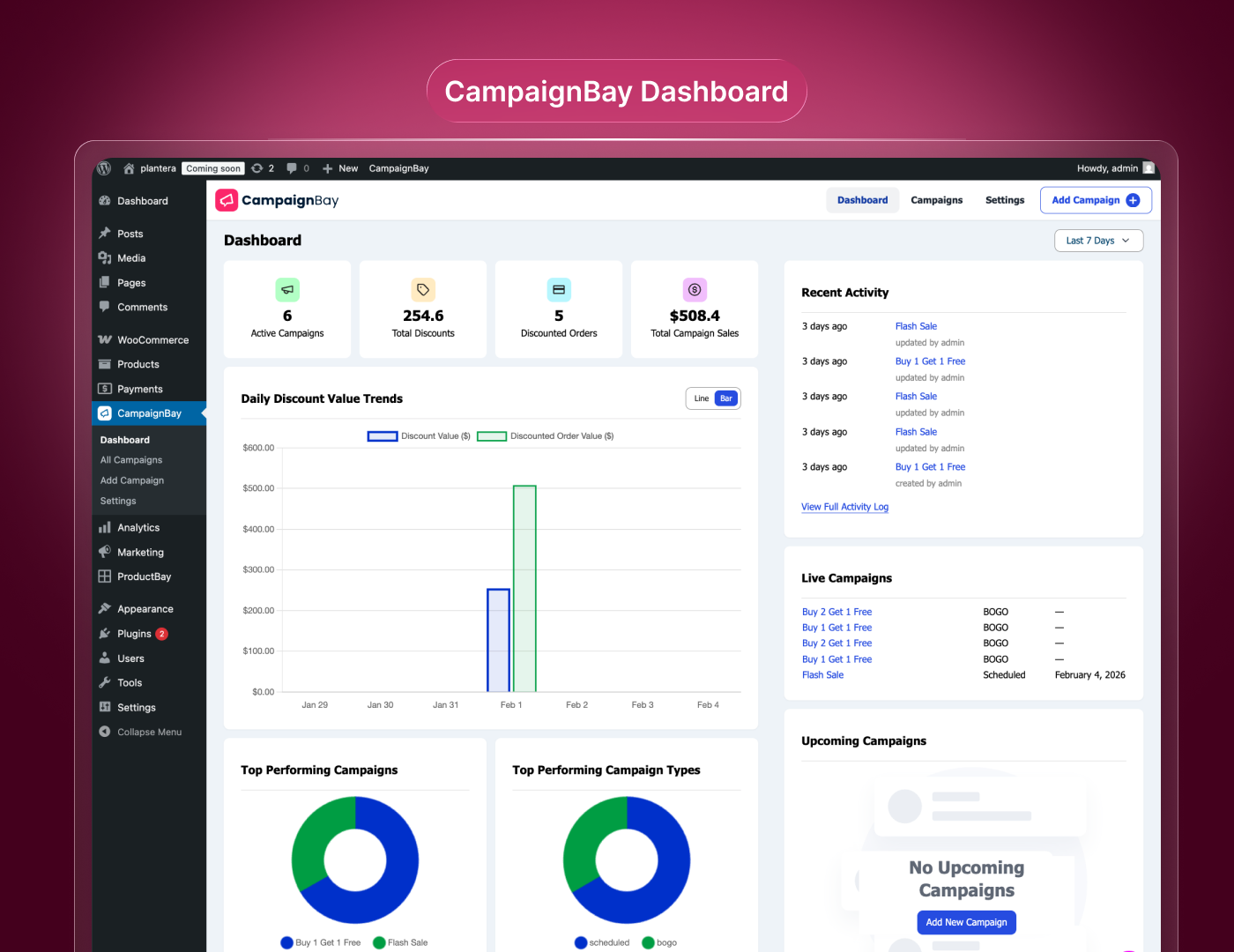
Dashboard Overview – Real-time KPIs and performance charts. 
Campaign Editor – Intuitive interface for creating campaigns. 
Campaign Calendar – Visualize and manage campaigns with color-coded bars across Month, Week, and Year views. 
All Campaigns (Table View) – Filtering, sorting, and bulk actions. 
All Campaigns (Grid View) – Card-based visual overview. 
Global Settings – Tabbed interface for plugin configuration. 
Product Settings – Customize discount message formats. 
Quantity Table Customizer – Style the product page pricing table. 
Cart Settings – Configure stacking rules. 
Advanced Settings – Plugin data management. 
Frontend: Product Page – Discount table and messages in action. 
Frontend: Cart Page – Strikethrough pricing and savings display.
ਸਥਾਪਤੀਕਰਨ
Requirements: WooCommerce must be installed and activated.
From WordPress Dashboard (Recommended)
- Navigate to Plugins Add New.
- Search for “CampaignBay”.
- Click “Install Now”, then “Activate”.
Manual Upload
- Download campaignbay.zip from WordPress.org.
- Go to Plugins Add New Upload Plugin.
- Upload the zip file and click “Install Now”.
- Click “Activate”.
Getting Started
After activation, find CampaignBay in your admin sidebar. Click “Add New Campaign” and follow our guide to create your first promotion in under 2 minutes!
ਅਕਸਰ ਪੁੱਛੇ ਜਾਂਦੇ ਸਵਾਲ
-
Does CampaignBay require WooCommerce?
-
Yes. CampaignBay is built specifically for WooCommerce and requires it to be installed and active.
-
Is CampaignBay free?
-
Yes! The core plugin is 100% free with no artificial limits. A Pro version is available with advanced features.
-
What are the system requirements?
-
WordPress 5.8+, PHP 7.0+, and WooCommerce installed.
-
Can I track campaign performance?
-
Yes. The built-in analytics dashboard shows real-time KPIs, charts, and top-performing campaigns.
-
What discount types are supported?
-
Scheduled Discounts, Quantity Based Discounts, Early Bird Discounts, and BOGO.
-
Can discounts stack?
-
By default, only the best discount applies. You can enable stacking in Settings Cart Settings.
-
How does scheduling work?
-
Set a start and end date. CampaignBay uses WordPress Cron to automatically activate and deactivate campaigns.
-
Can I limit discounts to specific user roles?
-
Yes! Use the Conditions feature to restrict campaigns to specific roles.
-
Where can I get support?
-
Visit our Support Forum.
ਸਮੀਖਿਆਵਾਂ

ਯੋਗਦਾਨੀ ਤੇ ਵਿਕਾਸਕਾਰ
“CampaignBay – Automated Discount Campaigns & Flash Sales for WooCommerce” is open source software. The following people have contributed to this plugin.
ਯੋਗਦਾਨੀ


ਵਿਕਾਸ ਕਾਰਜ ਵਿੱਚ ਰੁਚੀ ਰੱਖਦੇ ਹੋ?
Browse the code, check out the SVN repository, or subscribe to the development log by RSS.
ਤਬਦੀਲੀ-ਚਿੱਠਾ
1.1.6
- Enhancement: UI Optimization.
1.1.5
- Fix: Minor Bug Fixes.
1.1.4
- Enhancement: UI Optimization.
1.1.3
- Fix: Small UI Improvements.
1.1.2
- New Feature: Campaign Calendar Page — a dedicated calendar view to easily manage and visualize all your campaigns.
- Enhancement: Month, Week, and Year layout options for flexible campaign planning.
- Enhancement: Color-coded campaign bars — each campaign type (BOGO, Scheduled, Quantity, Early Bird, etc.) has its own distinct color for quick identification.
- Enhancement: Easily spot upcoming and currently active campaigns at a glance.
- Enhancement: Campaign type filter toggles to show or hide specific campaign types on the calendar.
- New Feature: Dashboard Calendar Widget — a compact calendar on the Dashboard with dot indicators on dates that have active campaigns.
1.1.1
- Added close button to the campaign onboarding modal with a confirmation prompt.
1.1.0
- Major Update: Complete UI Redesign! The entire admin interface has been rebuilt for a cleaner, faster, and more intuitive experience.
- New Feature: Multi-select campaign filters—now filter by multiple types and statuses simultaneously.
- Enhancement: Modernized dashboard with improved data visualization.
- Enhancement: Streamlined campaign editor with better form layouts.
- Enhancement: Refreshed settings pages with improved navigation.
- Enhancement: Performance improvements and codebase optimizations.
- Enhancement: Updated documentation links.
1.0.9
- Enhancement: UI refinements for a smoother experience.
1.0.8
- New Feature: Campaign Templates! Pre-built templates for Flash Sales, BOGO, Bulk Discounts, and Early Bird offers.
- Enhancement: Visual template selector with example previews.
- Enhancement: Campaigns now default to “Active” status for faster onboarding.
1.0.7
- New Feature: Conditional Discounts! New “Conditions” section with User Role targeting.
- Enhancement: Major UI upgrade across campaign editor and settings pages.
1.0.6
- New Feature: Options to disable promotional messages on cart and product pages.
1.0.5
- Enhancement: BOGO architecture upgrade—free products now added as separate cart items.
- Enhancement: Improved hook system and standardized discount data structure.
- Fix: Variable product message and table formatting issues.
1.0.4
- Fix: Activation error introduced in 1.0.3.
1.0.3
- Fix: Minor bug fixes and stability improvements.
1.0.2
- Enhancement: Interactive Tour Guide for new users.
1.0.1
- Enhancement: Updated plugin display name for better discoverability.
- Refactor: Migrated admin interface to TypeScript for improved code quality.
1.0.0
- Initial release of CampaignBay.