
ਵੇਰਵਾ
Is your old content getting buried? Auto Republish & Permalink Manager breathes new life into your evergreen posts, bringing them back to the top to increase your traffic and engagement. It’s the ultimate tool for content creators who want to maximize their existing work and improve their site’s SEO without manual effort.
By intelligently updating the “last modified” date, you signal to Google that your content is fresh and relevant, which can significantly boost your search rankings.
Why Choose Auto Republish & Permalink Manager?
- 📈 Boost Your SEO & Traffic: Refreshing content tells search engines your site is actively maintained, helping you rank higher. Choose to update the original publish date to bring posts to the top of your blog, or just the modified date for a pure SEO boost.
- ⚙️ Works With EVERYTHING – Automatically!: Our plugin dynamically detects ALL custom post types. Whether you run a blog, a WooCommerce store, or have custom post types for recipes, jobs, or listings, it just works. No configuration is needed.
- 🕒 Save Dozens of Hours: Stop wasting time manually updating old posts. Set up a schedule in minutes and let the plugin handle the rest. Our powerful and reliable cron-based system runs silently in the background.
- 🚀 Safe for Large Websites: Processing thousands of posts? No problem. All bulk operations are done in safe, asynchronous batches to prevent server timeouts and ensure smooth operation on any hosting environment.
- 🎨 Modern & Intuitive UI: We’ve designed a clean, tabbed interface that makes managing your settings a breeze. No clutter, no confusion.
Core Features
- Powerful Automatic Scheduling: Set a schedule to run every few minutes, hourly, or daily to republish a specific number of your oldest posts.
- Dynamic Post Type Support: Automatically finds and works with Posts, Pages, Products, and any other public custom post type registered on your site.
- SEO-Friendly Update Mode: Choose to update only the “Last Modified” date (recommended for SEO) or the original “Publish Date”.
- Granular Control: Select exactly which post types to include in the automatic schedule. Republish only Posts, or Posts and Products—the choice is yours.
- Advanced Republish Order: Choose to republish your oldest posts first (to revive forgotten content), your newest posts, or completely random posts.
- Manual Bulk Republisher: Need to refresh an entire category or post type at once? The manual tool with its live progress bar makes it simple and safe.
- Keyword Filtering: Finely tune your republishing jobs by only including or completely excluding posts that contain specific keywords.
- Permalink Cleanup Tool: Easily remove any numeric suffixes (e.g.,
-1234) that have been added to your permalinks with a single click. - Search Engine Notifications: Automatically notifies Google (via Rank Math) and Bing after updating content to encourage faster re-indexing.
ਸਕਰੀਨਸ਼ਾਟ
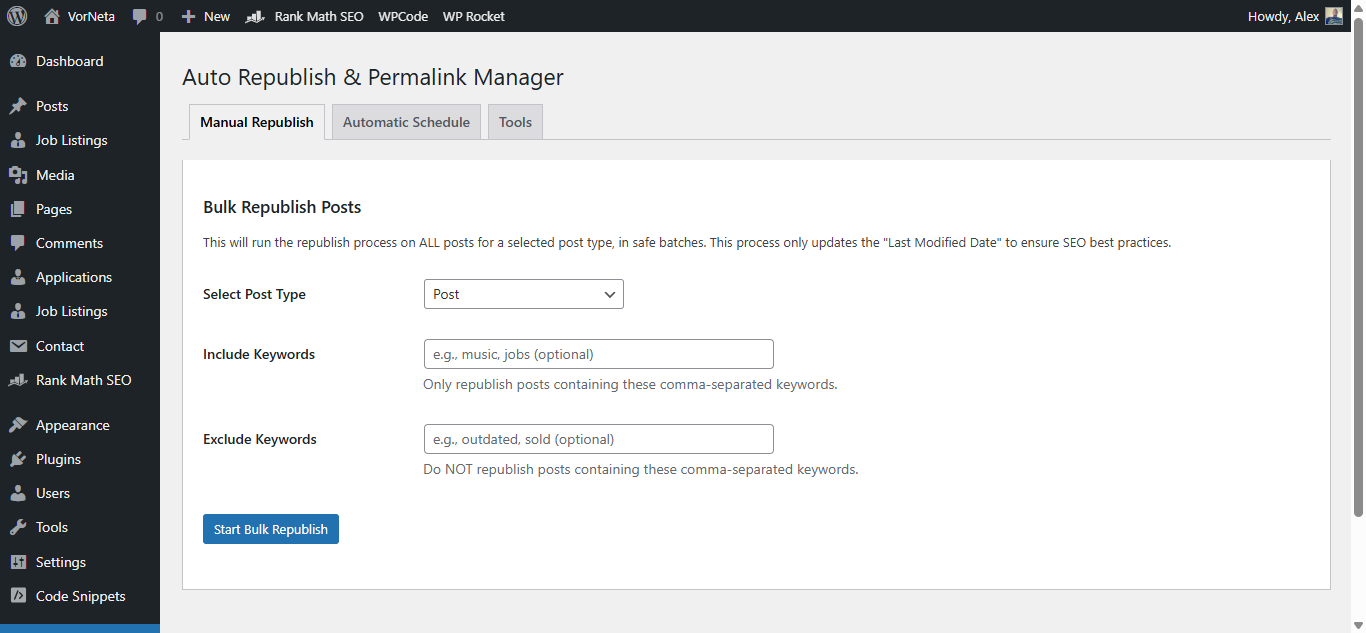
The Clean & Modern Tabbed Interface: Easily navigate between Manual Republish, Automatic Schedule, and Tools. 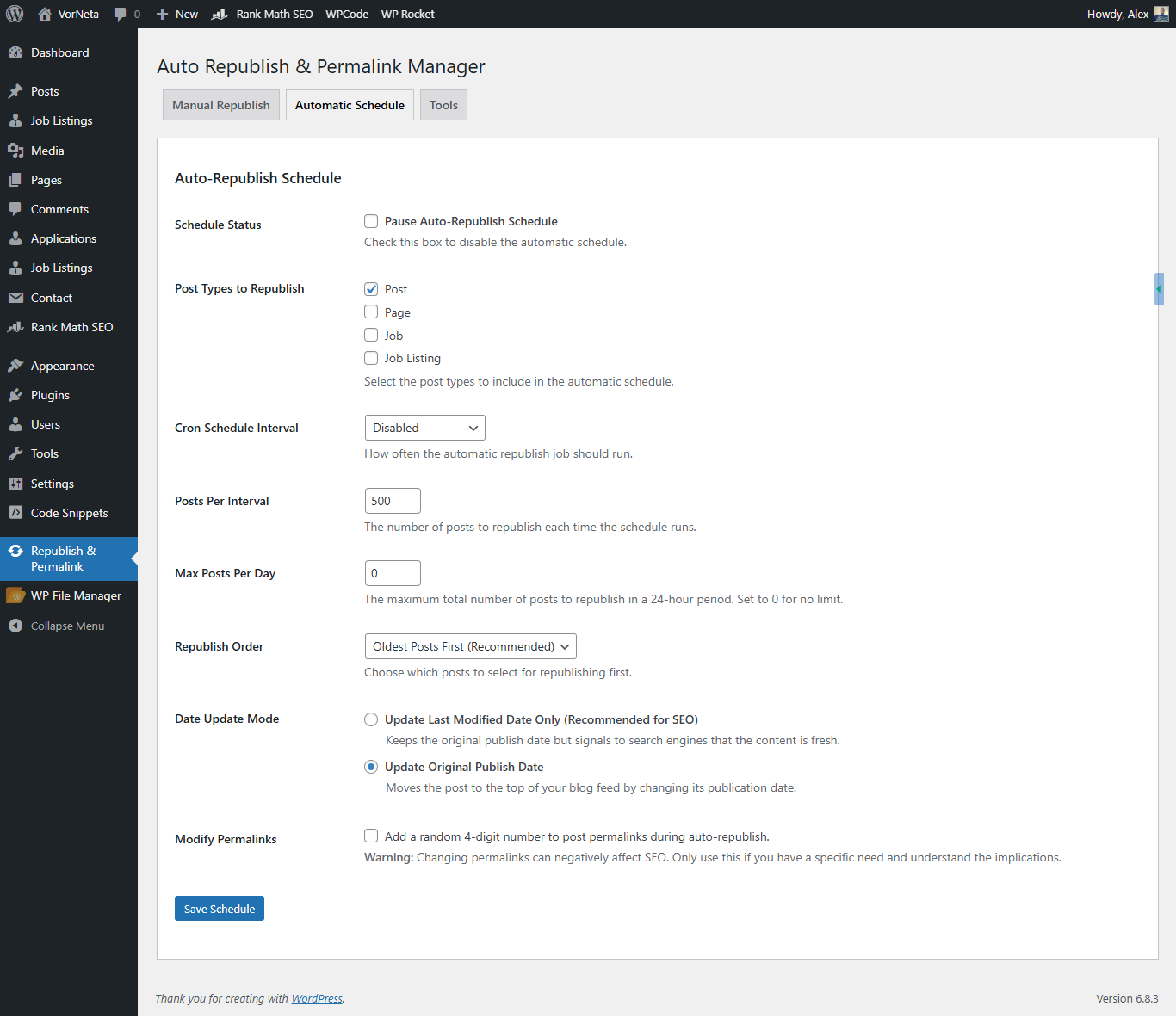
Powerful Automatic Scheduling: Full control over your content refresh strategy, including post types, interval, order, and the SEO-friendly date mode. 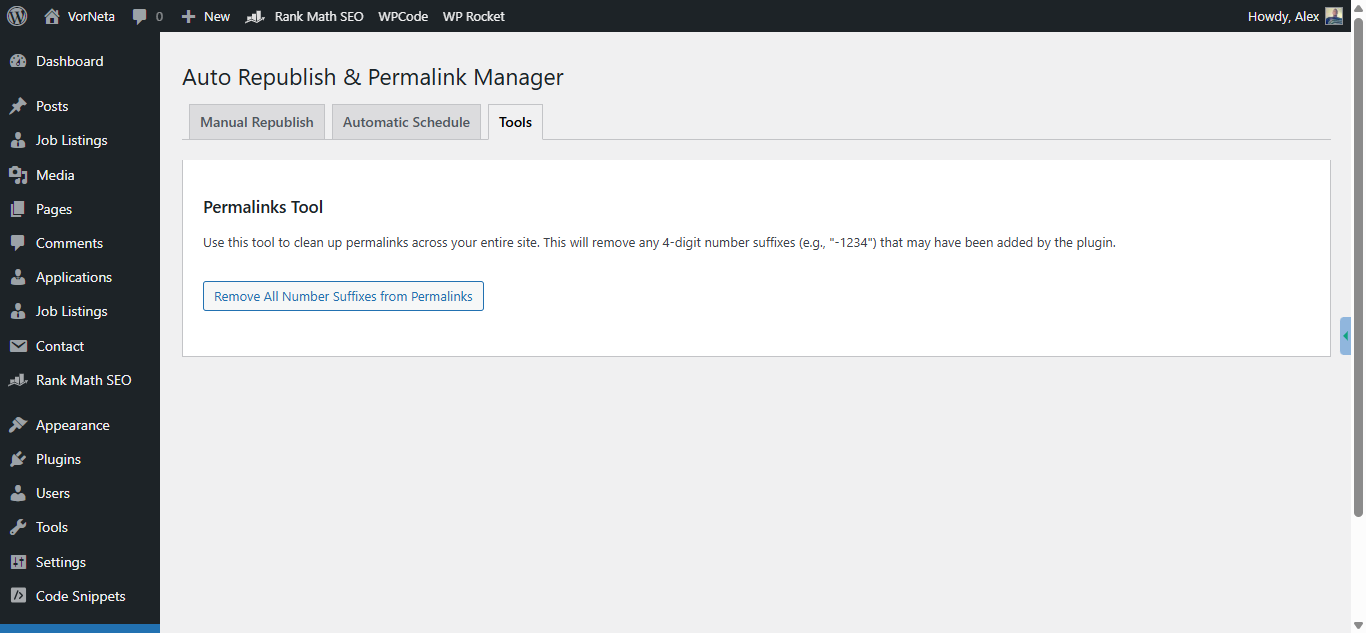
The Simple Permalink Cleanup Tool: A one-click utility to clean up numeric suffixes from your permalinks site-wide.
ਸਥਾਪਤੀਕਰਨ
- Upload the
auto-republish-permalink-managerfolder to the/wp-content/plugins/directory. - Activate the plugin through the Plugins menu in WordPress.
- Navigate to Republish & Permalink in the WordPress admin dashboard to configure settings.
ਅਕਸਰ ਪੁੱਛੇ ਜਾਂਦੇ ਸਵਾਲ
-
What’s the difference between updating the ‘publish date’ vs. the ‘modified date’?
-
Updating the publish date will change the post’s original publication timestamp, moving it to the top of your blog’s main feed. Updating the modified date (recommended) keeps the original publish date but tells search engines like Google that the content has been recently refreshed, which is excellent for SEO without altering your post order.
-
Will this work with my theme’s Custom Post Type (e.g., Recipes, Listings, Portfolio)?
-
Yes! As of version 4.0.0, the plugin automatically detects all public post types on your site. You can select them in the dropdown for manual updates and choose which ones to include in the automatic schedule.
-
Is it safe to run on a site with thousands of posts?
-
Absolutely. All bulk and scheduled operations are processed in small, manageable batches to ensure your site remains fast and never times out, regardless of its size.
-
Is changing permalinks bad for SEO?
-
Yes, changing the URL (permalink/slug) of an established post can be bad for SEO if not handled with proper redirects. Our plugin separates date updating from permalink changing. We only recommend using the permalink modification feature if you have a specific reason and understand the implications. The primary SEO benefit comes from updating the modified date, which does not change the URL.
ਸਮੀਖਿਆਵਾਂ

ਯੋਗਦਾਨੀ ਤੇ ਵਿਕਾਸਕਾਰ
“Auto Republish & Permalink Manager” is open source software. The following people have contributed to this plugin.
ਯੋਗਦਾਨੀ

“Auto Republish & Permalink Manager” ਦਾ ਆਪਣੀ ਭਾਸ਼ਾ ਵਿੱਚ ਅਨੁਵਾਦ ਕਰੋ।
ਵਿਕਾਸ ਕਾਰਜ ਵਿੱਚ ਰੁਚੀ ਰੱਖਦੇ ਹੋ?
Browse the code, check out the SVN repository, or subscribe to the development log by RSS.
ਤਬਦੀਲੀ-ਚਿੱਠਾ
4.0.0 – The Modernization Update (09-October-2025)
- MAJOR: Dynamic Post Type Detection! The plugin now automatically discovers ALL public post types on your site (Posts, Pages, Products, custom types). No more hardcoding!
- MAJOR: Complete UI/UX Overhaul! Introduced a clean, modern, and intuitive tabbed interface to separate Manual, Automatic, and Tool settings.
- NEW: Select Post Types for Automation. You can now choose exactly which post types the automatic cron schedule should run on, giving you full control.
- IMPROVEMENT: Migrated Bulk Updates to REST API. The manual bulk republisher now uses the modern WordPress REST API for superior reliability and performance, replacing the old admin-ajax method.
- IMPROVEMENT: Full Code Refactor. The entire plugin has been rewritten using Object-Oriented Programming (OOP) best practices, making it faster, more stable, and more maintainable.
- NEW: Keyword Filters for Manual Updates. You can now use include/exclude keyword filters when running the manual bulk republish tool.
- FIX: Consolidated the “Restore Posts” and “Remove Numbers” functions into a single, clear “Permalink Cleanup Tool”.
- TWEAK: Set the default date update mode to “Modified Date” as it’s the recommended option for SEO.
3.4
- Feature: Added integration with Rank Math’s Instant Indexing API to notify Google of updates.
- Feature: Added automatic sitemap cache flushing for Yoast SEO and Rank Math.
- Feature: Added republish order setting (Oldest First, Newest First, Random).
3.3
- Feature: Introduced the AJAX-powered Bulk Republish feature with a live progress bar for safely updating many posts at once.
- Feature: Added advanced scheduling options to run only on specific days or between certain times.
- TWEAK: Improved the keyword filtering logic for more accuracy.
3.2
- Feature: Added explicit support for WooCommerce Products and other common custom post types.
- Feature: Implemented the core scheduling system (WP-Cron) for automatic republishing.
- Feature: Added option to set a maximum number of posts to republish per day.
3.1
- Initial Release: Manual republishing for Posts and Pages, permalink cleanup tool.