ਵੇਰਵਾ
Captain Advance Filter ਇੱਕ ਹਲਕਾ WordPress ਖੋਜ ਅਤੇ ਫਿਲਟਰ ਪਲੱਗਇਨ ਹੈ ਜੋ ਤੁਹਾਨੂੰ ਪੋਸਟਾਂ, ਪੇਜਾਂ, ਕਸਟਮ ਪੋਸਟ ਕਿਸਮਾਂ ਅਤੇ WooCommerce ਉਤਪਾਦਾਂ ਲਈ ਸ਼ਕਤੀਸ਼ਾਲੀ AJAX ਸੰਚਾਲਿਤ ਫਿਲਟਰ ਬਣਾਉਣ ਦੀ ਆਗਿਆ ਦਿੰਦਾ ਹੈ।
ਕੋਡਿੰਗ ਤੋਂ ਬਿਨਾਂ ਉੱਨਤ ਖੋਜ ਅਤੇ ਫਿਲਟਰਿੰਗ ਅਨੁਭਵ ਬਣਾਓ। ਕਸਟਮ ਕਵਰੀਆਂ ਅਤੇ ਫਿਲਟਰ ਸੈੱਟ ਬਣਾਓ, ਕਈ ਫਿਲਟਰ ਕਿਸਮਾਂ ਅਤੇ ਡਿਸਪਲੇਅ ਸਟਾਈਲ ਵਿੱਚੋਂ ਚੁਣੋ, ਅਤੇ ਪੇਜ ਨੂੰ ਰੀਲੋਡ ਕੀਤੇ ਬਿਨਾਂ ਫਿਲਟਰ ਕੀਤੇ ਨਤੀਜੇ ਤੁਰੰਤ ਦਿਖਾਓ।
ਸ਼੍ਰੇਣੀਆਂ, ਟੈਗਸ, ਕਸਟਮ ਟੈਕਸੋਨੋਮੀਜ਼, ਪੋਸਟ ਮੇਟਾ, ਉਤਪਾਦ ਗੁਣਾਂ, ਕੀਮਤ, ਸਟਾਕ ਸਥਿਤੀ, ਰੇਟਿੰਗਾਂ, ਮਿਤੀਆਂ ਅਤੇ ਹੋਰ ਬਹੁਤ ਕੁਝ ਦੁਆਰਾ ਆਪਣੀ ਸਮੱਗਰੀ ਨੂੰ ਫਿਲਟਰ ਕਰੋ। ਚੈਕਬਾਕਸ, ਰੇਡੀਓ ਬਟਨਾਂ, ਡ੍ਰੌਪਡਾਉਨ, ਖੋਜ ਖੇਤਰਾਂ, ਰੇਂਜ ਸਲਾਈਡਰਾਂ, ਏ-ਜ਼ੈਡ ਨੈਵੀਗੇਸ਼ਨ, ਮਿਤੀ ਚੋਣਕਾਰਾਂ, WooCommerce ਰੇਟਿੰਗਾਂ, ਜਾਂ ਫਰੰਟਐਂਡ ਵਿਊ ਸਵਿੱਚਰ ਦੀ ਵਰਤੋਂ ਕਰਕੇ ਫਿਲਟਰ ਵਿਕਲਪ ਪ੍ਰਦਰਸ਼ਿਤ ਕਰੋ।
ਪੁਨਰ-ਵਰਤੋਂ ਯੋਗ ਫਿਲਟਰਿੰਗ ਪ੍ਰਣਾਲੀਆਂ ਬਣਾਉਣ ਲਈ ਵਿਜ਼ੂਅਲ ਕਵਰੀ ਬਿਲਡਰ ਅਤੇ ਫਿਲਟਰ ਸੈੱਟ ਬਿਲਡਰ ਦੀ ਵਰਤੋਂ ਕਰੋ, ਫਿਰ ਉਹਨਾਂ ਨੂੰ ਸ਼ਾਰਟਕੋਡਸ, ਗੁਟੇਨਬਰਗ ਬਲੌਕਸ, ਜਾਂ ਐਲੀਮੈਂਟਰ ਵਿਜੇਟਸ ਦੀ ਵਰਤੋਂ ਕਰਕੇ ਕਿਤੇ ਵੀ ਪ੍ਰਦਰਸ਼ਿਤ ਕਰੋ।
YouTube Tutorials | Facebook Community | X | Free Support
✨ ਮੁੱਖ ਵਿਸ਼ੇਸ਼ਤਾਵਾਂ:
- AJAX Search & Filtering: ਪੇਜ ਰੀਲੋਡ ਕੀਤੇ ਬਿਨਾਂ ਨਤੀਜਿਆਂ ਨੂੰ ਤੁਰੰਤ ਅੱਪਡੇਟ ਕਰੋ।
- Visual Query Builder: ਪੋਸਟਾਂ, ਪੇਜਾਂ, ਕਸਟਮ ਪੋਸਟ ਕਿਸਮਾਂ ਅਤੇ ਉਤਪਾਦਾਂ ਲਈ ਕਸਟਮ ਕਵਰੀਆਂ ਬਣਾਓ।
- Filter Set Builder: ਕਈ ਫਿਲਟਰਾਂ ਨੂੰ ਜੋੜੋ ਅਤੇ ਉਹਨਾਂ ਨੂੰ ਇੱਕ ਮੁੜ ਵਰਤੋਂ ਯੋਗ ਕਵਰੀ ਨਾਲ ਕਨੈਕਟ ਕਰੋ।
- Multiple Filter Types: Checkbox, Radio, Pill Tabs, Dropdown, Search, Range, A Z, Date Picker, Woo Rating, and View Switcher.
- Taxonomy & Meta Filtering: ਸ਼੍ਰੇਣੀਆਂ, ਟੈਗਸ, ਕਸਟਮ ਟੈਕਸੋਨੋਮੀਜ਼, ਕਸਟਮ ਫੀਲਡਸ ਅਤੇ ਪੋਸਟ ਮੇਟਾ ਦੀ ਵਰਤੋਂ ਕਰਕੇ ਸਮੱਗਰੀ ਨੂੰ ਫਿਲਟਰ ਕਰੋ।
- WooCommerce Product Filters: ਗੁਣਾਂ, ਕੀਮਤ, ਸਟਾਕ ਸਥਿਤੀ ਅਤੇ ਸਟਾਰ ਰੇਟਿੰਗਾਂ ਦੁਆਰਾ ਉਤਪਾਦਾਂ ਨੂੰ ਫਿਲਟਰ ਕਰੋ।
- Multiple Display Styles: List, Buttons, Color Swatches, Image Swatches, Tabs, and Pill Tabs for supported filters.
- AJAX Pagination: ਨੰਬਰਡ Pagination, Load More, Infinite Scroll, ਜਾਂ None ਵਿੱਚੋਂ ਚੋਣ ਕਰੋ।
- AJAX Loader Styles: AJAX ਨਤੀਜੇ ਲੋਡ ਕਰਨ ਲਈ Spinner, Overlay, Skeleton, ਜਾਂ None ਚੁਣੋ।
- Frontend View Switcher: ਵਿਜ਼ਟਰਾਂ ਨੂੰ ਉਪਲਬਧ ਗਰਿੱਡ ਕਾਲਮ ਲੇਆਉਟਸ ਵਿੱਚ ਬਦਲਣ ਦੀ ਆਗਿਆ ਦਿਓ।
- Shareable Filter URLs: URL ਵਿੱਚ ਸੁਰੱਖਿਅਤ ਕੀਤੇ ਚੁਣੇ ਹੋਏ ਫਿਲਟਰ ਮੁੱਲਾਂ ਨਾਲ ਫਿਲਟਰ ਕੀਤੇ ਨਤੀਜੇ ਸਾਂਝੇ ਅਤੇ ਬੁੱਕਮਾਰਕ ਕਰੋ।
- Result Count: ਇੱਕ ਸਮਰਪਿਤ ਸ਼ਾਰਟਕੋਡ ਨਾਲ ਮੇਲ ਖਾਂਦੇ ਨਤੀਜਿਆਂ ਦੀ ਸੰਖਿਆ ਪ੍ਰਦਰਸ਼ਿਤ ਕਰੋ।
- Custom Result Cards: Choose from predefined card styles, including the new Boutique product card, or create custom card templates.
- Wishlist: Let visitors save items with a heart icon and view them on a Wishlist page using a shortcode or Elementor widget.
- Responsive Grid Layouts: ਡੈਸਕਟਾਪ, ਟੈਬਲੇਟ ਅਤੇ ਮੋਬਾਈਲ ਕਾਲਮਾਂ ਨੂੰ ਕੰਟਰੋਲ ਕਰੋ।
- Slider Layout: Show your cards as a slider with three styles: Equal Cards, Spotlight, and Carousel.
- Style Controls: Design your cards from the Style tab with color pickers, responsive typography, borders, shadows, spacing, and slider arrow, dot, and progress styling.
- Elementor Support: Dedicated Filter, Grid, Pagination, and Wishlist widgets.
- Gutenberg Support: ਫਿਲਟਰ, ਗਰਿੱਡ ਅਤੇ ਪੇਜੀਨੇਸ਼ਨ ਲਈ ਮੂਲ ਬਲੌਕਸ।
- Shortcode Support: Easily embed filters, grids, pagination, result counts, and the wishlist anywhere.
- Query Caching: ਤੇਜ਼ ਦੁਹਰਾਏ ਗਏ ਕਵਰੀਆਂ ਲਈ WordPress ਟ੍ਰਾਂਜ਼ੀਐਂਟਸ ਦੀ ਵਰਤੋਂ ਕਰਕੇ ਵਿਕਲਪਕ ਕੈਚਿੰਗ।
- Dark Mode: ਡਾਰਕ ਮੋਡ ਸਪੋਰਟ ਦੇ ਨਾਲ ਸਾਫ਼ ਅਤੇ ਆਧੁਨਿਕ React ਸੰਚਾਲਿਤ ਐਡਮਿਨ ਡੈਸ਼ਬੋਰਡ।
- No Coding Required: ਸਿੱਧੇ WordPress ਐਡਮਿਨ ਡੈਸ਼ਬੋਰਡ ਤੋਂ ਕਵਰੀਆਂ ਅਤੇ ਫਿਲਟਰ ਬਣਾਓ।
🔎 ਫਿਲਟਰ ਕਿਸਮਾਂ:
- Checkbox: ਇੱਕ ਜਾਂ ਕਈ ਵਿਕਲਪ ਚੁਣੋ।
- Radio: ਇੱਕ ਸਿੰਗਲ ਵਿਕਲਪ ਚੁਣੋ।
- Pill Tabs: A row of rounded tabs with an “All” tab first, ideal for a category switcher above your results.
- Dropdown: ਇੱਕ ਡ੍ਰੌਪਡਾਉਨ ਤੋਂ ਫਿਲਟਰ ਮੁੱਲ ਚੁਣੋ।
- Search: ਕੀਵਰਡਸ ਦੀ ਵਰਤੋਂ ਕਰਕੇ ਸਮੱਗਰੀ ਦੀ ਖੋਜ ਅਤੇ ਫਿਲਟਰ ਕਰੋ।
- Range: Create numeric range filters such as price ranges, as Min / Max number fields or a two-handle slider.
- A Z: ਵਰਣਮਾਲਾ ਅਨੁਸਾਰ ਸਮੱਗਰੀ ਬ੍ਰਾਊਜ਼ ਕਰੋ।
- Date Picker: ਪ੍ਰਕਾਸ਼ਤ ਮਿਤੀ ਰੇਂਜਾਂ ਦੁਆਰਾ ਸਮੱਗਰੀ ਨੂੰ ਫਿਲਟਰ ਕਰੋ।
- Woo Rating: ਸਟਾਰ ਰੇਟਿੰਗ ਦੁਆਰਾ WooCommerce ਉਤਪਾਦਾਂ ਨੂੰ ਫਿਲਟਰ ਕਰੋ।
- View Switcher: ਵਿਜ਼ਟਰਾਂ ਨੂੰ ਉਪਲਬਧ ਨਤੀਜਾ ਗਰਿੱਡ ਲੇਆਉਟਸ ਵਿੱਚ ਬਦਲਣ ਦੀ ਆਗਿਆ ਦਿਓ।
🎨 ਡਿਸਪਲੇਅ ਸਟਾਈਲ:
ਚੁਣੇ ਗਏ ਡੇਟਾ ਸਰੋਤ ਦੇ ਆਧਾਰ ‘ਤੇ ਚੈਕਬਾਕਸ ਅਤੇ ਰੇਡੀਓ ਫਿਲਟਰ ਕਈ ਡਿਸਪਲੇਅ ਸਟਾਈਲ ਦੀ ਵਰਤੋਂ ਕਰ ਸਕਦੇ ਹਨ:
- ਸੂਚੀ
- ਬਟਨ
- ਰੰਗ ਸਵਾਚ (Color Swatches)
- ਚਿੱਤਰ ਸਵਾਚ (Image Swatches)
- ਟੈਬਸ
- Pill Tabs
ਰੰਗ ਅਤੇ ਚਿੱਤਰ ਸਵਾਚ (Color and Image Swatches) ਉਪਲਬਧ ਹੋਣ ‘ਤੇ ਆਪਣੇ ਆਪ WooCommerce ਐਟ੍ਰੀਬਿਊਟ ਸਵਾਚ ਡੇਟਾ ਦੀ ਵਰਤੋਂ ਕਰ ਸਕਦੇ ਹਨ, ਜਦੋਂ ਸਵਾਚ ਡੇਟਾ ਕੌਂਫਿਗਰ ਨਹੀਂ ਹੁੰਦਾ ਤਾਂ ਫਾਲਬੈਕ ਵਿਕਲਪਾਂ ਨਾਲ।
📄 ਪੇਜੀਨੇਸ਼ਨ ਅਤੇ ਲੋਡਿੰਗ:
ਚੁਣੋ ਕਿ ਫਿਲਟਰ ਕੀਤੇ ਨਤੀਜੇ ਕਿਵੇਂ ਪ੍ਰਦਰਸ਼ਿਤ ਅਤੇ ਲੋਡ ਕੀਤੇ ਜਾਂਦੇ ਹਨ:
- Pagination: ਮਿਆਰੀ ਨੰਬਰ ਵਾਲਾ ਪੇਜੀਨੇਸ਼ਨ।
- Load More: ਪੇਜ ਛੱਡੇ ਬਿਨਾਂ ਵਾਧੂ ਨਤੀਜੇ ਲੋਡ ਕਰੋ।
- Infinite Scroll: ਸਕ੍ਰੋਲ ਕਰਦੇ ਸਮੇਂ ਆਪਣੇ ਆਪ ਹੋਰ ਨਤੀਜੇ ਲੋਡ ਕਰੋ।
- None: ਪੇਜੀਨੇਸ਼ਨ ਕੰਟਰੋਲਾਂ ਤੋਂ ਬਿਨਾਂ ਨਤੀਜੇ ਪ੍ਰਦਰਸ਼ਿਤ ਕਰੋ।
ਹਰੇਕ ਕਵਰੀ ਲਈ ਇੱਕ AJAX ਲੋਡਿੰਗ ਸੰਕੇਤਕ ਚੁਣੋ:
- ਸਪਿਨਰ
- ਓਵਰਲੇਅ
- ਸਕੈਲੀਟਨ
- ਕੋਈ ਨਹੀਂ
🛒 WooCommerce ਅਨੁਕੂਲਤਾ:
Captain Advance Filter WooCommerce ਨਾਲ ਕੰਮ ਕਰਦਾ ਹੈ ਅਤੇ ਸਮਰਪਿਤ ਉਤਪਾਦ ਫਿਲਟਰਿੰਗ ਵਿਸ਼ੇਸ਼ਤਾਵਾਂ ਪ੍ਰਦਾਨ ਕਰਦਾ ਹੈ।
- Woo Rating: WooCommerce ਉਤਪਾਦ ਰੇਟਿੰਗਾਂ ਦੀ ਵਰਤੋਂ ਕਰਕੇ N ਸਿਤਾਰਿਆਂ ਅਤੇ ਉੱਪਰ ਦੁਆਰਾ ਉਤਪਾਦਾਂ ਨੂੰ ਫਿਲਟਰ ਕਰੋ।
- Price Range: WooCommerce ਕੀਮਤ ਡੇਟਾ ਦੀ ਵਰਤੋਂ ਕਰਕੇ ਉਤਪਾਦਾਂ ਨੂੰ ਫਿਲਟਰ ਕਰੋ।
- Stock Status: ਉਪਲਬਧ ਸਟਾਕ ਸਥਿਤੀ ਦੁਆਰਾ ਉਤਪਾਦਾਂ ਨੂੰ ਫਿਲਟਰ ਕਰੋ।
- Product Attributes: ਰੰਗ, ਬ੍ਰਾਂਡ, ਆਕਾਰ ਅਤੇ ਹੋਰ ਬਹੁਤ ਕੁਝ ਵਰਗੇ ਗੁਣਾਂ ਦੁਆਰਾ ਫਿਲਟਰ ਕਰੋ।
- Color Swatches: ਰੰਗ ਸਵਾਚਾਂ ਵਜੋਂ ਉਤਪਾਦ ਗੁਣ ਵਿਕਲਪ ਪ੍ਰਦਰਸ਼ਿਤ ਕਰੋ।
- Image Swatches: ਚਿੱਤਰਾਂ ਦੀ ਵਰਤੋਂ ਕਰਕੇ ਉਤਪਾਦ ਗੁਣ ਵਿਕਲਪ ਪ੍ਰਦਰਸ਼ਿਤ ਕਰੋ।
- Shop Card: WooCommerce ਉਤਪਾਦ ਦੀ ਕੀਮਤ, ਸੇਲ ਬੈਜ, ਅਤੇ Add to Cart ਬਟਨ ਪ੍ਰਦਰਸ਼ਿਤ ਕਰੋ।
- Boutique Card: A product card with a category label, badges, wishlist heart, price, description, and an Add to Bag button whose label you can change. Captain Advance Filter Pro adds a second, more refined style called Elegant Boutique.
- Custom Product Templates: WooCommerce ਵਿਸ਼ੇਸ਼ ਟੋਕਨਾਂ ਦੀ ਵਰਤੋਂ ਕਰੋ ਜਿਵੇਂ ਕਿ
{{price}},{{sale_badge}}, ਅਤੇ{{add_to_cart}}।
🧩 ਕਸਟਮ ਪੋਸਟ ਟਾਈਪ ਸਪੋਰਟ:
ਕਿਸੇ ਵੀ ਜਨਤਕ ਤੌਰ ‘ਤੇ ਦੇਖਣ ਯੋਗ WordPress ਪੋਸਟ ਟਾਈਪ ਨਾਲ Captain Advance Filter ਦੀ ਵਰਤੋਂ ਕਰੋ। ਟੈਕਸੋਨੋਮੀਜ਼, ਪੋਸਟ ਮੇਟਾ, ਮਿਤੀਆਂ, ਖੋਜ ਸ਼ਰਤਾਂ, ਅਤੇ ਹੋਰ ਸਮਰਥਿਤ ਫਿਲਟਰ ਸਰੋਤਾਂ ਦੀ ਵਰਤੋਂ ਕਰਕੇ ਕਸਟਮ ਕਵਰੀਆਂ ਅਤੇ ਫਿਲਟਰ ਨਤੀਜੇ ਬਣਾਓ।
🔌 ਬਿਲਡਰ ਇੰਟੀਗ੍ਰੇਸ਼ਨ:
- Elementor: Dedicated Filter, Grid, Pagination, and Wishlist widgets with Elementor styling controls.
- Gutenberg: ਫਿਲਟਰ, ਗਰਿੱਡ ਅਤੇ ਪੇਜੀਨੇਸ਼ਨ ਲਈ ਮੂਲ ਬਲੌਕਸ।
- Shortcodes: ਕਿਸੇ ਵੀ WordPress ਪੇਜ ਬਿਲਡਰ ਜਾਂ ਥੀਮ ਨਾਲ Captain Advance Filter ਦੀ ਵਰਤੋਂ ਕਰੋ ਜੋ ਸ਼ਾਰਟਕੋਡਾਂ ਦਾ ਸਮਰਥਨ ਕਰਦਾ ਹੈ।
- Bricks Builder: ਸਹਾਇਤਾ ਜਲਦੀ ਆ ਰہی ਹੈ।
⚡ ਕਾਰਗੁਜ਼ਾਰੀ:
- ਹਲਕਾ ਫਰੰਟਐਂਡ ਅਮਲੀਕਰਨ।
- ਪੂਰੇ ਪੇਜ ਨੂੰ ਰੀਲੋਡ ਕੀਤੇ ਬਿਨਾਂ AJAX ਸੰਚਾਲਿਤ ਫਿਲਟਰਿੰਗ।
- ਫਰੰਟਐਂਡ ਐਸੇਟਸ ਸਿਰਫ਼ ਉਨ੍ਹਾਂ ਪੰਨਿਆਂ ‘ਤੇ ਲੋਡ ਕੀਤੇ ਜਾਂਦੇ ਹਨ ਜਿੱਥੇ Captain Advance Filter ਦੀ ਵਰਤੋਂ ਕੀਤੀ ਜਾਂਦੀ ਹੈ।
- ਫਰੰਟਐਂਡ ‘ਤੇ jQuery ਦੀ ਕੋਈ ਨਿਰਭਰਤਾ ਨਹੀਂ ਹੈ।
- WordPress ਟ੍ਰਾਂਜ਼ੀਐਂਟਸ ਦੀ ਵਰਤੋਂ ਕਰਦੇ ਹੋਏ ਵਿਕਲਪਕ ਕਵਰੀ ਨਤੀਜਾ ਕੈਚਿੰਗ।
- ਨਤੀਜਾ ਕਾਰਡ ਚਿੱਤਰਾਂ ਲਈ ਮੂਲ ਲੇਜ਼ੀ ਲੋਡਿੰਗ ਸਹਾਇਤਾ।
🔗 ਸ਼ਾਰਟਕੋਡ:
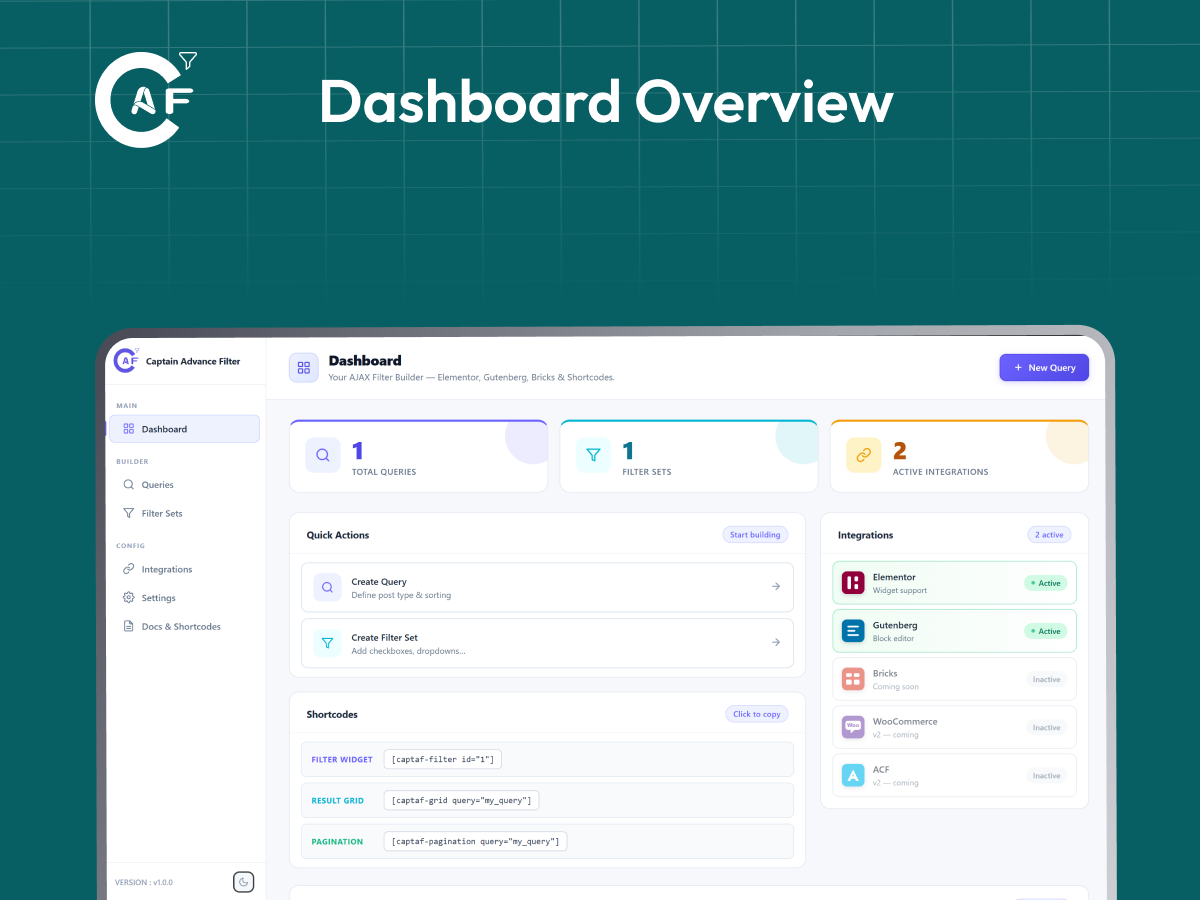
[captaf-filter id="1"]: ਇੱਕ ਫਿਲਟਰ ਸੈੱਟ ਪ੍ਰਦਰਸ਼ਿਤ ਕਰੋ।[captaf-grid query="query_key"]: ਫਿਲਟਰ ਕੀਤੀ ਸਮੱਗਰੀ ਗਰਿੱਡ ਪ੍ਰਦਰਸ਼ਿਤ ਕਰੋ।[captaf-pagination query="query_key"]: ਪੇਜਨੇਵੀਗੇਸ਼ਨ ਕੰਟਰੋਲ ਦਿਖਾਓ।[captaf-count query="query_key"]: ਮੇਲ ਖਾਂਦੇ ਨਤੀਜੇ ਦੀ ਗਿਣਤੀ ਪ੍ਰਦਰਸ਼ਿਤ ਕਰੋ।[captaf-wishlist]: Display the visitor’s saved wishlist items.[captaf-clear-filters query="query_key"]: A standalone “Clear Filters” button you can place anywhere on the page – top, bottom, wherever – instead of relying on the automatic active-filters bar above the filter widget. Optionaltext="Reset"for custom button text,hide_empty="no"to keep it always visible instead of only appearing once a filter is active.
ਤੁਸੀਂ only ਵਿਸ਼ੇਸ਼ਤਾ (attribute) ਦੀ ਵਰਤੋਂ ਕਰਕੇ ਫਿਲਟਰ ਸੈੱਟ ਵਿੱਚੋਂ ਵਿਅਕਤੀਗਤ ਫਿਲਟਰ ਵੀ ਪ੍ਰਦਰਸ਼ਿਤ ਕਰ ਸਕਦੇ ਹੋ।
ਸਕਰੀਨਸ਼ਾਟ


ਬਲਾਕ
This plugin provides 3 blocks.
- Filter
- Grid
- Pagination
ਸਥਾਪਤੀਕਰਨ
- ਪਲੱਗਇਨ ਫੋਲਡਰ ਨੂੰ
/wp-content/plugins/ਵਿੱਚ ਅਪਲੋਡ ਕਰੋ - ਵਰਡਪ੍ਰੈਸ ਵਿੱਚ Plugins ਸਕ੍ਰੀਨ ਤੋਂ ਪਲੱਗਇਨ ਨੂੰ ਐਕਟੀਵੇਟ ਕਰੋ
- WordPress ਦੇ ਐਡਮਿਨ ਮੈਨੂ ਤੋਂ Captain Advance Filter ਖੋਲ੍ਹੋ।
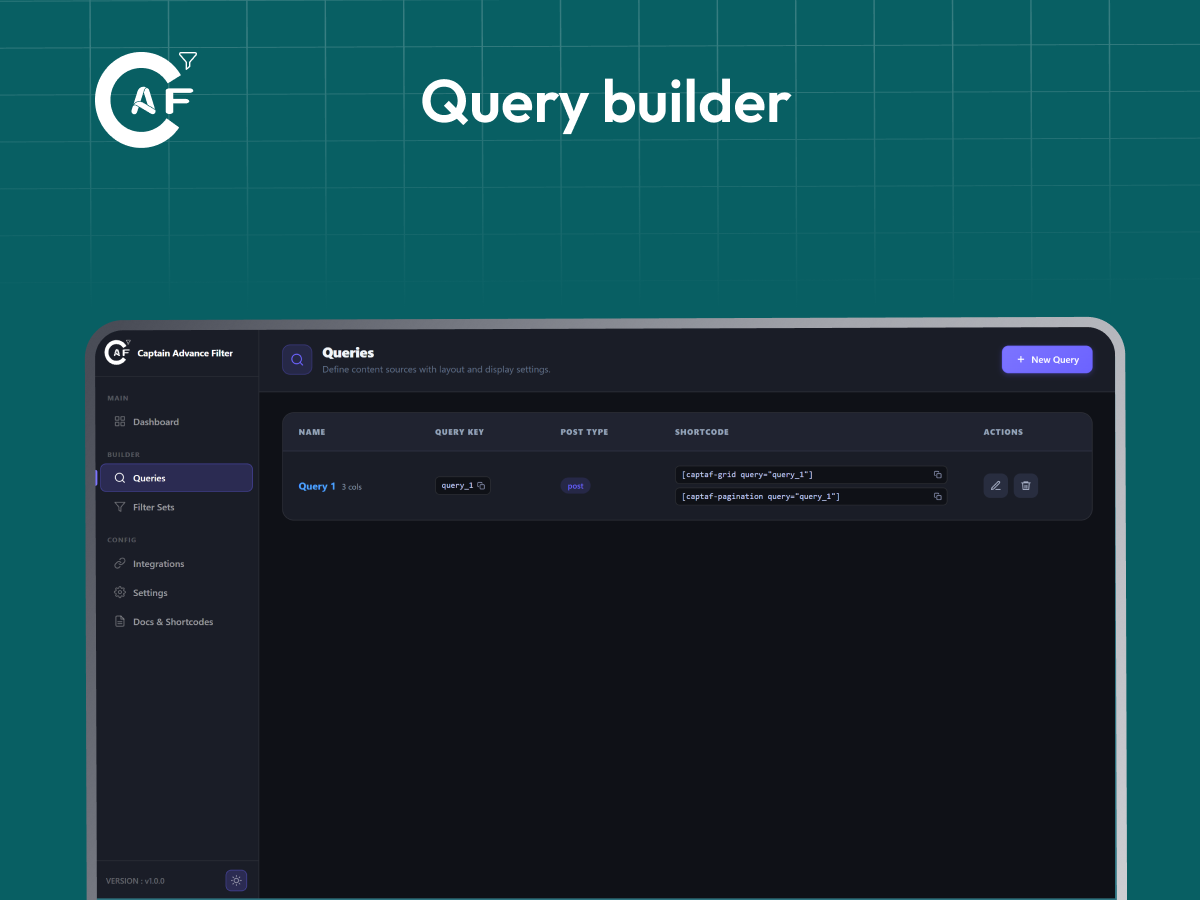
- ਕਵਰੀ ਬਿਲਡਰ ਦੀ ਵਰਤੋਂ ਕਰਕੇ ਇੱਕ ਕਵਰੀ ਬਣਾਓ।
- ਇੱਕ ਫਿਲਟਰ ਸੈੱਟ ਬਣਾਓ ਅਤੇ ਇਸਨੂੰ ਆਪਣੀ ਕਵਰੀ ਨਾਲ ਕਨੈਕਟ ਕਰੋ।
- ਆਪਣੇ ਫਿਲਟਰ ਦੀਆਂ ਕਿਸਮਾਂ, ਡਿਸਪਲੇਅ ਸਟਾਈਲ, ਪੇਜੀਨੇਸ਼ਨ ਅਤੇ ਲੋਡਰ ਸੈਟਿੰਗਾਂ ਨੂੰ ਕੌਂਫਿਗਰ ਕਰੋ।
- ਆਪਣੇ ਪੇਜ ਵਿੱਚ ਤਿਆਰ ਕੀਤਾ ਸ਼ਾਰਟਕੋਡ ਸ਼ਾਮਲ ਕਰੋ ਜਾਂ Elementor ਜਾਂ Gutenberg ਏਕੀਕਰਣ ਦੀ ਵਰਤੋਂ ਕਰੋ।
ਅਕਸਰ ਪੁੱਛੇ ਜਾਂਦੇ ਸਵਾਲ
-
ਕੀ Captain Advance Filter ਐਲੀਮੈਂਟਰ ਤੋਂ ਬਿਨਾਂ ਕੰਮ ਕਰਦਾ ਹੈ?
-
ਹਾਂ। Elementor ਵਿਕਲਪਿਕ ਹੈ। ਤੁਸੀਂ Gutenberg ਬਲੌਕਸ, ਸ਼ਾਰਟਕੋਡਸ, ਜਾਂ ਕਿਸੇ ਵੀ WordPress ਥੀਮ ਨਾਲ Captain Advance Filter ਦੀ ਵਰਤੋਂ ਕਰ ਸਕਦੇ ਹੋ ਜੋ ਸ਼ਾਰਟਕੋਡਸ ਦਾ ਸਮਰਥਨ ਕਰਦਾ ਹੈ।
-
How does the Wishlist work?
-
Turn it on from the Wishlist page in the plugin menu, then add the [captaf-wishlist] shortcode (or the “Captain Wishlist” Elementor widget) to any page. Visitors save items with a heart icon on your cards. By default saved items live in the visitor’s own browser, so nothing is stored on your server. Captain Advance Filter Pro can also save them to the visitor’s account, and items saved as a guest are moved into their account when they log in.
-
Can I show the Range filter as a slider?
-
Yes. In Filter Sets, choose the Range filter type, then set Range Style to Slider. You can set the step and add a prefix or suffix such as $ or km.
-
Can I hide the “N filters active” bar?
-
Yes. In Filter Sets, open the filter set and turn off “Show ‘N filters active’ bar” under Active Filters Bar.
-
ਕੀ ਇਹ WooCommerce ਨਾਲ ਕੰਮ ਕਰਦਾ ਹੈ?
-
ਹਾਂ। Captain Advance Filter ਗੁਣਾਂ (attributes), ਕੀਮਤ, ਸਟਾਕ ਸਥਿਤੀ, ਅਤੇ ਉਤਪਾਦ ਰੇਟਿੰਗਾਂ ਦੁਆਰਾ WooCommerce ਉਤਪਾਦ ਫਿਲਟਰਿੰਗ ਦਾ ਸਮਰਥਨ ਕਰਦਾ ਹੈ। WooCommerce ਖਾਸ Shop Card ਅਤੇ swatch ਵਿਕਲਪ ਵੀ ਉਪਲਬਧ ਹਨ।
-
ਕੀ ਮੈਂ ਕਸਟਮ ਪੋਸਟ ਕਿਸਮਾਂ (custom post types) ਨੂੰ ਫਿਲਟਰ ਕਰ ਸਕਦਾ ਹਾਂ?
-
ਹਾਂ। ਕਿਸੇ ਵੀ ਜਨਤਕ ਤੌਰ ‘ਤੇ ਦੇਖਣ ਯੋਗ WordPress ਪੋਸਟ ਟਾਈਪ ਨੂੰ ਕਵਰੀ ਸਰੋਤ ਵਜੋਂ ਵਰਤਿਆ ਜਾ ਸਕਦਾ ਹੈ।
-
ਕੀ ਮੈਂ ਕਸਟਮ ਫੀਲਡਸ ਜਾਂ ਪੋਸਟ ਮੇਟਾ ਦੁਆਰਾ ਫਿਲਟਰ ਕਰ ਸਕਦਾ ਹਾਂ?
-
ਹਾਂ। ਫਿਲਟਰ ਟੈਕਸੋਨੋਮੀਜ਼ ਤੋਂ ਇਲਾਵਾ ਡੇਟਾ ਸਰੋਤ ਵਜੋਂ ਸਮਰਥਿਤ ਪੋਸਟ ਮੇਟਾ ਫੀਲਡਸ ਦੀ ਵਰਤੋਂ ਕਰ ਸਕਦੇ ਹਨ।
-
ਕੀ ਇਹ AJAX ਫਿਲਟਰਿੰਗ ਦਾ ਸਮਰਥਨ ਕਰਦਾ ਹੈ?
-
ਹਾਂ। ਫਿਲਟਰ ਕੀਤੇ ਨਤੀਜੇ ਪੂਰੇ ਪੇਜ ਨੂੰ ਰੀਲੋਡ ਕੀਤੇ ਬਿਨਾਂ AJAX ਦੀ ਵਰਤੋਂ ਕਰਕੇ ਲੋਡ ਕੀਤੇ ਜਾਂਦੇ ਹਨ।
-
ਕਿਹੜੇ ਪੇਜੀਨੇਸ਼ਨ ਵਿਕਲਪ ਉਪਲਬਧ ਹਨ?
-
ਤੁਸੀਂ ਨੰਬਰਡ Pagination, Load More, Infinite Scroll, ਜਾਂ None ਵਿੱਚੋਂ ਚੋਣ ਕਰ ਸਕਦੇ ਹੋ।
-
ਕਿਹੜੀਆਂ ਲੋਡਰ ਸਟਾਈਲ ਉਪਲਬਧ ਹਨ?
-
ਤੁਸੀਂ AJAX ਨਤੀਜੇ ਲੋਡ ਕਰਨ ਲਈ Spinner, Overlay, Skeleton, ਜਾਂ None ਚੁਣ ਸਕਦੇ ਹੋ।
-
How do I show my results as a slider?
-
In the Query editor, go to Select Layout, click Slider next to Grid, and choose a style: Equal Cards, Spotlight (bigger middle card), or Carousel (counter and progress bar). The slides are your Posts Per Page, and the Columns and Gap settings decide how many cards show at once. Pagination is not used with the slider.
-
ਕੀ ਵਿਜ਼ਟਰ ਗਰਿੱਡ ਲੇਆਉਟਸ ਵਿੱਚ ਬਦਲ ਸਕਦੇ ਹਨ?
-
ਹਾਂ। ਵਿਜ਼ਟਰਾਂ ਨੂੰ ਉਪਲਬਧ ਫਰੰਟਐਂਡ ਗਰਿੱਡ ਕਾਲਮ ਲੇਆਉਟਸ ਵਿੱਚ ਬਦਲਣ ਦੀ ਇਜਾਜ਼ਤ ਦੇਣ ਲਈ View Switcher ਫਿਲਟਰ ਕਿਸਮ ਸ਼ਾਮਲ ਕਰੋ।
-
ਹਾਂ। ਚੁਣੇ ਹੋਏ ਫਿਲਟਰ ਮੁੱਲਾਂ ਨੂੰ ਪੇਜ URL ਨਾਲ ਸਿੰਕ ਕਰਨ ਲਈ ਸਮਰਥਿਤ ਫਿਲਟਰਾਂ ਲਈ Shareable URL ਵਿਕਲਪ ਨੂੰ ਸਮਰੱਥ ਬਣਾਓ। ਵਿਜ਼ਟਰ ਫਿਲਟਰ ਕੀਤੇ ਨਤੀਜੇ ਸਾਂਝੇ ਜਾਂ ਬੁੱਕਮਾਰਕ ਕਰ ਸਕਦੇ ਹਨ।
-
“ਕੀ ਮੈਨੂੰ ਕੋਡਿੰਗ ਦੀ ਜਾਣਕਾਰੀ ਲੋੜੀਂਦੀ ਹੈ?”
-
ਨਹੀਂ। ਵਿਜ਼ੂਅਲ ਐਡਮਿਨ ਡੈਸ਼ਬੋਰਡ ਦੀ ਵਰਤੋਂ ਕਰਕੇ ਕਵਰੀਆਂ ਅਤੇ ਫਿਲਟਰ ਸੈੱਟ ਬਣਾਏ ਜਾ ਸਕਦੇ ਹਨ। ਸ਼ਾਰਟਕੋਡ ਆਪਣੇ ਆਪ ਤਿਆਰ ਹੋ ਜਾਂਦੇ ਹਨ।
-
ਕੀ Captain Advance Filter ਮੇਰੀ ਵੈੱਬਸਾਈਟ ਨੂੰ ਹੌਲੀ ਕਰ ਦੇਵੇਗਾ?
-
ਪਲੱਗਇਨ ਸ਼ਰਤੀਆ ਐਸੇਟ ਲੋਡਿੰਗ ਦੀ ਵਰਤੋਂ ਕਰਦਾ ਹੈ ਤਾਂ ਜੋ ਫਰੰਟਐਂਡ ਐਸੇਟਸ ਸਿਰਫ਼ ਉਨ੍ਹਾਂ ਪੰਨਿਆਂ ‘ਤੇ ਹੀ ਲੋਡ ਹੋਣ ਜਿੱਥੇ Captain Advance Filter ਦੀ ਅਸਲ ਵਿੱਚ ਵਰਤੋਂ ਕੀਤੀ ਜਾਂਦੀ ਹੈ। ਦੁਹਰਾਏ ਗਏ ਸਰਚਾਂ ਨੂੰ ਬਿਹਤਰ ਬਣਾਉਣ ਲਈ ਵਿਕਲਪਕ ਕਵਰੀ ਕੈਚਿੰਗ ਵੀ ਉਪਲਬਧ ਹੈ।
-
ਕੀ ਫਰੰਟਐਂਡ REST ਐਂਡਪੋਇੰਟ ਸੁਰੱਖਿਅਤ ਹਨ?
-
ਹਾਂ। ਫਿਲਟਰਿੰਗ ਐਂਡਪੁਆਇੰਟ ਇਹ ਤਸਦੀਕ ਕਰਦੇ ਹਨ ਕਿ ਨਤੀਜੇ ਵਾਪਸ ਕਰਨ ਤੋਂ ਪਹਿਲਾਂ ਕਵਰ ਕੀਤੀਆਂ ਗਈਆਂ ਪੋਸਟ ਕਿਸਮਾਂ ਅਤੇ ਟੈਕਸੋਨੋਮੀਜ਼ ਜਨਤਕ ਤੌਰ ‘ਤੇ ਦੇਖਣ ਯੋਗ ਹਨ। ਪ੍ਰਾਈਵੇਟ ਡੇਟਾ ਇਨ੍ਹਾਂ ਐਂਡਪੁਆਇੰਟਾਂ ਰਾਹੀਂ ਸਾਹਮਣੇ ਨਹੀਂ ਆਉਂਦਾ।
ਸਮੀਖਿਆਵਾਂ
ਯੋਗਦਾਨੀ ਤੇ ਵਿਕਾਸਕਾਰ
“Captain Advance Filter” is open source software. The following people have contributed to this plugin.
ਯੋਗਦਾਨੀ“Captain Advance Filter” has been translated into 9 locales. Thank you to the translators for their contributions.
“Captain Advance Filter” ਦਾ ਆਪਣੀ ਭਾਸ਼ਾ ਵਿੱਚ ਅਨੁਵਾਦ ਕਰੋ।
ਵਿਕਾਸ ਕਾਰਜ ਵਿੱਚ ਰੁਚੀ ਰੱਖਦੇ ਹੋ?
Browse the code, check out the SVN repository, or subscribe to the development log by RSS.
ਤਬਦੀਲੀ-ਚਿੱਠਾ
1.6.2
- New: Layout/Style Option : Added a new Style tab to the settings page, allowing users to easily design and manage layouts and styles including colors, borders, shadows, and background colors.
- New: Typography control : Added a new typography control for the style manager, letting you manage responsive options, size, weight, transform, style, line height, and letter spacing in one place.
- New: Slider Dots Style Panel : Added new style controls for Slider Styles 1 and 2 to customize dot colors, active dot colors, size, active width, gap, and top spacing.
- New: Slider Progress & Counter Style Panel : Added a new style panel for Slider Style 3 to customize bar color, fill color, height, counter color, and typography.
- New: Card Background & Border Panel : Added a new Card Background panel in the Style sub-tab combining card background gradients, per-side borders, margin, padding, and shadows to replace the separate Border panel.
- New : Clear Filters Button : Added a new “Clear Filters Button” option to the Filter Sets dropdown so users can drag and place it anywhere in the list with customizable text.
- New : Clear Filters Shortcode : Added a new shortcode to place a standalone “Clear Filters” button anywhere on the page outside of the automatic filter bar.
- New : Boutique Card Style Settings : Added a custom “Add to Bag Button Text” setting to Card Display Options for the Boutique card style, and moved Boutique to the top of the Card Style list.
- New : Layout Preview Fallbacks : Added bundled illustration placeholders for card-style and masonry-tile previews in the Select Layout step on brand-new installs to replace bare photo icons.
- New : Custom Color Picker : Replaced native browser color inputs in the Style sub-tab with a custom color picker featuring swatches, direct hex input, and a full hue/saturation/opacity picker with alpha channel support.
- New : Slider Arrows Style Panel : Added a Slider Arrows panel to the Style tab (shown for the Slider layout) to customize arrow background color, icon color, border, shadow, padding, and margin across all three slider styles.
- New : Active Filters Bar Setting : Added an option in Filter Sets to hide the “N filters active” bar shown above a filter set.
- Improved : Gap in Card Background : Moved the card Gap (Spacing) control from the Layout tab into the Card Background panel of the Style tab, and the Add to Bag Button Text field now sits beside Columns instead of on its own row.
- Improved : Card Image Size per Query : Card Image Size moved out of the global Settings page into each query (Query editor, Step 3, Layout tab, Card Image card), so every query can use its own image size. Existing queries keep using the previous global value until you change them.
- Improved : Wishlist Pro Card : In the free version the whole “Account Wishlist (Database)” card on the Wishlist page is now a link that opens the Pro page in a new tab.
- Improved : Insert Code Label : The “WordPress Shortcode” tab in the Insert Code step is now simply “Shortcode”.
- Improved : Filter Sets Editor Display : Updated the Filter Sets editor to show friendly filter type names (such as “Pill Tabs”) instead of internal names.
- Improved : Plugin Styles & Slider Behavior : Insulated plugin buttons, links, and pagination elements from theme styles to keep their layout intact, and updated the slider to move exactly one card or page per click.
- Improved : Query Editor Navigation Buttons : Moved the Back, Next, and Finish buttons to the top of the step bar so they stay in view while scrolling, eliminating the need to scroll down.
- Improved : Query Editor Step Bar : Added a soft glow effect to the current step in the Query editor’s step bar to make it easier to identify your current position.
- Fix : Slider Arrows Alignment : Fixed Slider Style 1 arrows jumping on cards without featured images so they consistently align with the middle of the image area.
- Fix : Default Query Names & Keys : Fixed an issue where new queries started blank by ensuring they now automatically default to sequential names and keys like “Query 1” and query_1.
- Fix : Slider Spotlight Style : Fixed the empty gap beside the first and last card in Slider Style 2 and made next / previous slide smoothly instead of jumping.
- Fix : Duplicate Query Key : Fixed the second grid staying on the loading spinner when the same Query Key is used more than once on a page (for example separate desktop and mobile grids).
- Fix : Missing Queries : Fixed a query that existed in the database but did not appear on the Queries list and blocked its own Query Key as already in use.
- Fix : Add to Bag Button : Fixed the Add to Bag button on product cards opening a raw JSON page instead of adding the product to the cart.
- Fix : Loader Overlay : Fixed Spinner and Skeleton loaders appearing below the results instead of covering them while filtering.
- Fix : Special Characters : Fixed category and term names containing “&” showing as “&” in filters and card labels.
- Fix : Clear All and Range : Clear All now also resets Range filter values back to their full range.
- Fix: Minor bug fixes and overall improvements for better stability and performance.
1.6.1
- New: Account Wishlist integration – With Captain Advance Filter Pro’s Account Wishlist enabled, guest wishlist items are automatically synced to the user’s account upon login and cleared from the browser copy.
- New: Slider layout – Style 1 (Equal Cards): displays equal-sized cards with side arrows and bottom dots for easy navigation.
- New: Slider layout – Style 2 (Spotlight): enlarges the middle card while dimming the surrounding cards, with navigation arrows placed on the middle card.
- New: Slider layout – Style 3 (Carousel): features a counter and top-right arrows accompanied by a bottom progress bar.
- New: Pill Tabs filter – added support for using Pill Tabs as a display style for Radio and Checkbox filters.
- New: Range filter slider – added a two-handle slider option to replace Min / Max number fields, complete with customizable step increments, live value readouts, and optional prefixes or suffixes.
- New: Elegant Boutique card style (Pro) – a refined product card for jewelry and fashion stores with a large image, colour swatches, sale price, Quick Look chip, and a pill Add to Bag button. Listed in Card Style with a PRO tag in the free version, with an upgrade popup on click.
- Improved: Insert Code step – redesigned the Query editor’s Insert Code step with one-click shortcode copying, ready-to-paste PHP snippets for child themes, and clear options to pick your embed method (Block Editor, Elementor, or PHP template).
- Improved: Wishlist – added the [captaf-wishlist] shortcode directly to the Wishlist page row and repositioned the Wishlist menu item above Settings in the sidebar for easier access.
- Fix: Show Count setting – Checkbox, Radio, and Pill Tabs filters now correctly respect the Show Count setting, ensuring counts only appear when enabled.
- Fix: Filter reset on Clear All – “Clear All” now properly resets the visual selection state of Tab, Pill Tabs, Button, and Swatch filters so the “All” option lights up and previous choices are no longer highlighted.
- Fix: Minor bug fixes and overall improvements for better stability and performance.
1.6.0
- New: Wishlist – visitors can save items with a heart icon and browse them later on their own Wishlist page. Add it anywhere with the [captaf-wishlist] shortcode or the new “Captain Wishlist” Elementor widget. Saved items are kept in the visitor’s own browser (Local mode), so nothing is stored on your server. Turn it on or off from the new Wishlist page in the sidebar. An account-based (database) mode is available in Pro.
- New: Boutique card style – a WooCommerce product card with a category label, sale / low-stock / bestseller / new badge, wishlist heart, price, title, short description, and a full-width Add to Bag button. Every part, including the wishlist heart and the Add to Bag button, can be switched on or off in Card Display Options.
- Improved: If a query’s post type is no longer available (for example WooCommerce was deactivated), the Query editor now shows a warning, and site admins see a clear message on the front end instead of an empty grid.
- New: Quick Support : Added a floating Panel providing direct access to free support tickets, changelog updates (“What’s New?”), Facebook community discussions, a feature request and bug reporting system, and a directory of other free Captain plugins.
- Fix: Quick Support launcher was silently blocking clicks on the Query editor’s Back/Next buttons – its invisible click area was stretching to the full width of the (hidden) support dialog instead of just the button itself.
- New: MCP Support : Added MCP support for AI assistants to read and manage queries, filter sets, and settings through the WordPress Abilities API.
- Fix: Added missing translator comments for strings with placeholders, and preserved them through the production JS build so
wp i18n make-potno longer warns about undocumented placeholders. - Performance: All pages (Dashboard, Queries, Filter Sets, Settings, Docs, Help, Rollback, Our Products, White Label, Upgrade, MCP) are now code-split – only the app shell loads upfront, each page’s JS/CSS downloads on demand when the user opens it.
- Fix: Minor bug fixes and overall improvements for better stability and performance.
1.5.0
- Added: Added a new Step 3 Settings to the Edit Query page for managing card design.
- Added: Added Card Display Options to Step 3 of Settings with Show Title, Description, Author, and Date switches.
- Performance: Admin app no longer re-renders every open page on unrelated state updates.
- Changed: Columns picker moved to the Settings step, shown only when Grid layout is selected.
- Changed: removed the redundant “- Desktop” text next to the Columns device-switcher icon.
- Changed: Gap (px) moved to Settings and is now a 0-100 slider next to the Columns card.
- Changed: List layout and Slider are marked Coming Soon (disabled with a hover hint) on the Select Layout step.
- Fixed: Cached filter results are no longer stale after saving or deleting a query or filter set.
- Fixed: Columns picker on the Settings step now spans full width instead of sitting squeezed in a third of the row.
- Fixed: Layout card background now matches Card Display Options and the rest of the Settings step.
- Fixed: left-column toggle no longer overlaps the right column’s label text in Card Display Options.
- Fixed: stray extra line under the last row of Card Display Options.
- Changed: removed the icons from the Layout and Spacing card headings on the Settings step.
- Removed: Unused admin pages, components, and AJAX handlers left over from earlier development.
1.4.0
- ਜੋੜਿਆ ਗਿਆ: ਚੁਣੇ ਹੋਏ ਫਿਲਟਰਾਂ ਨੂੰ ਪੇਜ URL ਨਾਲ ਸਿੰਕ ਕਰਨ ਲਈ ਸਾਂਝਾ ਕਰਨ ਯੋਗ ਫਿਲਟਰ URL।
- ਜੋੜਿਆ ਗਿਆ: ਪੇਜੀਨੇਸ਼ਨ, ਲੋਡ ਮੋਰ ਅਤੇ ਇਨਫਿਨਿਟ ਸਕ੍ਰੋਲ ਲਈ ਕੋਈ ਨਹੀਂ (None) ਵਿਕਲਪ।
- ਜੋੜਿਆ ਗਿਆ: ਆਟੋ ਸੇਵ ਦੇ ਨਾਲ ਤਿੰਨ-ਪੜਾਅ ਕਵਰੀ ਸੰਪਾਦਕ ਵਿਜ਼ਾਰਡ।
- ਜੋੜਿਆ ਗਿਆ: ਕਸਟਮ ਬ੍ਰਾਂਡਿੰਗ ਅਤੇ ਐਡਮਿਨ ਮੀਨੂ ਕੰਟਰੋਲਾਂ ਲਈ ਵ੍ਹਾਈਟ ਲੇਬਲ ਵਿਕਲਪ।
- ਜੋੜਿਆ ਗਿਆ: ਅਨਇੰਸਟਾਲ ਕਰਨ ‘ਤੇ ਸੈਟਿੰਗਾਂ ਨੂੰ ਸੁਰੱਖਿਅਤ ਰੱਖਣਾ ਅਤੇ ਵਿਕਲਪਕ ਪਲੱਗਇਨ ਡੇਟਾ ਮਿਟਾਉਣਾ।
- ਜੋੜਿਆ ਗਿਆ: ਕਵਰੀਆਂ, ਫਿਲਟਰ ਸੈੱਟਾਂ, ਪੇਜੀਨੇਸ਼ਨ ਅਤੇ ਲੋਡ ਮੋਰ ਲਈ ਨਵੇਂ ਦਸਤਾਵੇਜ਼ ਗਾਈਡ।
- ਜੋੜਿਆ ਗਿਆ: ਮੁਫਤ ਬਨਾਮ ਪ੍ਰੋ ਤੁਲਨਾ ਅਤੇ ਆਟੋ-ਹਾਈਡ ਪ੍ਰੋ ਪ੍ਰੋਮੋ ਬੈਨਰ ਦੇ ਨਾਲ ਨਵਾਂ ਅੱਪਗ੍ਰੇਡ ਪੇਜ।
- ਸੁਧਾਰਿਆ ਗਿਆ: ਕਵਰੀ ਅਤੇ ਫਿਲਟਰ ਸੈੱਟ ਸੰਪਾਦਕ ਲੇਆਉਟ ਅਤੇ ਜਵਾਬਦੇਹ ਕੰਟਰੋਲ।
- ਸੁਧਾਰਿਆ ਗਿਆ: ਐਡਮਿਨ ਡੈਸ਼ਬੋਰਡ ਵਿੱਚ ਡਾਰਕ ਮੋਡ ਸਪੋਰਟ।
- ਸੁਧਾਰਿਆ ਗਿਆ: ਸਾਂਝਾ ਕਰਨ ਯੋਗ URL ਕੰਟਰੋਲ ਹੁਣ ਪ੍ਰਤੀ ਫਿਲਟਰ ਕੌਂਫਿਗਰ ਕੀਤੇ ਜਾ ਸਕਦੇ ਹਨ।
- ਸੁਧਾਰਿਆ ਗਿਆ: ਕਵਰੀ ਸੰਪਾਦਕ ਸੈਟਿੰਗਾਂ, ਕਾਰਡ ਡਿਜ਼ਾਈਨ, ਕਾਲਮ ਅਤੇ ਲੇਆਉਟ ਕੰਟਰੋਲ।
- ਸੁਧਾਰਿਆ ਗਿਆ: ਦਸਤਾਵੇਜ਼, ਮਦਦ ਅਤੇ ਸਾਡੇ ਉਤਪਾਦ ਪੇਜ।
- ਜੋੜਿਆ ਗਿਆ: ਪਹਿਲਾਂ ਪ੍ਰਕਾਸ਼ਤ ਪਲੱਗਇਨ ਸੰਸਕਰਣਾਂ ਲਈ ਰੋਲ ਬੈਕ ਸਹਾਇਤਾ।
- ਬਦਲਿਆ ਗਿਆ: ਫਰੰਟਐਂਡ ਵਿਊ ਸਵਿੱਚਰ ਹੁਣ ਇੱਕ ਫਿਲਟਰ ਕਿਸਮ ਵਜੋਂ ਉਪਲਬਧ ਹੈ।
- ਹੱਲ ਕੀਤਾ ਗਿਆ: ਕਈ ਐਡਮਿਨ ਯੂ.ਆਈ., ਡਾਰਕ ਮੋਡ, ਜਵਾਬਦੇਹ ਲੇਆਉਟ, ਸ਼ਾਰਟਕੋਡ ਅਤੇ ਫਰੰਟਐਂਡ ਫਿਲਟਰਿੰਗ ਸਮੱਸਿਆਵਾਂ।
1.3.0
- ਜੋੜਿਆ ਗਿਆ: ਫਿਲਟਰਾਂ ਲਈ ਟੈਕਸੋਨੋਮੀ ਅਤੇ ਪੋਸਟ ਮੇਟਾ ਡੇਟਾ ਸਰੋਤ।
- ਜੋੜਿਆ ਗਿਆ: WooCommerce ਉਤਪਾਦਾਂ ਲਈ ਕੀਮਤ ਰੇਂਜ ਅਤੇ ਸਟਾਕ ਸਥਿਤੀ ਫਿਲਟਰਿੰਗ।
- ਜੋੜਿਆ ਗਿਆ: ਚੈਕਬਾਕਸ ਅਤੇ ਰੇਡੀਓ ਫਿਲਟਰਾਂ ਲਈ ਟੈਬਸ ਡਿਸਪਲੇਅ ਸਟਾਈਲ।
- ਜੋੜਿਆ ਗਿਆ: ਮਲਟੀ-ਸਿਲੈਕਟ ਚੈਕਬਾਕਸ ਅਤੇ ਡ੍ਰੌਪਡਾਉਨ ਫਿਲਟਰਾਂ ਲਈ ਮੈਚ ਐਨੀ ਅਤੇ ਆਲ ਸਪੋਰਟ।
- ਜੋੜਿਆ ਗਿਆ: ਸਾਂਝਾ ਕਰਨ ਯੋਗ ਫਿਲਟਰ URL ਸਹਾਇਤਾ।
- ਜੋੜਿਆ ਗਿਆ: ਨਵੀਂ ਮਦਦ (Help) ਅਤੇ ਸਾਡੇ ਉਤਪਾਦ ਪੇਜ।
- ਜੋੜਿਆ ਗਿਆ: ਪ੍ਰਕਾਸ਼ਤ ਪਲੱਗਇਨ ਸੰਸਕਰਣਾਂ ਲਈ ਰੋਲ ਬੈਕ (Roll Back) ਸਹਾਇਤਾ।
- ਸੁਧਾਰਿਆ ਗਿਆ: ਕਵਰੀ ਸੰਪਾਦਕ, ਫਿਲਟਰ ਸੰਪਾਦਕ, ਦਸਤਾਵੇਜ਼, ਡੈਸ਼ਬੋਰਡ ਅਤੇ ਨੈਵੀਗੇਸ਼ਨ ਯੂ.ਆਈ.।
- ਸੁਧਾਰਿਆ ਗਿਆ: ਐਡਮਿਨ ਡੈਸ਼ਬੋਰਡ ਵਿੱਚ ਡਾਰਕ ਮੋਡ ਸਪੋਰਟ।
- ਸੁਧਾਰਿਆ ਗਿਆ: ਜਵਾਬਦੇਹ ਲੇਆਉਟਸ ਅਤੇ ਫਰੰਟਐਂਡ ਕੰਟਰੋਲ।
- ਹੱਲ ਕੀਤਾ ਗਿਆ: ਕਈ ਫਿਲਟਰਿੰਗ, ਕੈਚਿੰਗ, ਯੂ.ਆਈ., ਸ਼ਾਰਟਕੋਡ ਅਤੇ ਡਾਰਕ ਮੋਡ ਸਮੱਸਿਆਵਾਂ।
1.2.0
- ਜੋੜਿਆ ਗਿਆ: ਮਿਤੀ ਚੋਣਕਾਰ (Date Picker) ਫਿਲਟਰ।
- ਜੋੜਿਆ ਗਿਆ: WooCommerce ਲਈ Woo Rating ਫਿਲਟਰ।
- ਜੋੜਿਆ ਗਿਆ: ਸੂਚੀ, ਬਟਨ, ਰੰਗ ਸਵਾਚ ਅਤੇ ਚਿੱਤਰ ਸਵਾਚ ਡਿਸਪਲੇਅ ਸਟਾਈਲ।
- ਸੁਧਾਰਿਆ ਗਿਆ: WooCommerce ਉਤਪਾਦ ਫਿਲਟਰਿੰਗ ਅਤੇ ਨਤੀਜਾ ਕਾਰਡ।
- ਸੁਧਾਰਿਆ ਗਿਆ: ਡਾਰਕ ਮੋਡ ਅਤੇ ਫਰੰਟਐਂਡ ਨਤੀਜਾ ਕਾਰਡ ਸਟਾਈਲ।
- ਸੁਧਾਰਿਆ ਗਿਆ: ਐਡਮਿਨ ਡੈਸ਼ਬੋਰਡ ਅਤੇ ਫਰੰਟਐਂਡ ਵਿੱਚ ਅਨੁਵਾਦ ਤਿਆਰੀ।
- ਹੱਲ ਕੀਤਾ ਗਿਆ: ਰੇਂਜ ਫਿਲਟਰ ਮੁੱਲ ਸਹੀ ਢੰਗ ਨਾਲ ਲਾਗੂ ਨਹੀਂ ਕੀਤੇ ਜਾ ਰਹੇ ਸਨ।
- ਹੱਲ ਕੀਤਾ ਗਿਆ: ਕਈ ਡਾਰਕ ਮੋਡ ਅਤੇ ਫਰੰਟਐਂਡ ਕਾਰਡ ਡਿਸਪਲੇਅ ਸਮੱਸਿਆਵਾਂ।
1.1.0
- ਜੋੜਿਆ ਗਿਆ: ਕਲਾਸਿਕ, ਘੱਟੋ-ਘੱਟ (Minimal), ਸ਼ਾਪ ਕਾਰਡ ਅਤੇ ਡਾਰਕ ਓਵਰਲੇਅ ਨਤੀਜਾ ਕਾਰਡ ਸਟਾਈਲ।
- ਜੋੜਿਆ ਗਿਆ: WooCommerce ਕੀਮਤ, ਸੇਲ ਬੈਜ, ਅਤੇ Add to Cart ਸਹਾਇਤਾ।
- ਜੋੜਿਆ ਗਿਆ: ਕਸਟਮ ਕਾਰਡ ਟੈਂਪਲੇਟ ਟੋਕਨ।
- ਜੋੜਿਆ ਗਿਆ:
onlyਵਿਸ਼ੇਸ਼ਤਾ ਦੀ ਵਰਤੋਂ ਕਰਦੇ ਹੋਏ ਵਿਅਕਤੀਗਤ ਫਿਲਟਰ ਸ਼ਾਰਟਕੋਡਸ। - ਜੋੜਿਆ ਗਿਆ: ਐਡਮਿਨ ਡੈਸ਼ਬੋਰਡ ਲਈ ਜਵਾਬਦੇਹ ਮੋਬਾਈਲ ਨੈਵੀਗੇਸ਼ਨ।
- ਜੋੜਿਆ ਗਿਆ: ਐਲੀਮੈਂਟਰ ਅਤੇ ਗੁਟੇਨਬਰਗ ਫਰੰਟਐਂਡ ਐਸੇਟ ਖੋਜ।
- ਸੁਧਾਰਿਆ ਗਿਆ: ਅਨੁਵਾਦ ਤਿਆਰੀ ਅਤੇ ਐਡਮਿਨ ਯੂ.ਆਈ.।
- ਹੱਲ ਕੀਤਾ ਗਿਆ: ਕਈ ਫਰੰਟਐਂਡ, ਸ਼ਾਰਟਕੋਡ ਅਤੇ ਏਕੀਕਰਣ ਸਮੱਸਿਆਵਾਂ।
1.0.0
- ਜੋੜਿਆ ਗਿਆ: ਚੈਕਬਾਕਸ, ਰੇਡੀਓ, ਡ੍ਰੌਪਡਾਉਨ, ਰੇਂਜ ਸਲਾਈਡਰ, ਖੋਜ ਅਤੇ ਏ-ਜ਼ੈਡ ਫਿਲਟਰ ਕਿਸਮਾਂ।
- ਜੋੜਿਆ ਗਿਆ: ਪੇਜੀਨੇਸ਼ਨ, ਲੋਡ ਮੋਰ ਅਤੇ ਇਨਫਿਨਿਟ ਸਕ੍ਰੋਲ।
- ਜੋੜਿਆ ਗਿਆ: Elementor ਵਿਜਟ।
- ਜੋੜਿਆ: ਗੁਟਨਬਰਗ ਬਲਾਕ।
- ਜੋੜਿਆ ਗਿਆ: ਵਿਜ਼ੂਅਲ ਕਵਰੀ ਬਿਲਡਰ।
- ਜੋੜਿਆ ਗਿਆ: ਫਿਲਟਰ ਸੈੱਟ ਬਿਲਡਰ।
- ਜੋੜਿਆ ਗਿਆ: ਜਵਾਬਦੇਹ (responsive) ਗਰਿੱਡ ਲੇਆਉਟਸ ਅਤੇ ਕਾਲਮ ਸਵਿੱਚਰ।
- ਜੋੜਿਆ ਗਿਆ: AJAX ਫਿਲਟਰਨਿੰਗ ਅਤੇ ਲਾਈਵ ਨਤੀਜੇ ਅੱਪਡੇਟ।
- ਜੋੜਿਆ ਗਿਆ: ਨਤੀਜਾ ਗਿਣਤੀ ਸ਼ੋਰਟਕੋਡ।
- ਜੋੜਿਆ ਗਿਆ: ਫਿਲਟਰ, ਗਰਿੱਡ, ਪੇਜੀਨੇਸ਼ਨ ਅਤੇ ਕਾਊਂਟ ਸ਼ਾਰਟਕੋਡਸ।
- ਜੋੜਿਆ ਗਿਆ: ਕਵਰੀ ਕੈਚਿੰਗ।
- ਜੋੜਿਆ: React ਨਾਲ ਚਲਾਇਆ ਗਿਆ ਐਡਮਿਨ ਡੈਸ਼ਬੋਰਡ।
- ਜੋੜਿਆ ਗਿਆ: ਫਰੰਟਐਂਡ ਫਿਲਟਰਨਿੰਗ ਅਤੇ ਐਡਮਿਨ ਪ੍ਰਬੰਧਨ ਲਈ REST API।
- ਜੋੜਿਆ ਗਿਆ: ਸ਼ਰਤੀਆ ਫਰੰਟਐਂਡ ਐਸੇਟ ਲੋਡਿੰਗ।
- ਜੋੜਿਆ ਗਿਆ: ਸੁਰੱਖਿਆ ਮਜ਼ਬੂਤੀ ਅਤੇ ਇਨਪੁੱਟ ਸੈਨੀਟਾਈਜ਼ੇਸ਼ਨ।