

ਵੇਰਵਾ
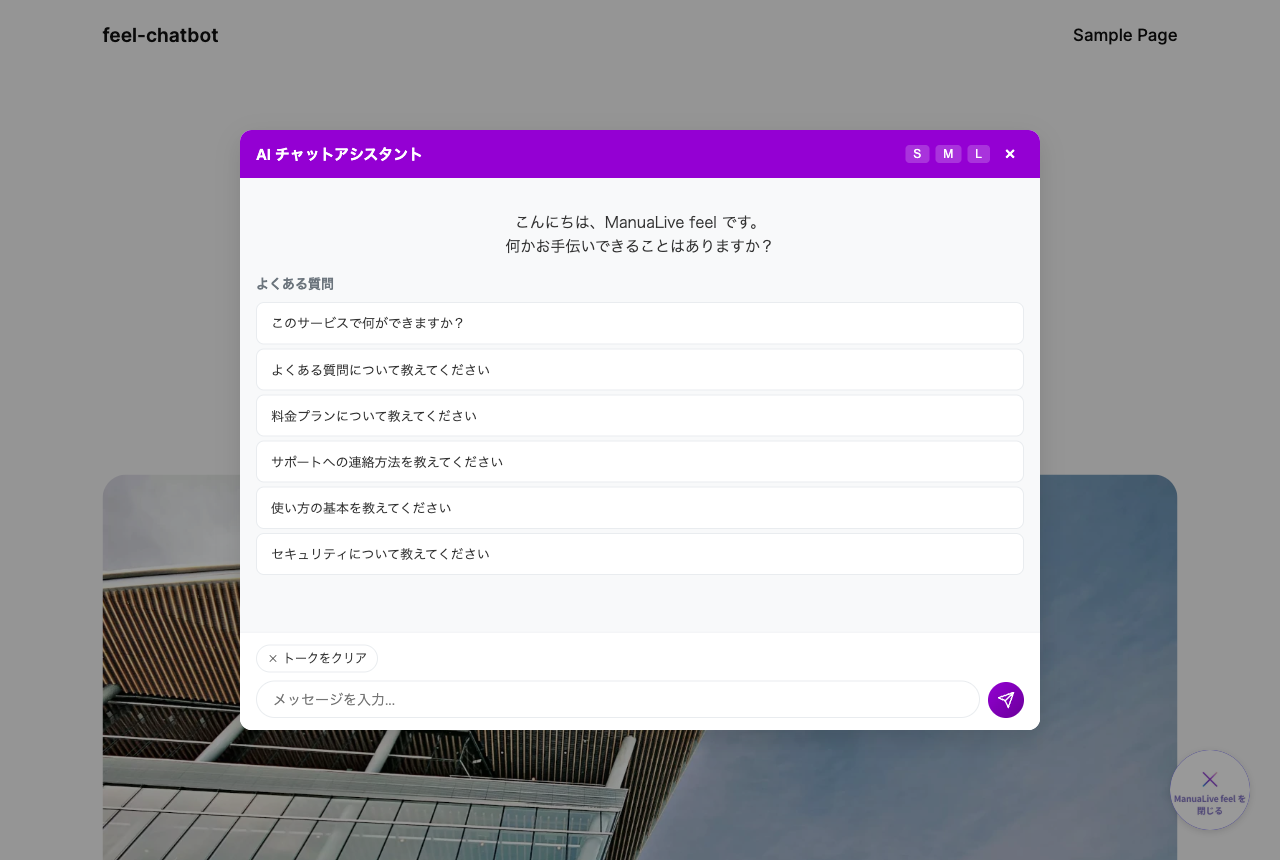
Feel Chatbot is the official plugin for connecting your WordPress site to “FeelFlow”, the AI chat service provided by FeelFlow Inc. It places a small chat widget on your site, and an AI trained on your site’s public content (posts and pages) answers visitors’ questions automatically.
This plugin is a client for a cloud-based service (SaaS). A FeelFlow account (a free plan is available) and a widget API key are required to use it.
Key features
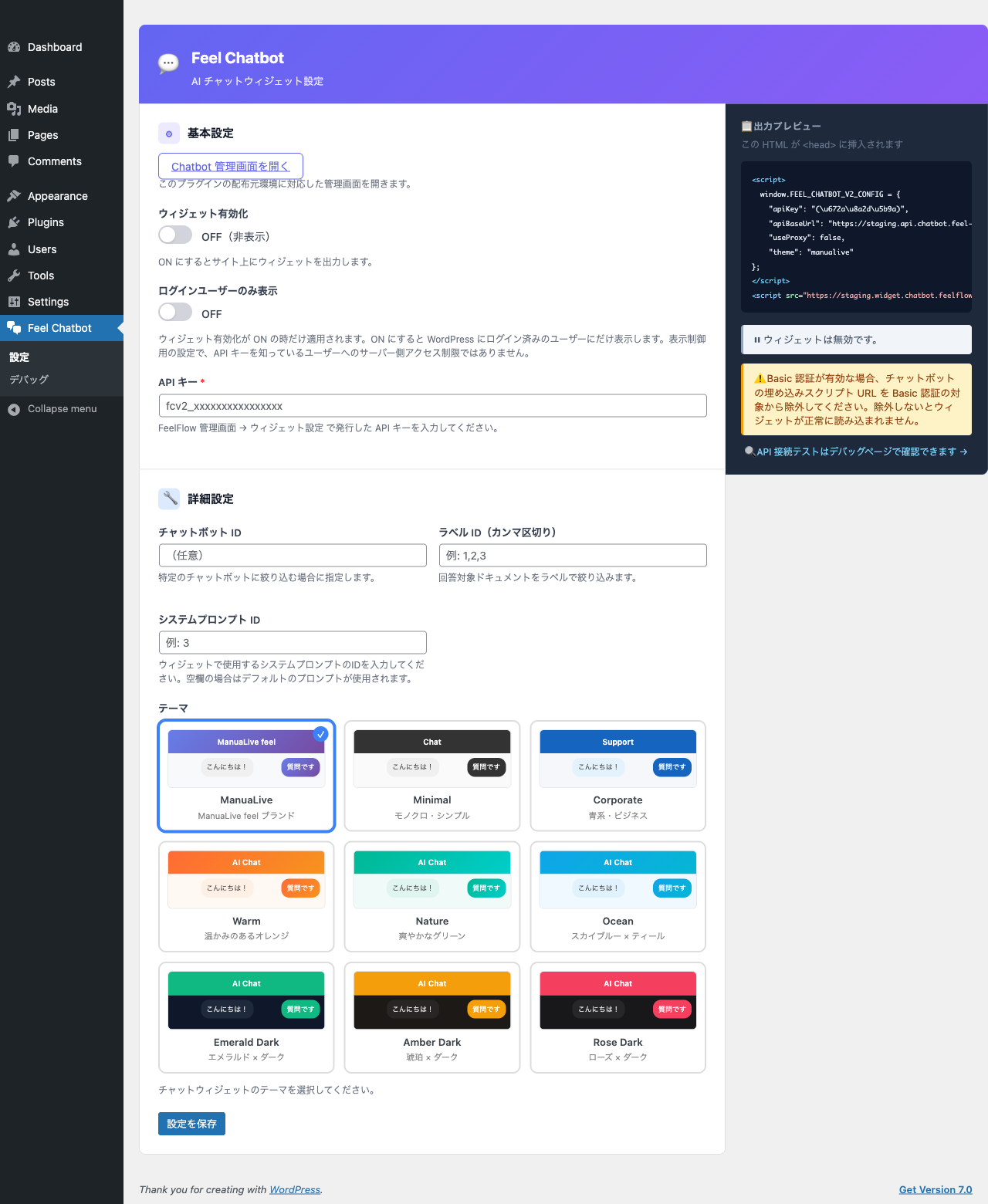
- Automatically displays an AI chat widget on your site, with an on/off toggle.
- “Logged-in only” mode to show the widget to signed-in users only.
- Response tuning via chatbot ID, label, and system prompt.
- 9 themes (manualive / minimal / corporate / warm / nature / ocean and dark themes).
- Provides REST endpoints so the FeelFlow backend can sync your site’s public content.
What you need
- A FeelFlow account (a free plan is available) and a widget API key, which you generate in the FeelFlow dashboard at https://chatbot.feelflow.net
External services
This plugin relies on FeelFlow, a third-party cloud-based AI chat service, to generate AI chat answers for visitors and to index your site’s public content for those answers. The plugin cannot provide its chat functionality without it.
This service is provided by FeelFlow Inc.: Terms of Service, Privacy Policy.
The data sent and when it is sent are as follows.
This plugin contacts the following FeelFlow domains:
widget.chatbot.feelflow.net– serves the chat widget’s JavaScript and CSS (CDN).apiv2.chatbot.feel-flow.net– the Chatbot API, used for AI answers, content sync, and the admin connection test.chatbot.feelflow.net– the FeelFlow dashboard, where you sign up and obtain a widget API key. It is opened only when you follow the link; the plugin makes no automatic requests to it.
-
Running the chat widget
- The widget’s JavaScript and CSS are loaded from the CDN host widget.chatbot.feelflow.net.
- When a visitor interacts with the chat, the input text, the context of the page being viewed, and the site’s public widget API key are sent to the Chatbot API host apiv2.chatbot.feel-flow.net to obtain an AI answer.
- When sent: when a visitor opens and uses the chat on a page where the widget is enabled.
-
Content sync
- This plugin provides authenticated REST endpoints (/feel-chatbot/v1/posts, /pages, /server-info) that the FeelFlow backend (host apiv2.chatbot.feel-flow.net) reads.
- The FeelFlow backend retrieves the body / title / excerpt / taxonomies (categories and tags) of your published posts and pages, the author information of public content (display name and email address), featured images (URL and alt text), and post custom fields (public metadata whose key does not begin with an underscore), and builds an index for AI answers.
- When sent: when a connection is configured with an API key and FeelFlow runs a sync.
-
Admin “API connection test” (Debug page)
- On the plugin’s Debug screen, clicking “API connection test” sends the configured widget API key to the Chatbot API health endpoint (path /health on host apiv2.chatbot.feel-flow.net) to verify connectivity.
- When sent: only when a site administrator clicks the test button on the Debug page.
Service provider and terms:
- Provider: FeelFlow Inc. https://feelflow.co.jp
- Terms of Service: https://id.feelflow.net/legal/terms
- Privacy Policy: https://id.feelflow.net/legal/privacy
ਸਕਰੀਨਸ਼ਾਟ
ਸਥਾਪਤੀਕਰਨ
- Upload and activate the plugin.
- Open the Feel Chatbot menu in the WordPress admin.
- Enter the widget API key issued by FeelFlow.
- Turn on “Enable widget” and save.
- Visit your site; the chat widget appears in the bottom-right corner.
You can also adjust the chatbot ID, label, theme, and logged-in-only display from the settings screen as needed.
ਅਕਸਰ ਪੁੱਛੇ ਜਾਂਦੇ ਸਵਾਲ
-
Is there a cost to use it?
-
The plugin itself is free. Generating answers and syncing content use the FeelFlow cloud service, so a FeelFlow account is required.
A free plan is available, which includes up to 20 questions per month, 1 chatbot, and 10 synced documents (on the free plan, content sync is manual only). Paid plans with higher limits and automatic sync are also available. See the pricing page for details: https://chatbot.feelflow.net/pricing
-
Where do I get an API key?
-
Sign in to the FeelFlow dashboard at https://chatbot.feelflow.net, open the widget settings, and generate a widget API key. Then paste that key into this plugin’s settings screen.
-
The widget does not appear
-
Make sure “Enable widget” is on and an API key has been entered. If “Logged-in only” mode is on, the widget is shown only to signed-in users.
-
Where is visitor data sent?
-
Please see the “External services” section below.
ਸਮੀਖਿਆਵਾਂ
There are no reviews for this plugin.
ਯੋਗਦਾਨੀ ਤੇ ਵਿਕਾਸਕਾਰ
“Feel Chatbot” is open source software. The following people have contributed to this plugin.
ਯੋਗਦਾਨੀ
“Feel Chatbot” ਦਾ ਆਪਣੀ ਭਾਸ਼ਾ ਵਿੱਚ ਅਨੁਵਾਦ ਕਰੋ।
ਵਿਕਾਸ ਕਾਰਜ ਵਿੱਚ ਰੁਚੀ ਰੱਖਦੇ ਹੋ?
Browse the code, check out the SVN repository, or subscribe to the development log by RSS.
ਤਬਦੀਲੀ-ਚਿੱਠਾ
1.0.0
- Initial release for WordPress.org.
- AI chat widget display (enable toggle / logged-in-only mode).
- Settings for chatbot ID, label, system prompt, and theme.
- Content sync REST endpoints for the FeelFlow backend.