

ਵੇਰਵਾ
Shoppable videos for WooCommerce, TikTok-style
VidShop brings social-media-style video shopping to your WooCommerce store. Customers swipe through videos, tap a product they like, and check out without leaving the player.
It fits any store that sells visual products: fashion, beauty, electronics, or home décor.
See it on a live store: Interactive Demo
Want more? Upgrade to VidShop Pro
Generate shoppable videos with AI
Don’t have footage? Turn a product photo into a video. Pick a WooCommerce product, choose a style, and VidShop builds a short vertical video from its image, then saves it to your library as a draft linked to that product. You review it and publish when it looks right.
What VidShop does
- Swipe between videos like a social feed, so browsing feels like an app instead of a product grid.
- Buy inside the video. The cart and checkout open right in the player.
- See what’s working: views, watch time, likes, and add-to-carts.
- Built for phones first, and it works on desktop with a mouse.
- No code to set up.
- Runs on the WooCommerce products you already have.
Features
AI video generation
- Turn a product photo into a short vertical video
- Choose a style template, or let Auto match one to the product
- Set the length and pick background music or silent
- Finished videos save to your library as drafts, linked to the product
- A progress banner tracks renders while you keep working
Analytics
- Views, total and unique
- Watch time, average and total
- Likes, total and unique
- Add-to-cart counts
- Product views
- Your top videos and products
Video management
- Publish, draft, or trash a video
- Upload from the Media Library or link a URL
- Link products to each video
- Bulk actions and quick edit
Shortcode generator
- Pick all videos or specific IDs
- Set colors and layout
- Copy and paste into any page or post
- Layouts: grid, carousel, inline (TikTok-style), and stories
Frontend
- Swipeable player
- Tappable product hotspots
- View counts and likes
- Cart and checkout inside the player
- Product variations
- Works on phones and desktops
Products
- Any number of products per video
- Variable products
- Live inventory sync
- One-tap add to cart
Branding
- Colors that match your store
- Responsive layouts
- Works with touch and mouse
Setup in four steps
1. Add your video. Upload it or paste a URL, then set a thumbnail.
2. Connect products. Pick the WooCommerce products to link.
3. Generate a shortcode. Choose which videos to show, the layout, and the colors.
4. Go live. Paste the shortcode anywhere on your site.
Example shortcodes:
[vsfw-videos videos="all" type="grid" color-schema="#1e40af"]

[vsfw-videos videos="123,456,789" type="carousel" color-schema="#e11d48"]

[vsfw-videos videos="all" type="inline" color-schema="#10b981"]

[vsfw-videos videos="all" type="stories" color-schema="#1e40af" autoplay="yes" loop="yes"]
Performance and compatibility
- Lazy loading and caching for speed
- Works with common caching and CDN plugins
- Mobile-first, responsive design
- Clean code with hooks for developers
- Translation-ready
Who it’s for
- Fashion and apparel: show clothes moving on a person
- Beauty and cosmetics: before-and-after and how-to-use clips
- Home and décor: products in a real room
- Electronics and tech: features and unboxing
- Lifestyle products: the kind of thing people buy after seeing it used
ਸਕਰੀਨਸ਼ਾਟ
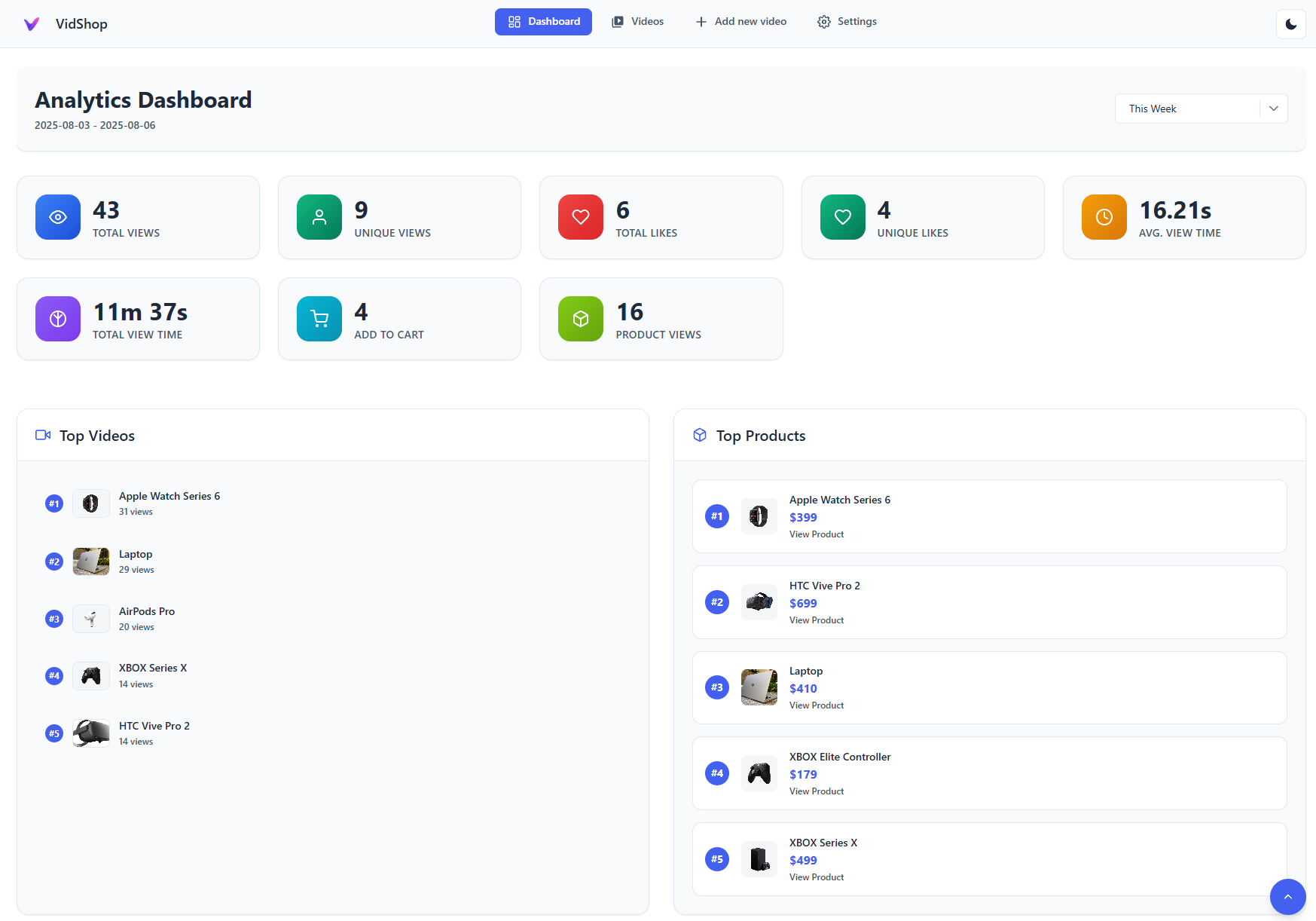
Analytics Dashboard – Gain detailed insights into video performance 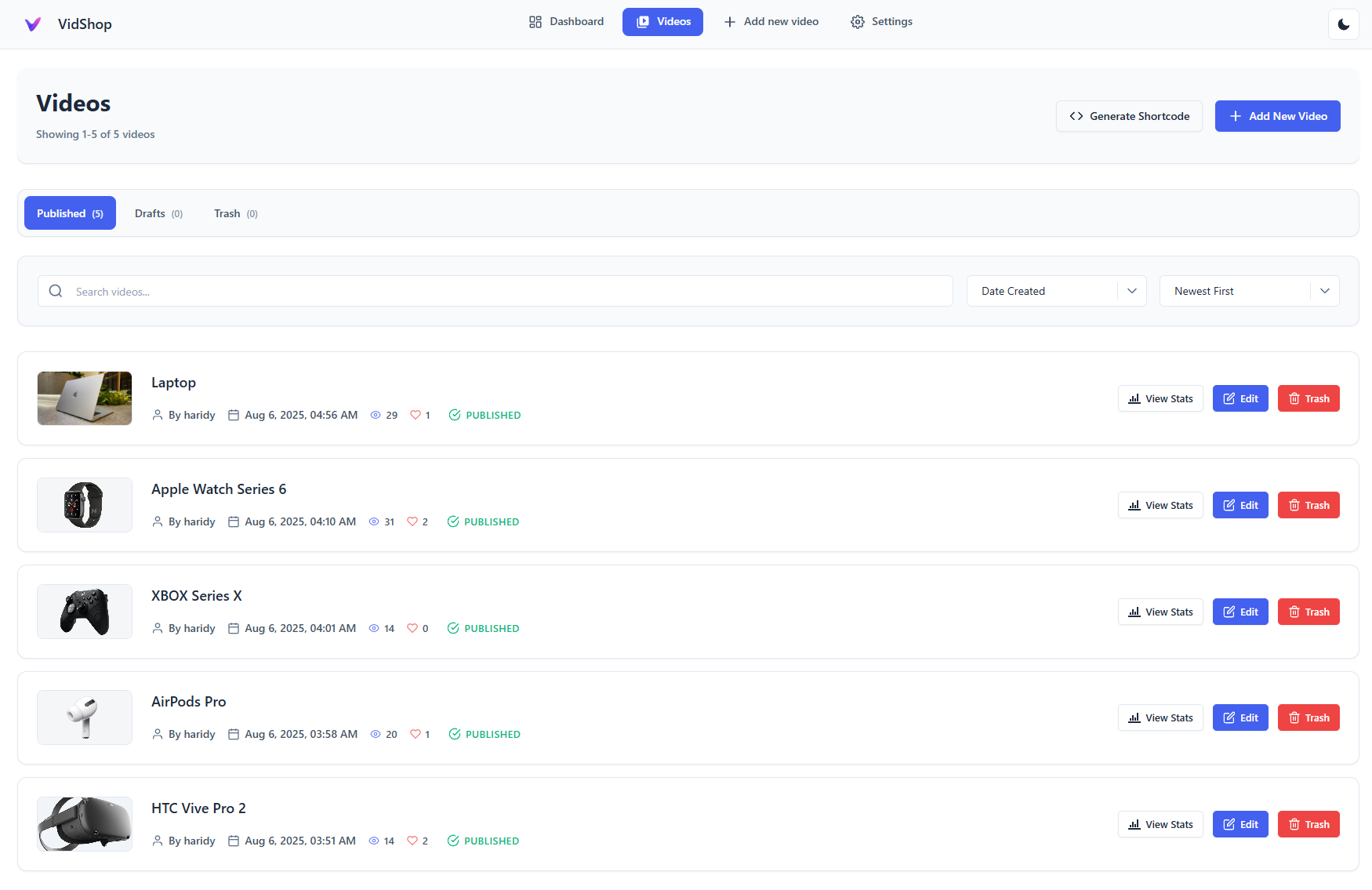
Video Management – Easily manage and edit videos 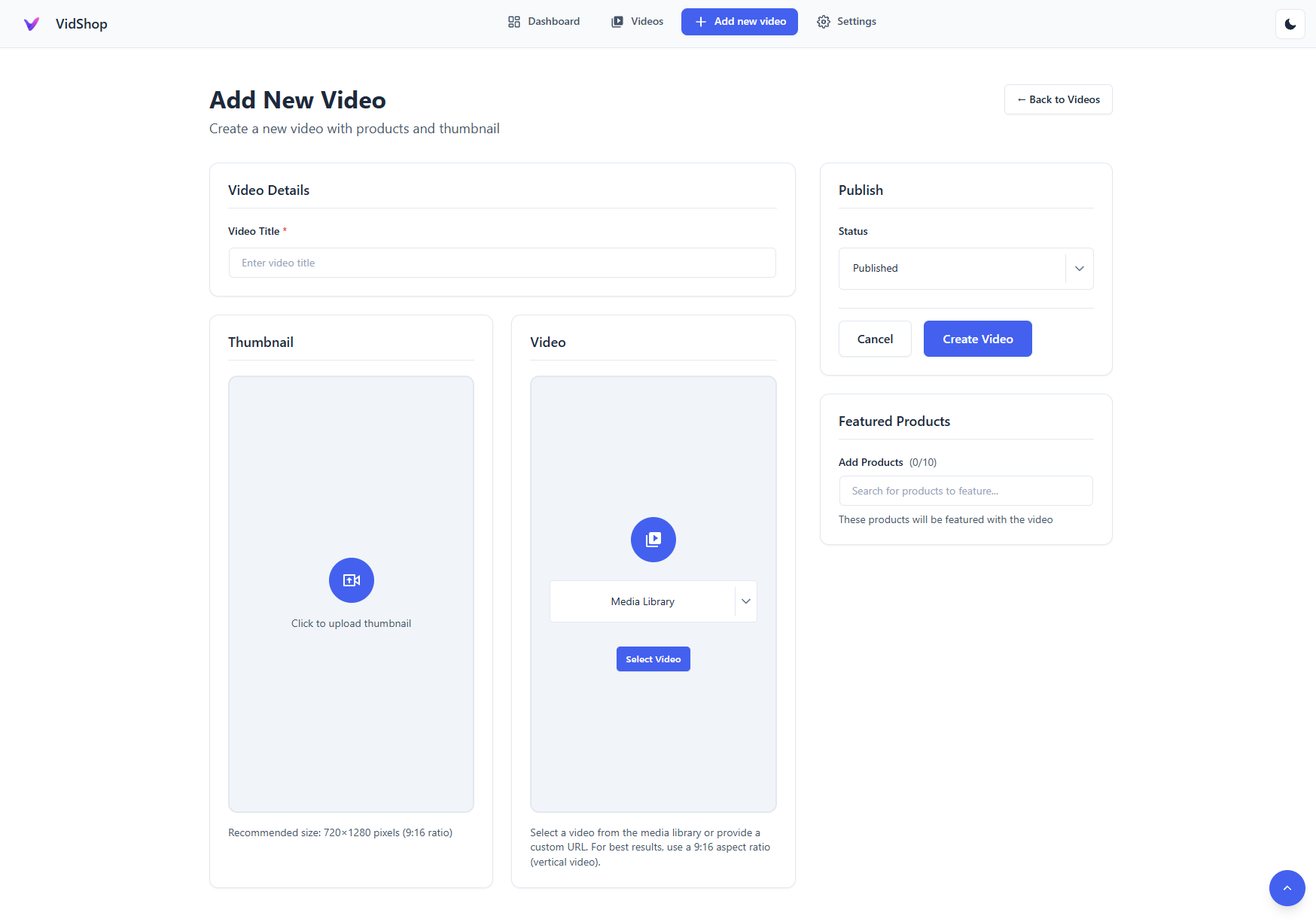
Video Creation Form – Simple and intuitive video setup 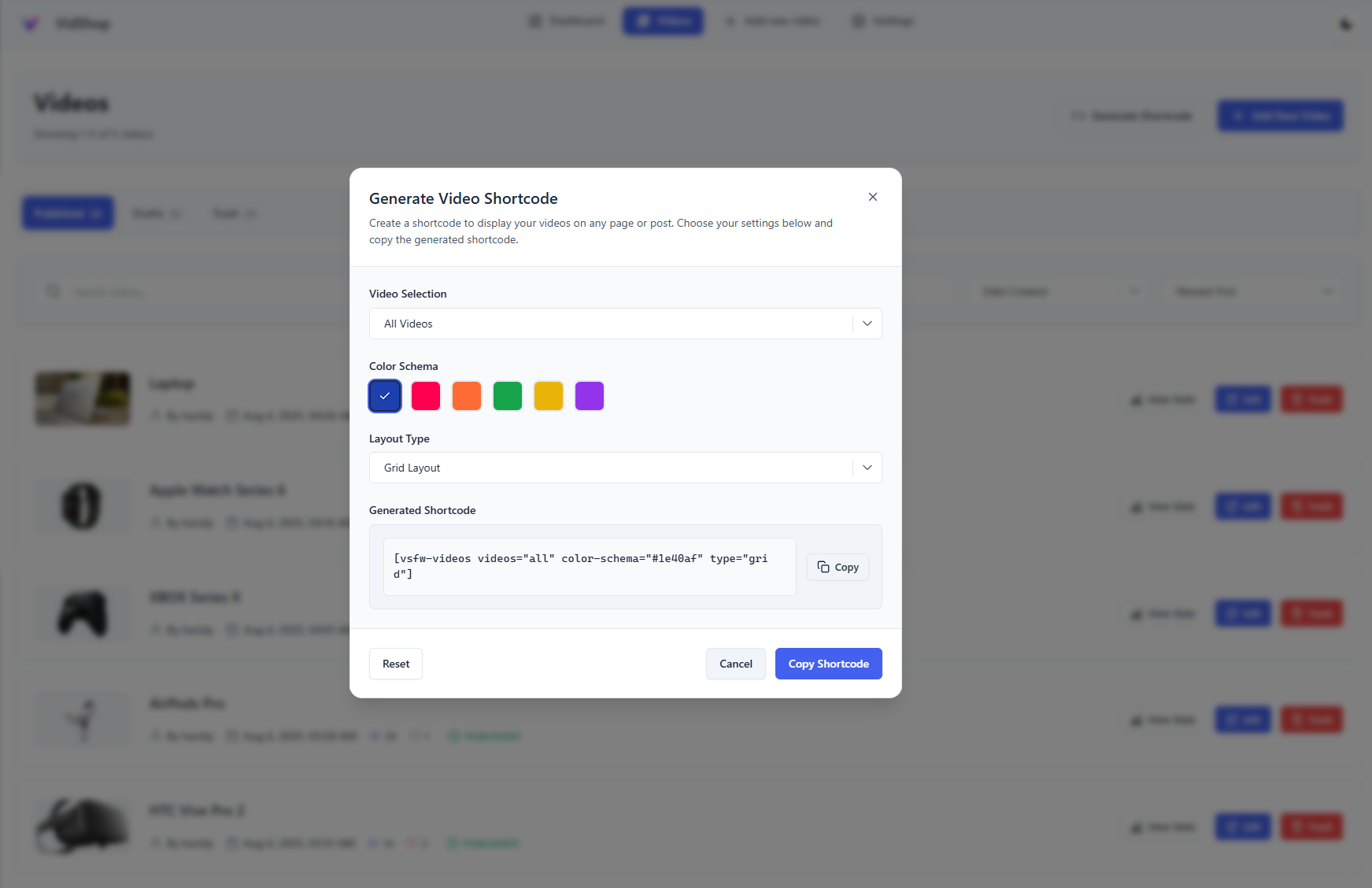
Shortcode Generator – Customize your video presentation 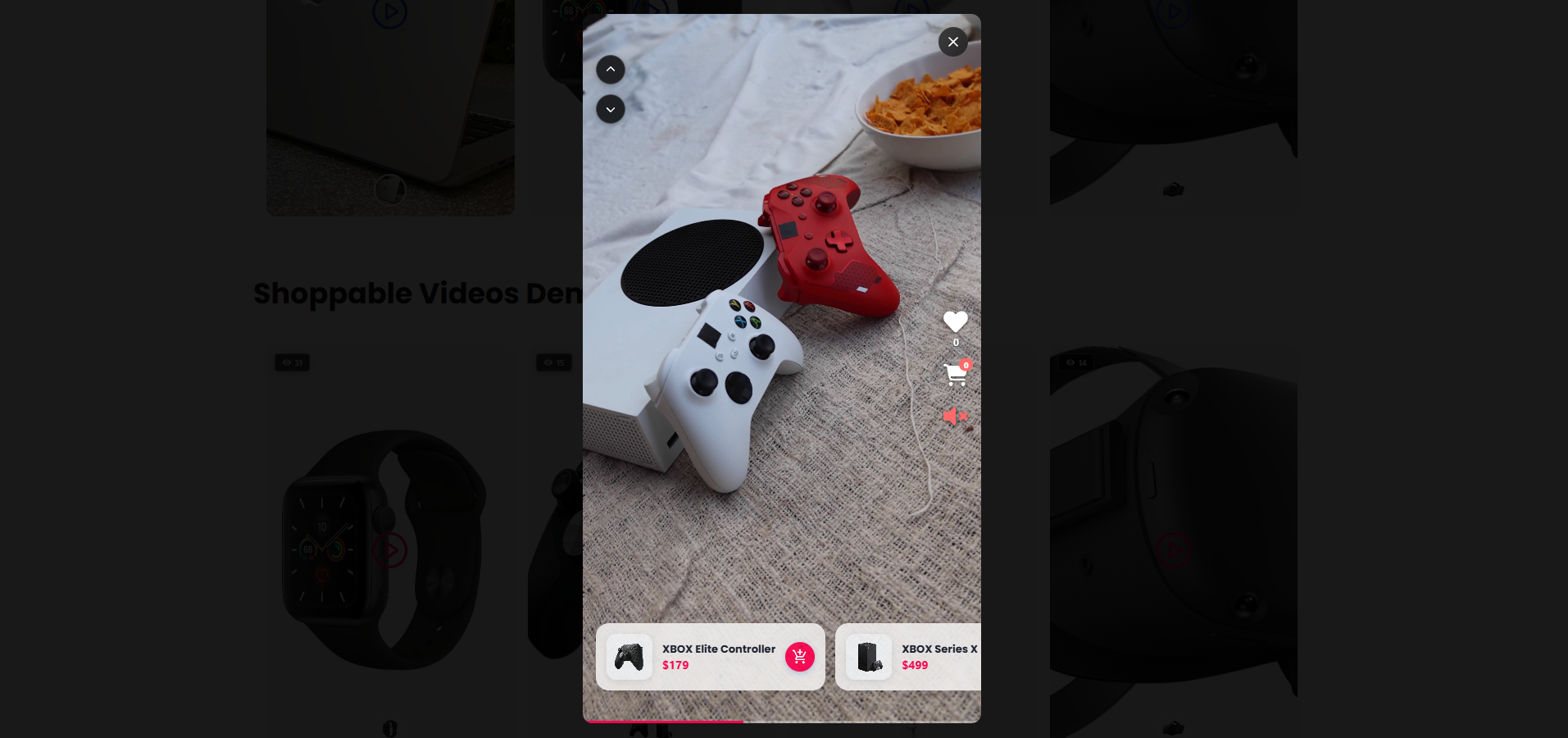
Modern Video Player – Engaging swipe navigation and product integration 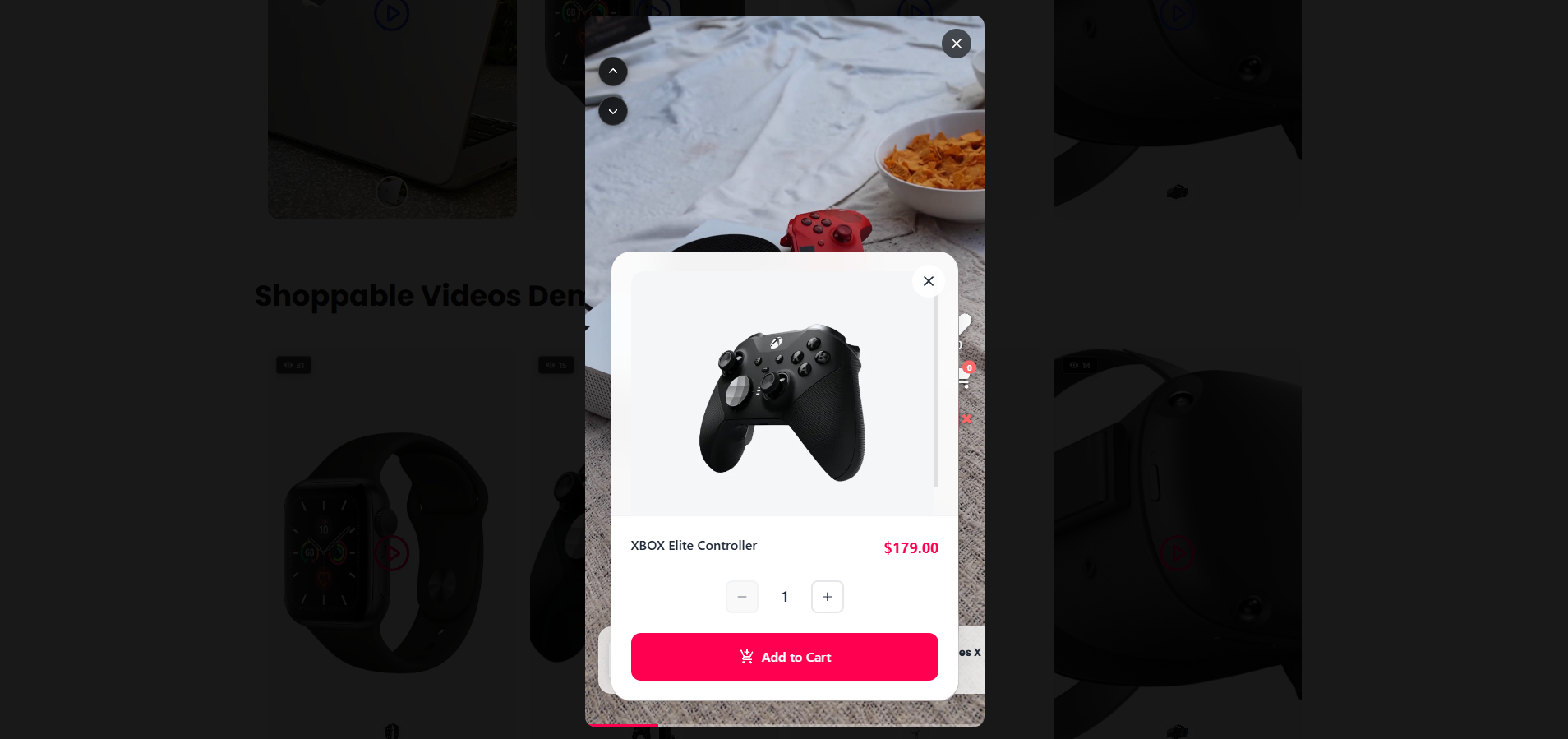
Interactive Product Shopping – Seamless product browsing 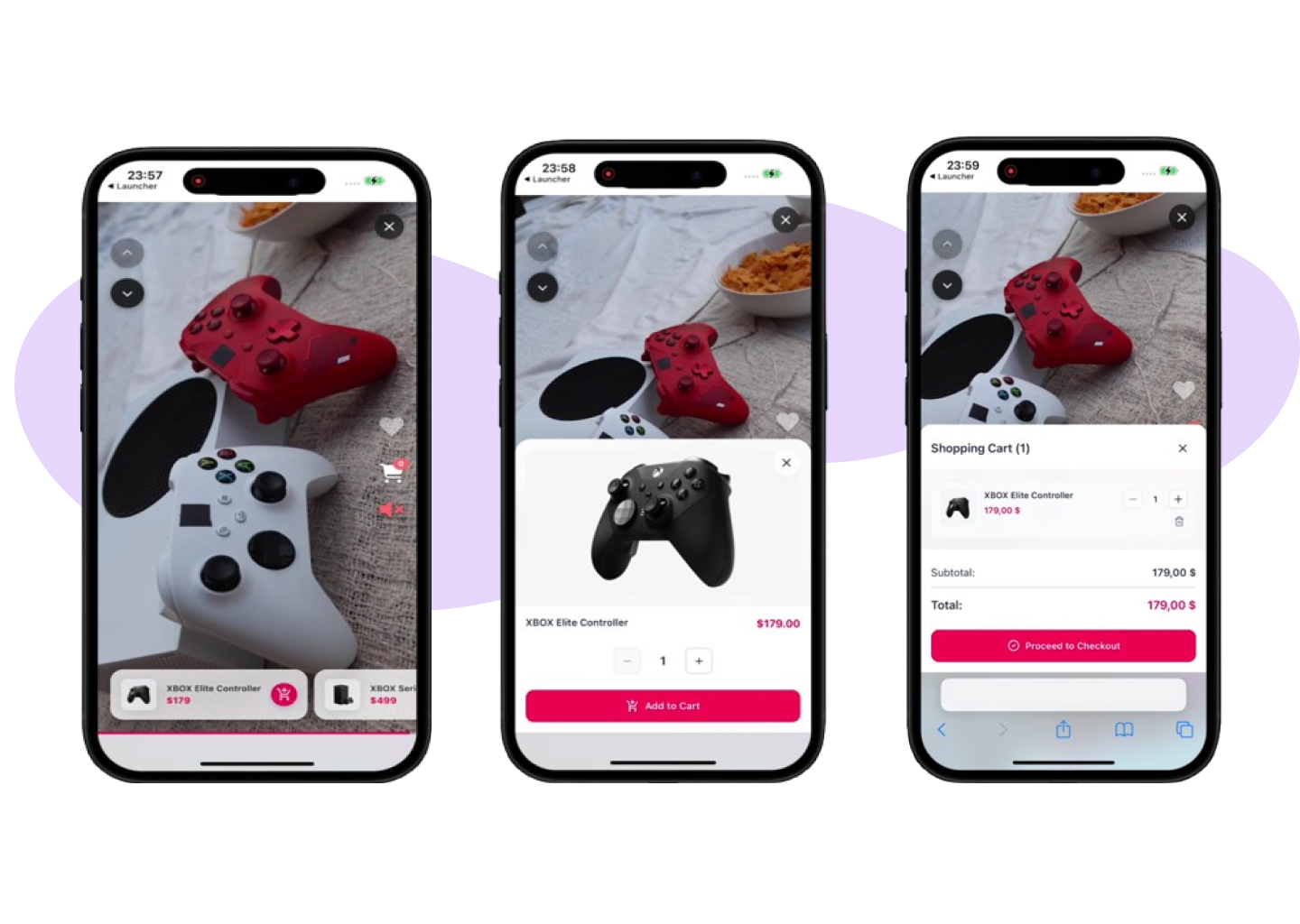
Mobile Experience – Optimized for mobile shopping 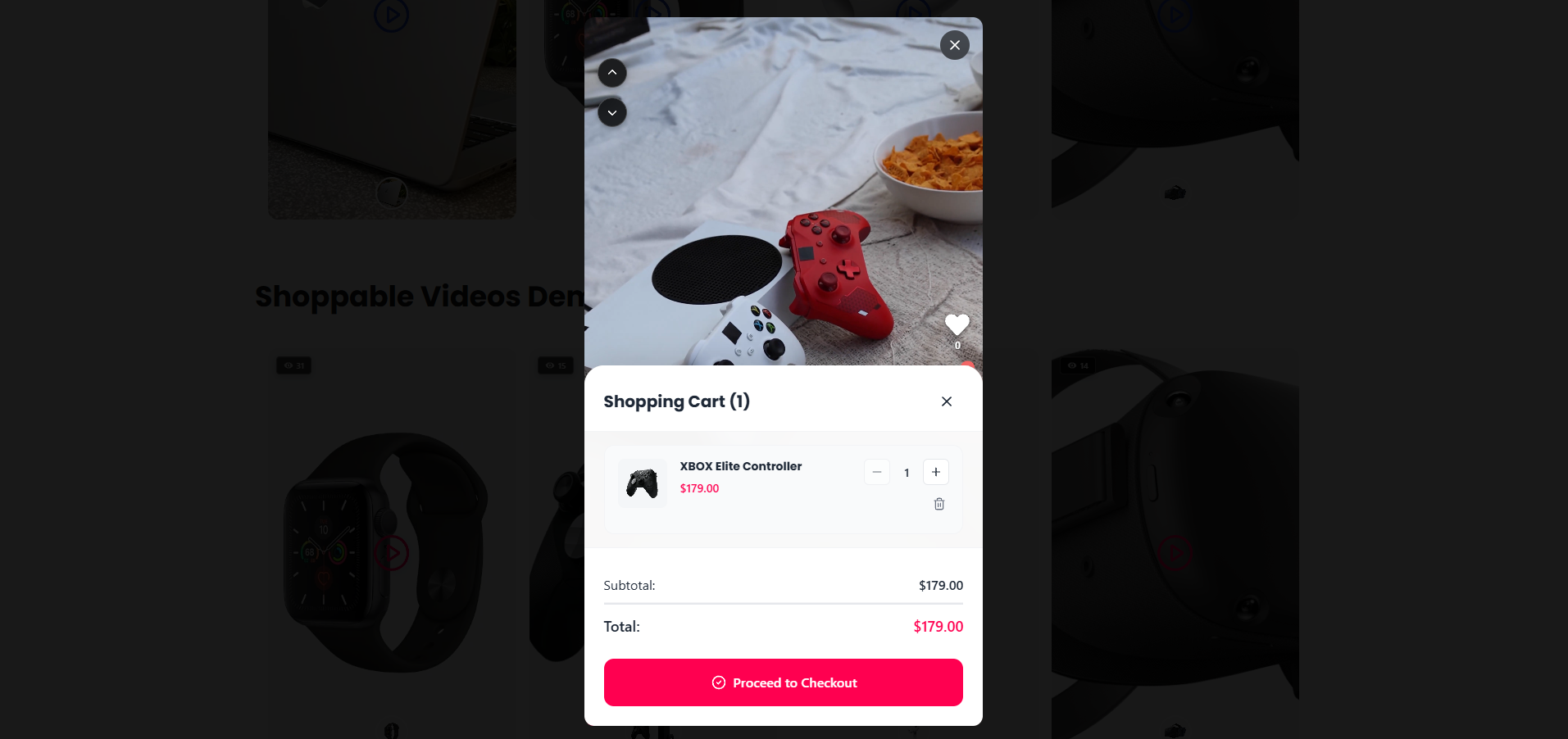
Live Cart & Checkout – Streamlined shopping process
ਸਥਾਪਤੀਕਰਨ
Quick Setup (Recommended)
- Install from Plugins > Add New (search “VidShop”)
- Activate and verify WooCommerce is active
- Configure basic settings (VidShop > Settings)
- Create your first video via VidShop > Add New
Manual Installation
- Upload the plugin ZIP to
/wp-content/plugins/vidshop-for-woocommerce/ - Activate via Plugins menu
- Configure in VidShop > Settings
ਅਕਸਰ ਪੁੱਛੇ ਜਾਂਦੇ ਸਵਾਲ
-
Can VidShop create videos for me with AI?
-
Yes. Connect a free WPCreatix account, pick a product, and VidShop generates a shoppable video from its image. Your first video is free; VidShop Pro covers ongoing generation.
-
Do I need video editing skills?
-
No. Upload videos you already have, link products, and publish. Or let the AI generate one from a product photo.
-
Can people buy without leaving the video?
-
Yes. The cart and checkout open inside the player.
-
Is swiping mobile-only?
-
Swiping is built for touch, but desktop visitors can navigate with the mouse.
-
Does it support variable products?
-
Yes. Customers pick variations inside the video.
-
Where can I show videos?
-
Anywhere shortcodes work: pages, posts, and widgets.
-
Will it slow down my site?
-
It shouldn’t. Videos lazy-load and the assets are kept small.
ਸਮੀਖਿਆਵਾਂ


ਯੋਗਦਾਨੀ ਤੇ ਵਿਕਾਸਕਾਰ
“VidShop – Shoppable Videos for WooCommerce” is open source software. The following people have contributed to this plugin.
ਯੋਗਦਾਨੀ
“VidShop – Shoppable Videos for WooCommerce” ਦਾ ਆਪਣੀ ਭਾਸ਼ਾ ਵਿੱਚ ਅਨੁਵਾਦ ਕਰੋ।
ਵਿਕਾਸ ਕਾਰਜ ਵਿੱਚ ਰੁਚੀ ਰੱਖਦੇ ਹੋ?
Browse the code, check out the SVN repository, or subscribe to the development log by RSS.
ਤਬਦੀਲੀ-ਚਿੱਠਾ
1.3.0 – AI Shoppable Video Generation
- New: Generate shoppable videos with AI — connect a free WPCreatix account (a free video to try) or VidShop Pro for more, pick a product, and VidShop turns its image into a ready-to-sell shoppable video.
- New: “Generate with AI” lives right where you create videos — on the Videos screen and as an option on Add New Video — plus a one-click entry point in the product editor.
- New: An app-wide progress banner tracks renders in the background and links you straight to each finished video.
- New: Finished AI videos are added to your library automatically, linked to the chosen product, and marked as AI-generated.
1.2.0 – Ordering, Price Formatting, Display Controls & Extensibility Hooks
- New: Added an extensibility layer: third-party add-ons can register PHP
apply_filters/do_actionand JS@wordpress/hooksfilters to extend admin surfaces, REST responses, and shortcodes without modifying plugin code. - New: JS filters for third-party admin UI extensions:
vsfw.admin.pages,vsfw.admin.home.widgets,vsfw.admin.pages.videoStats.body,vsfw.admin.shortcodeModal.generatedShortcode,vsfw.admin.pages.tags.body,vsfw.admin.videoForm.tagsSection,vsfw.admin.videosList.tagsFilter. - New: PHP filters and actions on
/vsfw/v1/videos:vsfw_video_list_query_params,vsfw_video_list_query,vsfw_video_response_data,vsfw_video_list_response,vsfw_video_saved. - New: PHP filters:
vsfw_video_shortcode_parsed_atts,vsfw_tags_filtering_enabled,vsfw_admin_localized_data,vsfw_frontend_localized_data. - New: Shortcode generator now supports drag-and-drop reordering for specific videos.
- New:
orderby(date, title, id, random) andorder(asc, desc) shortcode attributes for “all videos”. - New: Show / hide view count and like count, both as toggles in the shortcode generator and as
show-views/show-likesshortcode attributes. - New: Price formatting now mirrors WooCommerce — currency symbol position, thousands/decimal separators and decimal count are honored everywhere VidShop displays a price (product cards, modals, dashboard analytics).
- New: Price display settings page (VidShop Settings) lets you override WooCommerce’s defaults just for VidShop, with a one-click “Reset to WooCommerce defaults” button.
- New:
tags="..."/tags-operator="OR|AND"shortcode attributes; honored when an add-on plugin enables tag filtering by returningtruefrom thevsfw_tags_filtering_enabledfilter. - Improved: Admin bundle now depends on
wp-hooksso extensions can register JS filters reliably. - Improved: Settings REST endpoint now correctly persists
null-friendly defaults.
1.1.5 – Security Update
- Security: Added whitelist validation for fields parameter
- Security: Added integer sanitization for ids parameter
- Security: Implemented prepared statements for all raw SQL queries
- Security: Added column name validation in Query Builder
1.1.4 – Plugin URI Update
- Updated: Added proper Plugin URI for WordPress.org directory listing
1.1.3 – RTL Carousel Navigation Fix & Translations
- Fixed: Carousel navigation arrows now display correctly in RTL (Right-to-Left) languages – Arrow icons are properly mirrored for Arabic, Hebrew, and other RTL languages
- Improved: Better RTL support for horizontal and stories carousel layouts
- New: Added Arabic (ar) translation – Full plugin translation for Arabic-speaking users
- New: Added German (de_DE) translation – Full plugin translation for German-speaking users
- New: Added Brazilian Portuguese (pt_BR) translation – Full plugin translation for Brazilian Portuguese-speaking users
1.1.2 – WordPress 6.9 Compatibility & Aspect Ratio Fix
- New: WordPress 6.9 compatibility – Fully tested and compatible with the latest WordPress version
- Fixed: Videos Aspect Ratio Issue – Videos in grid and carousel layouts now maintain proper 9:16 aspect ratio on all screen sizes, preventing videos from appearing square on large screens
- Enhanced: Responsive video sizing – Better video proportions on desktop, tablet, and mobile devices with viewport-aware scaling
1.1.1 – Autoplay Fix for Grid and Carousel
- Fixed: Autoplay sequencing now properly advances to next video when current video ends in grid and carousel layouts
1.1.0 – Autoplay, Loop, and Stories Carousel
- New: Stories Carousel layout (stories-style interactive cards in a horizontal carousel)
- New: Autoplay and Loop options for all layouts (Grid, Carousel, Stories, Inline) – Automatically plays videos in sequence when modal is open, with option to restart from first video after the last ends
- New: Modal-aware video behavior – Videos loop on current video when product/cart modal is open, then resume sequencing when closed
- New: Custom URL redirect option for post-add-to-cart action – Redirect to any custom URL after adding product to cart, supports full URLs and relative paths with real-time validation
- New: Stories exclusive audio – Only one video unmuted at a time for better user experience
- New: Play on Hover for Stories (effective when autoplay=”no”)
- New: Auto-open product details for grid/carousel layouts – Automatically opens the first product in the video modal when modal is opened
- Improved: Modal interaction handling – Pauses video when modal opens, resumes on modal close
- Improved: Inline Carousel autoplay with sequenced playback and modal-aware looping behavior
- Improved: Modals render via portals with content scaling using –font-scale
- Improved: Product/cart modals in Stories open only for the current video
- Fixed: Video loading and playback consistency across all layouts
- Performance: Lazy-load current/adjacent slides with next-slide peek
- Performance: Optimized event listeners and state management
1.0.3 – Enhanced Product Interaction & Button Improvements
- New: Add to Cart Action option – Choose between showing product details modal or opening product page in new tab
- Fixed: Button sizing consistency – Improved button appearance across all themes and layouts
- Fixed: Cart modal button styling – Enhanced visual consistency for quantity and close buttons
- Fixed: Video controls button dimensions – Standardized sizing for better touch interaction
- Improved: Product card flexibility – Better control over customer shopping flow
- Enhanced: Theme compatibility – Buttons now maintain proper sizing regardless of theme CSS overrides
1.0.2 – Major Feature Update & Enhanced UX
- New: Carousel layout – Display videos in a beautiful horizontal scrolling carousel
- New: Inline layout (TikTok-style) – Vertical scrolling video feed for social media-like experience
- New: Custom color schema support – Full brand customization with unlimited color options
- New: Responsive customizations – Advanced responsive controls for different screen sizes
- New: Single video analytics – Detailed performance metrics for individual videos
- New: Play on hover option – Videos can automatically play when users hover over them
- Enhanced: Admin dashboard UX – Improved interface with better navigation and user experience
- Improved: Layout flexibility with multiple display options for different use cases
- Optimized: Performance improvements for better loading times across all layouts
1.0.1 – Enhanced Compatibility & User Experience
- Fixed: Dark mode browser compatibility issues – video controls, navigation, and close buttons now display consistently regardless of browser color scheme
- Fixed: Button sizing and padding issues – added protection against theme overrides to ensure consistent button appearance
- Enhanced: Admin interface icons for better visual clarity and user experience
- Improved: Theme compatibility – components now maintain consistent styling across all WordPress themes
1.0.0 – Initial Release
- Professional video management and seamless WooCommerce integration
- Detailed analytics dashboard with video and product insights
- Interactive frontend video shopping with mobile-first design
- Optimized for performance, security, and ease-of-use